Blogs

News

Email Subscriptions

Mehul Harry's DevExpress Blog

Video: How To Create A Web Report

     

Check out this 6 minute screencast on how to create a report in XtraReports for an ASP.NET application. XtraReports works both for WinForms and ASP.NET platforms. And the reports can be used in either platform because XtraReports uses a simple class structure to store the reports.

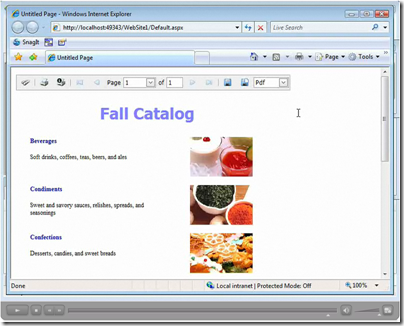
In this screencast, you’ll learn how to create and use a dataset to design a web report. You’ll also see how to use the ReportViewer and ReportToolBar to display and navigate the web report. Both these controls support callbacks as well as a clientside API which can be used to extend their functionality.

Click the image below and learn how to add reporting to your web applications.
image
Published Jun 11 2008, 08:35 AM by Mehul Harry (DevExpress)
Filed under: ,
Technorati tags: XtraReports, ASP.NET
Bookmark and Share

Comments


carol said:

very good

June 11, 2008 7:20 PM
 

Mehul Harry (DevExpress) said:

Thanks Carol!

June 11, 2008 8:19 PM
 

Sinan SARIKAYA said:

Hi Mehul,

I am trying to make a report in ASP.NET using your reporting tool. I've added Xtrareporting class but in design mode there are just winform components. I couldn't add gridview or aspxtreelist. When ever I tried to use normal treelist I could't bind my custom datatable because as u know there is not any bind option in winform components. Is there any way for me to bind my custom data source form any aspx pages to a aspxtreelist in a xtrareport ?

June 16, 2009 1:39 PM
 

Alan (DevExpress) said:

Sinan,

You're right, it's impossible to drop ASP.NET components onto the XtraReport at design time. Instead, XtraReports can embed Windows Forms components into it, by using the WinControlContainer wrapper. At this point, please clarify why you can't bind an XtraTreeList control to a datasource? For example, please see the XtraTreeList documentation, which describes how to bind a tree list to data: www.devexpress.com/.../Content.aspx.

Also, please clarify why you need to show a tree list control inside a report? AFAIK, the ASPxTreeList control can be exported to various formats without XtraReports: www.devexpress.com/Help. Or do you want to *print* a tree-like structure in a report? If so, then please try to use the XtraTreeList control inside an XtraReport - they should work together just fine.

PS. By the way, if you want to get an official guaranteed answer from Developer Express support within 24 hours, it's better to use our Support Center at http://www.devexpress.com/sc. And if you attach your project to your Support Center question, it will greatly help us understand your particular requirements.

June 17, 2009 7:42 AM
 

siby abin said:

hello sir, i am new to devexpress controls..

.how i can connect a report with my sql query which contains a joins of 4 or 5 tables...How can i user the Xtra reports to Connect it..I found a demo connecting only 1 table...

August 4, 2009 1:36 PM
 

Mehul Harry (DevExpress) said:

Hello Siby,

Yes, it's possible, check out some of the links here:

search.devexpress.com|P5|20

August 4, 2009 8:36 PM

About Mehul Harry (DevExpress)

Mehul Harry is an ASP.NET technical evangelist at Developer Express. You can reach him directly at mharry@DevExpress.com. You can also follow him on Twitter: http://twitter.com/mehulharry
More from DevExpress
Live Chat
Have a pre-sales question?
Need assistance with your evaluation?
We are here to help.
Chat is one of the many ways you can contact members of the DevExpress Team. We are available Monday-Friday between 8:30am and 5:00pm Pacific Time.
If you need additional product information, require pre-sales assistance, or want help with your order, write to us at info@devexpress.com or call us at
+1 (818) 844-3383.
