How To Download A Beta From The Client Center

If you own a DXperience subscription then you have early access to DXperience betas and release candidates. It doesn’t matter which DXperience subscription, whether it’s Universal, Enterprise, WinForms, or ASP.NET!
By the end of this post, you’ll know about when, why, and how to get a DXperience beta from the client center.
When?
Beta downloads of DXperience are published before one of the three major releases each year. Usually within a month before the actual release.
This is important: Betas are only available for a few weeks before the final release. Once the final release is out then the betas are removed.
Why?
As a developer, I gotta have it now! And the beta download allows you to get at the new features before they’re even released. And, if you find any bugs then you’ll help improve the final release. Thus completing the circle of life a quality release.
How?
The Client center of course! Follow the steps and screen shots below:
1. Login into your Client center account: https://www.devexpress.com/ClientCenter/default.aspx
2. Click on the DXperience product:

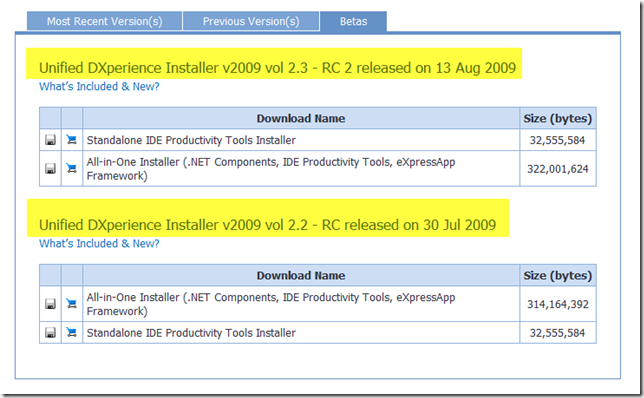
3. Click on the “Betas” tab:

4. Finally, download the beta and/or release candidate.
Problems?
If you don’t see a “Betas” tab then it could be because:
- Beta period has ended and then no one will see the betas tab.
- You don’t have a DXperience subscription.
- There’s a problem with your account. Contact the support team: support@DevExpress.com and include your Client Center ID.
Download The Beta
There’s only one reason to download a DXperience beta: Because it’s awesome! Yes, I said it. Now go get your copy and have fun test driving the new controls, charts, features and the other goodies.
DXperience? What's That?
DXperience is the .NET developer's secret weapon. Get full access to a complete suite of professional components that let you instantly drop in new features, designer styles and fast performance for your applications. Try a fully-functional version of DXperience for free now: http://www.devexpress.com/Downloads/NET/
Free DevExpress Products - Get Your Copy Today
 The DevExpress Team