New Layout Features In ASP.NET and WinForms Scheduler Reporting - v2010.1

Check out these 2 new features of the ASPxScheduler and XtraScheduler that helps you improve appointment layout and display.
Quick recap: Our Scheduler controls use the powerful XtraReports Suite for exporting and printing. This gives you added benefits for more flexibility, control and features. Read the 'ASP.NET Calendar Scheduling…New DevExpress Reporting Integration' post to learn more.
CanShrink And CanGrow
The 2 new layout properties are called CanShrink and CanGrow:
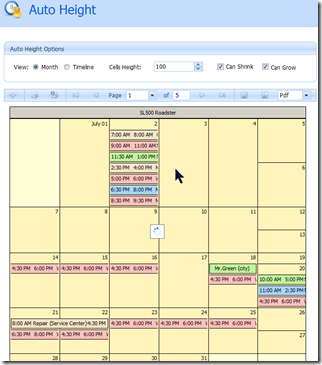
- CanShrink - allows you to avoid empty space wasted by cells with no appointments.
- CanGrow - can be used to resize a cell to show all appointments instead of printing the ‘More items’ link.
Online Demo
To see the new features in action, check out this ASPxScheduler online ‘AutoHeight’ demo:
Usage Scenario
When building a report, you want to use the most area to display your information content and use the page space in the most efficient way. While the Scheduler Reporting does has a VerticalLayout option (Fit/Tile), it may not be enough to help.
Scheduler Reporting now has two additional options for the HorizontalWeek and TimelineCells controls, namely CanShrink and CanGrow. They enable you to modify the layout as required for the cell size to fit the content.
To show how these options can be used, consider the monthly report scenario. Each month, you’re required to print each resource on a separate page while the displayed information is maximized.
To achieve this, use the HorizontalWeek control. It represents a month, so we set its height to the page height of the working area. Then set VerticalLayoutType option to Fit. In this mode, all weeks are fit in the visual border of the control (as it is set in Designer).
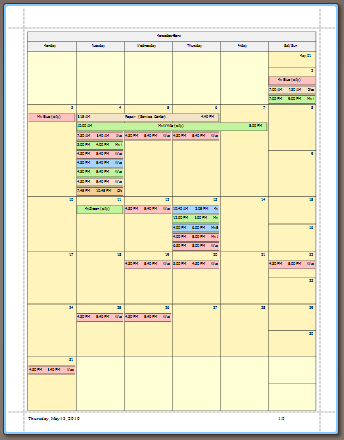
The CanShrink and CanGrow options can be switched on to allow the control to re-arrange its cells to maximize the number of appointments displayed. Note that the total height of the control remains the same. It is the same height that we set in the Designer mode. These 2 pictures below illustrate the report before and after CanShrink/CanGrow options switched on:

Download DXperience v2010 vol 1 now and test drive the new CanShrink and CanGrow features. Then drop me a line below with your thoughts. Thanks.
DXperience? What's That?
DXperience is the .NET developer's secret weapon. Get full access to a complete suite of professional components that let you instantly drop in new features, designer styles and fast performance for your applications. Try a fully-functional version of DXperience for free now: http://www.devexpress.com/Downloads/NET/
Free DevExpress Products - Get Your Copy Today
 The DevExpress Team