Blogs

News

Email Subscriptions

Mehul Harry's DevExpress Blog

Better Organized ASP.NET Themes for v2010 vol 2 Release

     

Here’s a small bit of news about our ASP.NET themes in the DXperience v2010 volume 2 release.

Reduce For Consistency

Many of the smaller ASP.NET controls like the Round Panel, Site Map and Cloud Control had small one-off themes. We’ve removed several of these smaller themes because:

  • These one-off themes were outdated and looked unusual
  • These one-off themes didn’t allow you to customize the whole website
  • These one-off themes didn’t use any CSS styles, they used the less-favorable inline styles
  • Not all of the DevExpress ASP.NET products supported these themes. Most didn’t need to since many great professional and modern themes like Office already existed
  • These one-off themes were not widely used

So, for consistency, we've removed several themes which were supported by only a few ASP.NET controls (I.e.: round panel, site map or cloud control).

4 New Themes

Good news! We introduced 4 new modern themes which are supported by all of our controls.

These include the three new Office 2010 (Blue, Silver, Black) themes and the new DevExpress Theme that matches our upcoming new demos. Watch the recent “What’s new in DXperience ASP.NET v2010 volume 2” webinar to learn more about the new demos and themes.
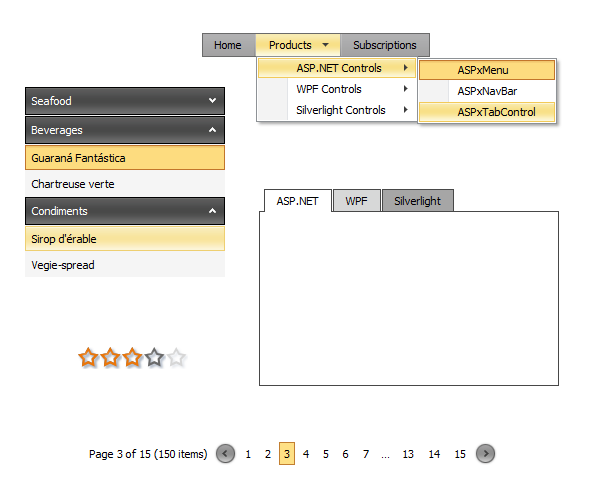
DevExpress ASP.NET Office 2010

Use Old Themes

If you wat to, you can continue to use the old themes. Simply use the project converter tool to upgrade your project’s .skin files.

However, in doing this, the old themes’ images will be unpacked and therefore not use the theme assembly. Of course, you can upgrade to one of the many new themes too and get the benefits of the theme assembly as well as modern look.


Adding a new theme for ALL of the DevExpress ASP.NET products usually means a lot of changes. In fact, even adding a new feature to one product means that all the ASP.NET themes may be affected. This change will ensure you that the provided themes will be consistent, clean, professional and work across all the popular browsers. Thanks!

Follow MehulHarry on Twitter

DXperience? What's That?

DXperience is the .NET developer's secret weapon. Get full access to a complete suite of professional components that let you instantly drop in new features, designer styles and fast performance for your applications. Try a fully-functional version of DXperience for free now: http://www.devexpress.com/Downloads/NET/

Published Nov 30 2010, 12:09 PM by Mehul Harry (DevExpress)
Filed under: , , ,
Technorati tags: Theme, Themes, DXperience, ASP.NET
Bookmark and Share

Comments


Peter Thorpe said:

This is much better. I like the theming and allow my end users to pick their theme but in deployment I would have to select the themes I knew covered all controls and deploy them to the themes directory. There wasn't much point in the others unless you were just using one control which I can't imagine many do.

November 30, 2010 5:55 PM
 

Drew Stainton said:

This begs the question: when can we expect a theme designer?  The controls are all great, but the time my designer has to spend matching the look of the controls to his design is insane.

November 30, 2010 6:11 PM
 

Mehul Harry (DevExpress) said:

Peter,

Thanks, and yes, it's better this way. However, if you really need, the option is still there.

November 30, 2010 7:03 PM
 

Mehul Harry (DevExpress) said:

Drew,

Great question and it's something we're discussing this week for our 2011 plans. ;-)

November 30, 2010 7:04 PM
 

Philip Williams said:

I can appreciate the reasons for wanting to remove the one off themes but I am surprised that you chose to do so given that a large number of customers will already be using them - even if the percentage of customers is small.  The one off themes are good themes.  RedGlass for example is great for making elements stand out - it has a high contrast.  There is no comparable theme that achieves this.

I would have preferred that you adopted both Silver and RedGlass and applied them across all controls.  No doubt there is some effort to do so but such a move would have sent the right message - DevExpress put these themes in - our customers have implemented them - we need to support them properly by expanding their implementation - we won't have partial themes anymore.

So please can you bring them back.  :)

January 11, 2011 4:50 PM
 

Dmitry Dobrovolsky_1 said:

Please bring back the Silver theme for round panel.

February 1, 2011 6:32 AM
 

Mehul Harry (DevExpress) said:

Dmitry,

From my post above:

If you wat to, you can continue to use the old themes. Simply use the project converter tool to upgrade your project’s .skin files.

However, in doing this, the old themes’ images will be unpacked and therefore not use the theme assembly. Of course, you can upgrade to one of the many new themes too and get the benefits of the theme assembly as well as modern look

Hope that helps, thanks.

February 1, 2011 5:11 PM
 

Glenn Lanier said:

We have been using the RedGlass ASPxRoundPanel theme and recently upgraded to 10.2.4. I ran the 10.2.4 ProjectConverter tool as referenced in the article - the skin file was updated, but no images were unpacked. I then removed the upgraded skin file and renamed the .bak file. I ran the 9.2.5 converter (as expected, nothing happened). I expected to see a Web folder created in the App_Themes\RedGlass folder – should I see something else?

--G

February 2, 2011 10:07 AM

About Mehul Harry (DevExpress)

Mehul Harry is an ASP.NET technical evangelist at Developer Express. You can reach him directly at mharry@DevExpress.com. You can also follow him on Twitter: http://twitter.com/mehulharry
More from DevExpress
Live Chat
Have a pre-sales question?
Need assistance with your evaluation?
We are here to help.
Chat is one of the many ways you can contact members of the DevExpress Team. We are available Monday-Friday between 8:30am and 5:00pm Pacific Time.
If you need additional product information, require pre-sales assistance, or want help with your order, write to us at info@devexpress.com or call us at
+1 (818) 844-3383.
