Blogs

News

Favorite Posts

ctodx

Discussions, news and rants from the CTO of Developer Express, Julian M Bucknall

Labels, Grid with formatted text

     

Someone in WinForms R&D obviously finished his work early and decided to add something we've been talking about for a little while: formatted text for labels and such like. It's not in the Release Candidate, but will be in the v2008 vol 2 release itself.

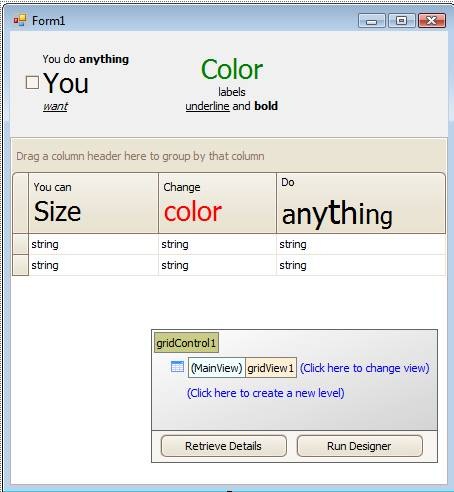
The Label, CheckEdit, and GridView have all been enhanced to accept HTML-like markup in their text properties. Since a picture is worth a thousand words, here's what I'm talking about:
 clip_image002

Obviously we're not suggesting you change all your business apps to look like ransom demands, but at least this gives a flavor of what you can do.

The look of the label above was created with this text:

<size=20><color=green>Color</color></size><br>labels<br><u>underline</u> and <b>bold</b>

The look of the third column header was created with this text:

Do<br><size=20>a<size=+2>n<size=+2>y<size=+2>t<size=-2>h<size=-2>i<size=-2>n<size=-2>g</size>

Another thing we've added to the design-time experience with our controls is a new smart tag menu option called "Get support".

clip_image002[4]

If you are online, this starts up your browser and loads the Support Center search page, passing along the name of the product you're using and the control name itself.

IE7 screenshot

Clicking on "Report a Bug" or "Ask a Question" from here will also give you forms pre-filled with the version numbers of DXperience and Visual Studio that you're developing with.

Published Jul 11 2008, 10:23 AM by Julian Bucknall (DevExpress)
Filed under: , ,
Technorati tags: WinForms, XtraGrid, v2008.2
Bookmark and Share

Comments


Ray Navasarkian (DevExpress) said:

"apps to look like ransom demands"

Now every once in a while Julian, you can be quite funny. :-)

July 11, 2008 1:08 PM
 

Neil D said:

Cool feature...to make it even more user friendly though you should be able to click on a little button that brings up an editor that would allow you to format the text w/o having to do the html.  

Also, will this work w/ fields in XtraReports?  For example

<size=20><color=green>Color</color></size><br>labels<br><u>underline</u> and <b>[FieldName]</b>.

Where FieldName is a field on a report.

Thanks,

Neil

July 11, 2008 1:10 PM
 

Steve Schoon said:

I've been wanting this for such a long time....thanks!

July 11, 2008 1:10 PM
 

Greg Shelton said:

This is really nice!  Will there be a option to retrieve the "text" value of the label without the markup?

For instance, I might want to display a "ransom" demand on the screen, but still be able to access the text without the markup.  Does that make sense?

Regardless, kudos to this impending change.

July 11, 2008 1:34 PM
 

Chris Craft said:

We were just looking for controls to due this yesterday! It's great we can just keep using DevExpress for everything. :D

It's a great idea, that I'm sure will be a big hit!

July 11, 2008 2:19 PM
 

Neal said:

Ya know how nice it would be to format columns of text data using this approach?  HTML tables are so neat, I was wondering just this week why this isn't in Winforms.  I have tabular data I want to display in columns and I have to use a fixed width font, string.format({0,3}) etc.  It would be neat if I could use a label to show tabular data if it uses HTML type rendering!

July 11, 2008 2:20 PM
 

Mark Miller said:

Julian just posted about new text formatting technology coming out in the v2008 vol 2 release of our

July 11, 2008 5:50 PM
 

Matthew Roberts said:

Woohoo! I frequently get asked to format part of a label - well done DX! look forward to seeing it in the flesh.

July 11, 2008 9:00 PM
 

Philip Lee said:

I hope this is in tooltips as well.

July 13, 2008 5:45 AM
 

Tolga Erken said:

Please add this feature to simplebutton, thanx.

July 13, 2008 7:08 PM
 

Przemyslaw Wlodarczak said:

Will this be available for titles of tabs in TabControl?

July 14, 2008 7:47 AM
 

Julian Bucknall (DevExpress) said:

All

Now that we have the basic markup language parser nailed and the text painting code done, we can add it to the other controls where it makes sense as and when we can. I dare say this new functionality will make it into minor releases; you won't have to wait for v2008 vol 3.

Cheers, Julian

July 14, 2008 11:31 AM
 

Cafer Sadik Abalioglu Holding A.S. said:

this feature will be very usefull for a grid displaying search results with highlighted text. why dont't you add a Highlight property (maybe including ShowHighlight, HighlightText, HighlightStyle,..) to XtraGrid and make things even simpler :)

Thanx

July 15, 2008 4:57 AM
 

Cafer Sadik Abalioglu Holding A.S. said:

btw, i think HighlightText property should be a string[], so that more than one word can be displayed highlighted.

or maybe, Highlight property can be derived from Collection.

July 15, 2008 5:15 AM
 

Conrad Akunga said:

Fantastic stuff! Now, in light of this it would be all the more fantastic if xtrabars supported a way to build a UI element like the Itunes search box :)

July 25, 2008 8:17 AM
 

Jurjen de Groot said:

Well, it's now july 27th and I've download and installed v2008 vol 2 this afternoon but when I can't get this to work yet. if i set the Text property to a value a mentioned in the examples, that's exactly what I get including the 'angle-brackets' and not the highlighted/formatted text. Is the some other property I have to set (as well) ??

thnaks,

Jurjen

July 27, 2008 3:47 PM
 

Jurjen de Groot said:

Found it, AllowHtml should be 'true'.

July 28, 2008 4:46 AM
 

ctodx said:

Mark Miller has been honing and refining his talk The Science of Great UI for a while now, and I've

February 12, 2009 9:27 PM

About Julian Bucknall (DevExpress)

Julian is the Chief Technology Officer at Developer Express. You can reach him directly at julianb@devexpress.com. You can also follow him on Twitter with the ID JMBucknall.
More from DevExpress
Live Chat
Have a pre-sales question?
Need assistance with your evaluation?
We are here to help.
Chat is one of the many ways you can contact members of the DevExpress Team. We are available Monday-Friday between 8:30am and 5:00pm Pacific Time.
If you need additional product information, require pre-sales assistance, or want help with your order, write to us at info@devexpress.com or call us at
+1 (818) 844-3383.