Blogs

News

Favorite Posts

ctodx

Discussions, news and rants from the CTO of Developer Express, Julian M Bucknall

DXperience v2008 vol 3: sorting by any column/row in the pivot grid (WinForms)


This one is for those hard-core types who live and breathe pivot grids (and I'm talking about the end-users here).

In version v2008 vol 3, you can specify the summary columns or rows that can be sorted. At run-time, the user merely has to right-click the column or row header to bring up a context menu and then select the required sorting option.

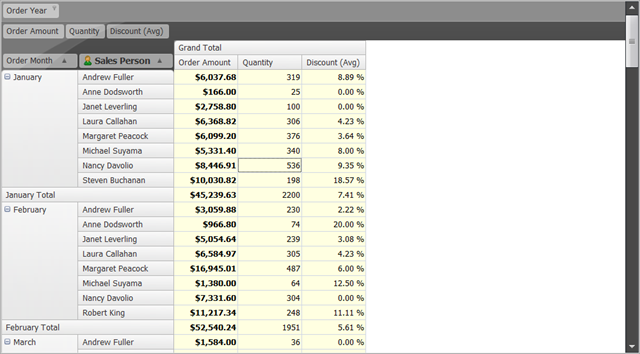
Since pictures are worth a thousand words, check this out. Here's a pivot grid showing orders generated by the sales people, ordered by month.
image

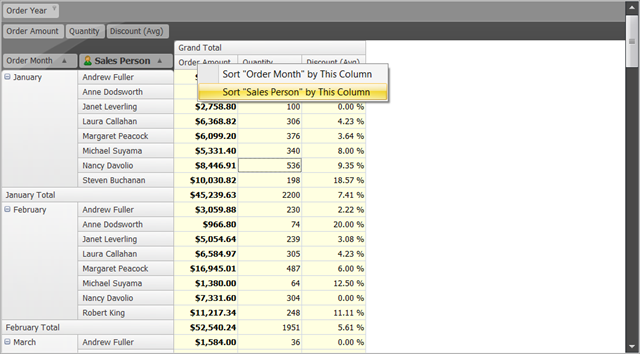
I'd really like to see those sales people sorted by order amount for each month. So, I right click on the Order Amount column header:
image

And select Sort Sales Person by This Column:
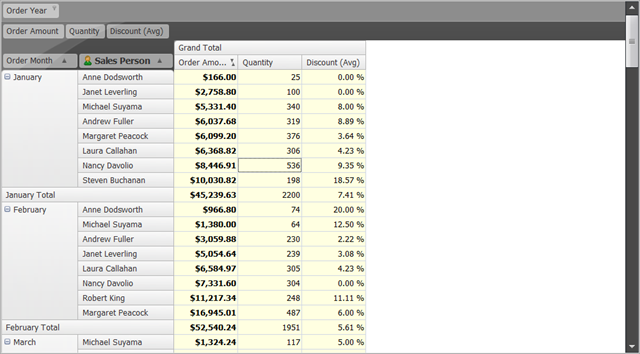
image

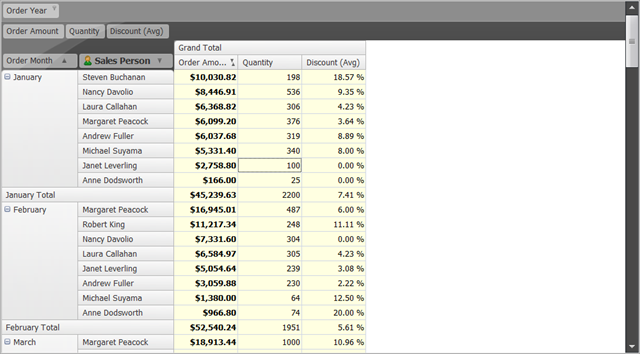
That showed the data in ascending order (and note the small icon in the Order Amount column header that shows it's the "sorting data". To show it in descending order, I merely click the Sales Person column header:
image

Published Oct 31 2008, 11:58 AM by Julian Bucknall (DevExpress)
Filed under: ,
Technorati tags: v2008.3, XtraPivotGrid
Bookmark and Share

Comments


awake said:

is this only for the winforms version?

October 31, 2008 3:58 PM
 

Jim Clay said:

Now that's cool!  When I eventually get our in house app completed, I will be shifting over to do a bunch of pivot grid stuff for the owner...This will be a very nice feature!

THanks,

Jim

October 31, 2008 4:31 PM
 

Bruno Kmita said:

Really nice!!!

Possibly the best new features in this release...

Tks a lot guys!

November 4, 2008 9:33 AM

About Julian Bucknall (DevExpress)

Julian is the Chief Technology Officer at Developer Express. You can reach him directly at julianb@devexpress.com. You can also follow him on Twitter with the ID JMBucknall.
More from DevExpress
Live Chat
Have a pre-sales question?
Need assistance with your evaluation?
We are here to help.
Chat is one of the many ways you can contact members of the DevExpress Team. We are available Monday-Friday between 8:30am and 5:00pm Pacific Time.
If you need additional product information, require pre-sales assistance, or want help with your order, write to us at info@devexpress.com or call us at
+1 (818) 844-3383.
