Blogs

News

Favorite Posts

ctodx

Discussions, news and rants from the CTO of Developer Express, Julian M Bucknall

Previewing v2009 vol 1: charting


These are the changes coming up in v2009.1 for our XtraCharts charting product.

Side-by-Side Bars with Different Value Axes

With this enhancement, all side-by-side bar, range bar, and Gantt series are placed side-by-side regardless of their axes. This means that if, for example, the X-axis is common for multiple series, and the Y-axis is different, the series are placed side-by-side.

side by side bar chart with different y-axes

New Option for Resolving Overlapped Labels

With every version of the XtraCharts suite, we continue improving our algorithms that resolve the overlapping of series labels (the edge cases annoy us, so we assume they annoy you too). XtraCharts v2009 vol 1 is no exeception: it provides an additional option to quickly hide some of the overlapping labels, thereby allowing you to achieve a more acceptable look for your charts when a large amount of data needs to be displayed.

Here's the current behavior, and you can see that, although we do a good job in ensuring labels don't overlap, the result looks a little messy:

Old style non-overlapping labels

With the new algorithm turned on, we remove some of the labels to give a much better, balanced look.
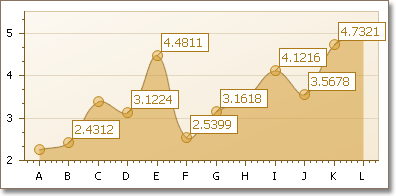
Improved non-overlapping labels

Callback Compression in ASP.NET AJAX Applications

From the release of DXperience v2008 vol 3 onwards, more and more DevExpress ASP.NET controls have been providing the capability to optionally compress callback results. This feature can give a notable performance boost to your web page by significantly reducing the traffic load. In v2009 vol 1, our charting product now supports this same functionality.

Published Mar 03 2009, 01:19 PM by Julian Bucknall (DevExpress)
Filed under: ,
Technorati tags: v2009.1, XtraCharts
Bookmark and Share

Comments


Chris W Walsh said:

I dont understand, if it improves to be such an increase in performance, why is it not set to true by default?? (that being the callback compression?)

March 3, 2009 8:19 PM
 

Alan (DevExpress) said:

Chris,

This was done for XtraCharts in the same way as it was done for other ASP.NET controls from Developer Express. This feature is turned off by default for backward compatibility purposes, and to protect our customers from any problems if it turns out that callback compression doesn't work well in some specific scenarios or web browsers.

However, we are constantly continuing to improve performance of our ASP.NET components, and probably we'll implement this behavior by default in the future.

In any case, thank you for your feedback!

March 4, 2009 3:30 AM
 

Chris W Walsh said:

Cheers Alan, thought it might be a backwards compatibility thing, love the work though!  Keep it up :)

March 4, 2009 5:17 AM

About Julian Bucknall (DevExpress)

Julian is the Chief Technology Officer at Developer Express. You can reach him directly at julianb@devexpress.com. You can also follow him on Twitter with the ID JMBucknall.
More from DevExpress
Live Chat
Have a pre-sales question?
Need assistance with your evaluation?
We are here to help.
Chat is one of the many ways you can contact members of the DevExpress Team. We are available Monday-Friday between 8:30am and 5:00pm Pacific Time.
If you need additional product information, require pre-sales assistance, or want help with your order, write to us at info@devexpress.com or call us at
+1 (818) 844-3383.
