Blogs

News

Favorite Posts

ctodx

Discussions, news and rants from the CTO of Developer Express, Julian M Bucknall

Previewing v2009 vol 1: pivot grid for ASP.NET


These are the new features for ASPxPivotGrid, out pivot table for web development.

Advanced Filter Editor

We've extended the ability to build complex filter expressions in our pivot grid, the same functionality that's present in most of our data analysis controls. Now your end-users can take advantage of the pivot grid’s embedded filter editor – Prefilter – and construct complex filter criteria with an unlimited number of filter conditions combined by any logical operators.
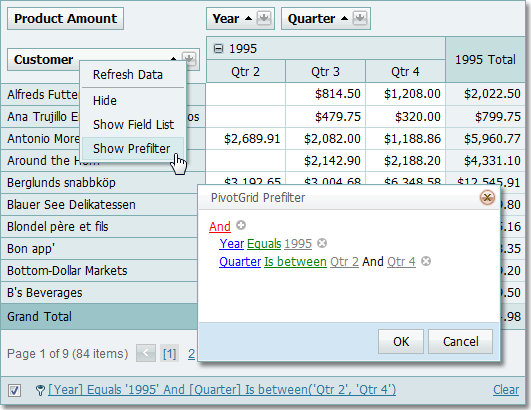
Prefilter in ASP.NET pivot control 

We've also added the ability to replace the default text that represents the filter expression currently applied with a custom description. All you need is to handle the specially designed server-side event.

Improved Row Header Alignment

Field headers displayed within the Row Header Area are now aligned to the corresponding field values. (The top image below is how it looked in previous versions, the bottom image shows the new improved look.)
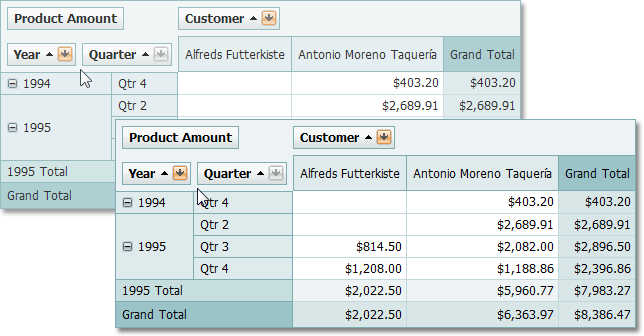
Row header alignment in ASP.NET pivot table

Published Mar 03 2009, 01:27 PM by Julian Bucknall (DevExpress)
Technorati tags: v2009.1, ASPxPivotGrid, ASP.NET
Bookmark and Share

Comments


Alain Bismark said:

No image....

March 3, 2009 6:07 PM
 

Julian Bucknall (DevExpress) said:

Alain: Newbie mistake, which I didn't spot since I was connected to the internal VPN when I looked at the resulting posts. Fixed now.

Cheers, Julian

March 3, 2009 7:05 PM
 

Claus Bogner said:

Really cool, but in my opinion it would be really important to add the ability to scroll within the filter-criteria builder. I've got datasets with 200 and more columns which all can be used to filter data, so I can't use the filterbuilder (even not the external - the list exceeds the window and you can only scroll by using the scroll wheel of your mouse - if you use the scrollbar of your browser, the list collapses). Why can't the column list be rendered as ASPxDropDownList instead of rendering as ASPxMenu? That would be the best solution. You can use the DDL to predefine the values for the filter, but not for choosing the column :(

March 4, 2009 6:20 AM
 

Julian Bucknall (DevExpress) said:

Claus: I would add a suggestion if I were you. The team that is responsible for the pivot tables is looking for just those kinds of requests.

Cheers, Julian

March 4, 2009 8:07 PM
 

Claus Bogner said:

Hello Julian,

there's already a suggestion in the support center.

Hoping to see it soon :-)

Regards,

Claus

March 5, 2009 4:31 PM

About Julian Bucknall (DevExpress)

Julian is the Chief Technology Officer at Developer Express. You can reach him directly at julianb@devexpress.com. You can also follow him on Twitter with the ID JMBucknall.
More from DevExpress
Live Chat
Have a pre-sales question?
Need assistance with your evaluation?
We are here to help.
Chat is one of the many ways you can contact members of the DevExpress Team. We are available Monday-Friday between 8:30am and 5:00pm Pacific Time.
If you need additional product information, require pre-sales assistance, or want help with your order, write to us at info@devexpress.com or call us at
+1 (818) 844-3383.
