Blogs

News

Favorite Posts

ctodx

Discussions, news and rants from the CTO of Developer Express, Julian M Bucknall

New gallery control in XtraBars Suite (coming in v2010 vol 2)

     

For the next version of XtraBars, we’ve created a standalone version of the gallery from our ribbon control. This post shows you a quick preview of this control; it will be available in v2010 vol.2 later this year.

The new GalleryControl provides a way to show a list of items, categorized, if necessary, into groups. Here’s the ‘default’ look:
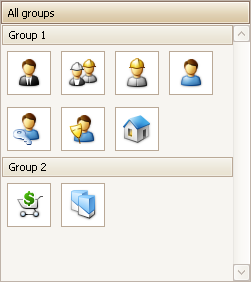
Default view for gallery control

Of course, you are not limited just to the standard image. You can add a caption and a description to each image:

Gallery control showing captions

But wait! There is more. For example:

1. The Gallery control provides all the same options that the original Ribbon galley has. (See the help for the Ribbon Gallery for details.)

2. The Gallery control also supports group filtering. (See here for information on group filtering.)

3. The gallery implements automatic item checking. With this feature, clicking an item automatically checks the item. Not only that, but the gallery provides several “check modes”:

  • Multiple items can be checked simultaneously
  • Multiple items can be checked, but only within a single group
  • Only a single item can be checked throughout the whole gallery
  • A single item can be checked in each group

4. By default, when the end-user enlarges the gallery, it adds additional columns to fill the newly created free space. When they reduce the gallery’s width, it removes the columns that can no longer be shown. It's possible to disable this feature by setting the GalleryControl.Gallery.AutoFitColumns option to false. In this mode, the number of columns is specified by the gallery's ColumnCount property.

5. The default orientation of gallery items is vertical, as shown above. The gallery also supports a horizontal orientation. If you do set the the orientation to horizontal, you will also change the orientation of the gallery group headers, the layout of the items  and the orientation of the scroll bar. As you can see in the following image, the GalleryControl's orientation is horizontal and its height has been reduced so that the control displays only one row of items (click to see the full size image):

Gallery displayed horizontally

6. Instead of just text, you can display custom controls within the group headers. You can see this best in the new PhotoViewer demo, where the group headers show images, multiple labels, and buttons (clink to enlarge):
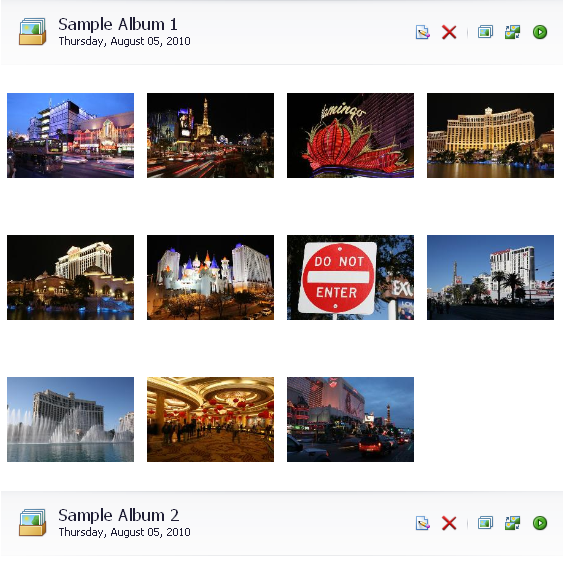
Gallery showing custom group headers

7. We’ve also implemented smooth scrolling of items, as you can see in this video:

There are also a bunch of minor features, such as:

  • specifying the background image or background color for the gallery
  • customizing the background image layout
  • the ability to customize the horizontal alignment of the gallery's content
  • providing multiple ways to specify how images are stretched within a gallery item
  • the custom drawing of gallery items

Of course, there’s a demo that demonstrates a real-world usage of the gallery control, a PhotoViewer application:
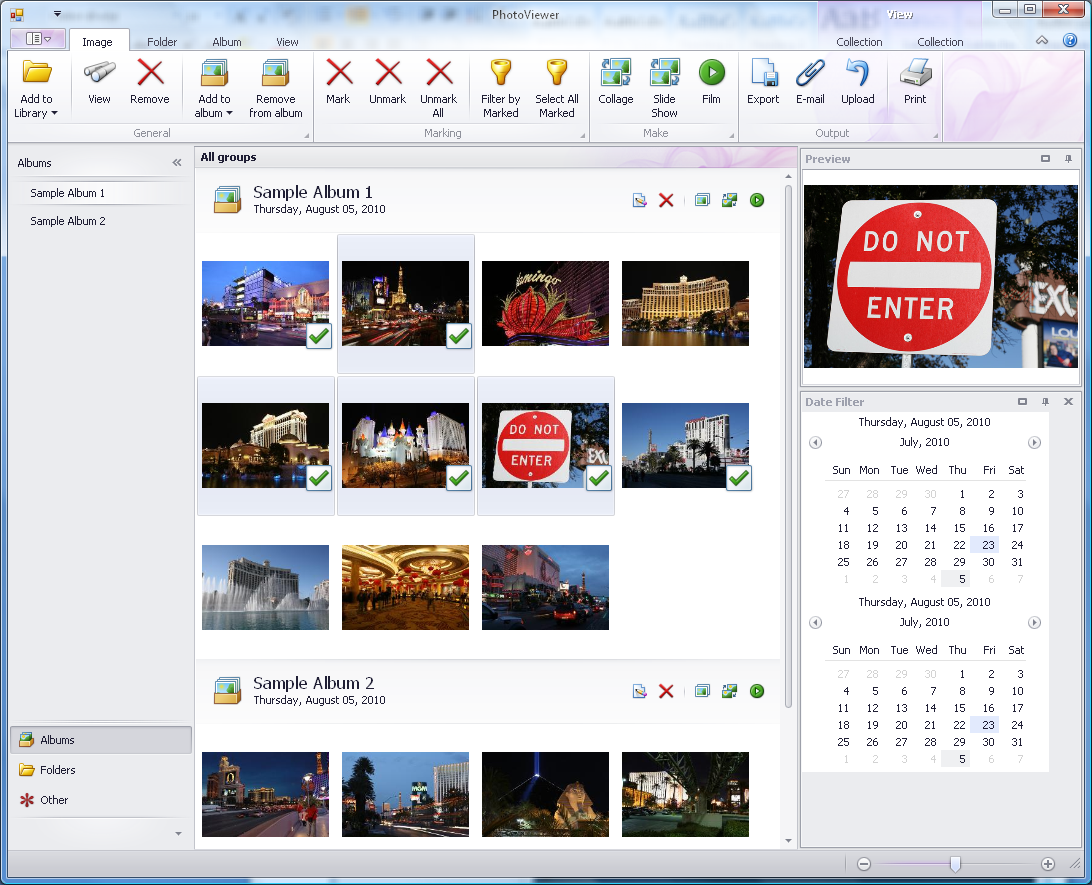
Gallery control demo

If you select one or more images from the gallery (use the Shift and/or Ctrl key as usual), and click View, the chosen images will be displayed in a special view, together with a horizontal gallery of selected images:

PhotoViewer demo application showing horizontal gallery 

As I said above: this control is not available yet, but will be provided as part of DXperience v2010 vol.2.

Published Aug 12 2010, 03:31 PM by Julian Bucknall (DevExpress)
Technorati tags: v2010.2, XtraBars, preview, ExMedia
Bookmark and Share

Comments


Juan Betancourt said:

Excellent. You're D' Best

August 12, 2010 7:14 PM
 

Mike Hunsberger said:

Later this year???? What is the ETA on this????

August 12, 2010 9:12 PM
 

Neal said:

This is seriously good!  Was getting ready to create this very UI in the XtraGrid via LayoutView.  Looking forward to beta soon!

August 12, 2010 10:00 PM
 

Julien Ferraro said:

I've seen the documentation on group filtering as you suggested.

There is one major drawback as I can see in the animation on that page. There is no visual indication that the filtering is possible. In the XtraGrid, there is a glyph in the column header telling you that you can apply a filter.

Here you just have another header, but the vast majority of users won't even try to click on it ...

Just my 2c

August 12, 2010 11:42 PM
 

Neal said:

Sure would be nice if we got away from the "Microsoft rectangles" and moved towards the "Apple rounded rectangles".  Just getting tired of the square Microsoft UI elements.

August 13, 2010 8:59 AM
 

Roger Parry said:

This looks great. Does allow end users to drag-and-drop the displayed gallery items to re-sort the images in the Win Forms version?

August 13, 2010 11:46 AM
 

Cory Crooks said:

Is this gonna be data-bindable? We have rolled our own databound-aware listview, but this might be nicer if it could bind against a datasource.

August 13, 2010 1:21 PM
 

Sigurd Decroos said:

Awesome, would love the databinding aswell!

August 13, 2010 3:04 PM
 

SLaks said:

This is basically a grouped ListView control without Details view.

I've been waiting for such a control for a long time.

Can the grouping be completely disabled?

Can it support inline rename?

August 26, 2010 7:53 AM
 

Rakesh Verma said:

It will be great if there is a way to specify different number of columns for each group.

For now, is there a way to get more information on this control.

September 7, 2010 1:54 AM
 

Michael Hardman said:

I'm just getting started making an image gallery control using the xtraGrid, my life could be made SO much easier by this. Any news on release date?

September 9, 2010 8:09 AM

About Julian Bucknall (DevExpress)

Julian is the Chief Technology Officer at Developer Express. You can reach him directly at julianb@devexpress.com. You can also follow him on Twitter with the ID JMBucknall.
More from DevExpress
Live Chat
Have a pre-sales question?
Need assistance with your evaluation?
We are here to help.
Chat is one of the many ways you can contact members of the DevExpress Team. We are available Monday-Friday between 8:30am and 5:00pm Pacific Time.
If you need additional product information, require pre-sales assistance, or want help with your order, write to us at info@devexpress.com or call us at
+1 (818) 844-3383.