Something we haven’t made much hoopla about is the fact that our WPF controls, such as the DXGrid for WPF) support RTL languages out of the box. One of the reasons is simple: we’re all LTR people at DevExpress, of different languages and countries, sure, but we all read from the left to the right.
So Emil Mesropian, tech evangelist for our XPF products, ran a test (he knows Farsi, but heck no one knew...) on the DXGrid using Farsi.
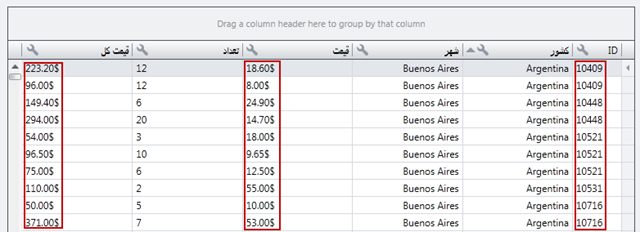
The immediate thought is: aren’t the numbers supposed to be right-justified? Or does the justification of numbers flip to the other side of the column (like we have it here) when using an RTL language? We didn’t know so Emil did some more research:

This is a screenshot from the Tehran Stock Exchange. The problem here is that they use Eastern Arabic numerals and center-align them. Hmm.
Next bit of research:
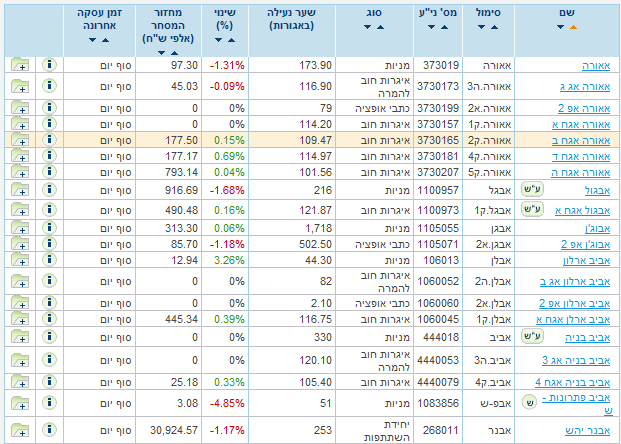
This is from the Tel-Aviv Stock Exchange and shows Western Arabic digits like we’re used to in the West and right aligns them like we’re used to. So no numeric column flipping.
The mire gets deeper, though:
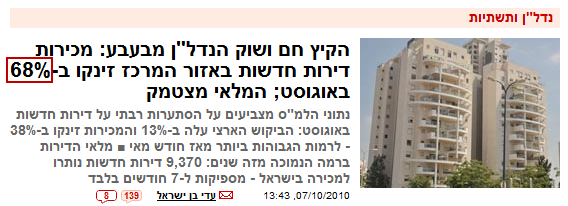
This shows that Hebrew shows that numbers with symbols are shown in the way we in the West expect.
But:

On this Kuwaiti site, percentages are shown with the symbol before the number. Emil was unable to find anything during this bit of research that showed dollar amounts (like $123.45) or Euro values (like €123,45), and so on, so we’re not sure how those would be represented.
The problem now is: what should we do? Whose conventions should we follow? The Hebrew/Israeli one? Or should we pay just as much attention to Arabic languages?
And more importantly who can help us clarify how to do this properly?
[Aside 1: This is explicitly about our WPF controls. I am not going to answer any questions about RTL on other platforms.]
[Aside 2: Please remember we cannot export to several Arabic countries under our export license. One of those is Iran, so even though I’m showing a screenshot from a Tehran government entity’s website, it’s only for illustration purposes.]
Free DevExpress Products - Get Your Copy Today
The following free DevExpress product offers remain available. Should you have any questions about the free offers below, please submit a ticket via the
DevExpress Support Center at your convenience. We'll be happy to follow-up.