Applying Security to State Machine module

In this blog entry will discuss how to restrict transition to certain states for specific system roles. Do not be put off by the title, by the end of the post you will surely agree that this is not as complicated as it sounds!
In the following example, control over transition to the Completed state is to be restricted to administrators. To make this happen we need to create a custom function criteria operator that will enumerate all user roles and check their name against this function’s argument. This is demonstrated below,
public class IsAllowedToRoleOperator : ICustomFunctionOperator {
public const string OperatorName = "IsAllowedToRole";
#region ICustomFunctionOperator Members
public object Evaluate(params object[] operands) {
if (!(operands != null && operands.Length == 1 && operands[0] is string)) {
throw new ArgumentException("IsAllowedToRole operator should have one paraneter - string roleName.");
}
var roleName = (string)operands[0];
bool result = false;
var userWithRoles = SecuritySystem.CurrentUser as IUserWithRoles;
if (userWithRoles != null) {
foreach (IRole role in userWithRoles.Roles) {
if (role.Name == roleName) {
result = true;
break;
}
}
}
return result;
}
public string Name {
get { return OperatorName; }
}
public Type ResultType(params Type[] operands) {
return typeof(bool);
}
#endregion
}
After implementing the operator we still need to register it, for example in a custom module.
public override void CustomizeTypesInfo(DevExpress.ExpressApp.DC.ITypesInfo typesInfo) {
base.CustomizeTypesInfo(typesInfo);
if (CriteriaOperator.GetCustomFunction(IsAllowedToRoleOperator.OperatorName) == null) {
CriteriaOperator.RegisterCustomFunction(new IsAllowedToRoleOperator());
}
}
Note: In future versions these custom operators will be registered to the core. Thus they will appear in all relevant UIs - this sure sounds like the DX way!
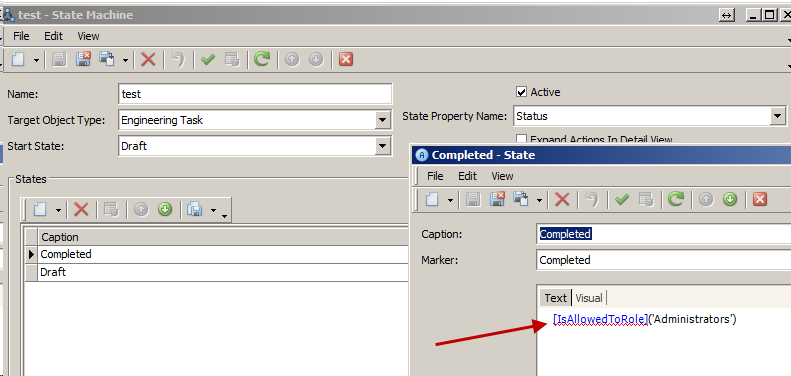
The next step is to set the TargetObjectCriteria of the Completed state to,
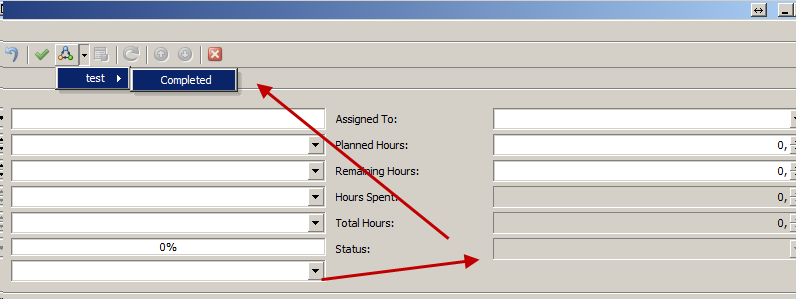
When a non administrator tries to perform the transition as shown,
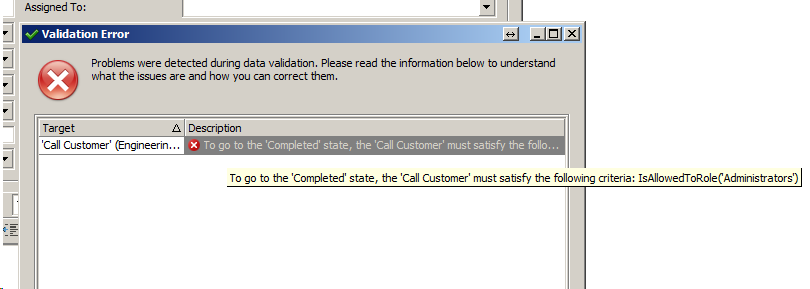
then a validation exception will be raised,
Using this approach the state machine designer is capable at runtime of restricting transition to certain states. Moreover applying different types of Security schemas is as easy as providing different versions of our custom function criteria operator.
We would appreciate your feedback on this post. Has it been useful to you? Feel free to contact us with any further questions
Related Links
Online documentation
Blog posts
Free DevExpress Products - Get Your Copy Today
 Apostolis Bekiaris (DevExpress)