How to use an eXpand module with an existing XAF application

Let me describe for a moment how we at DevExpress work. We build and sell software which means that we only sell and provide support for products that have been built and tested by us! However I am here as a framework evangelist and huge XAF fan. This makes it my duty to spread the word as much as I can and make XAF even bigger. To this end through collaboration within the XAF community, we have been building and supporting eXpand. This framework follows XAF to the letter and takes things even further. eXpand gets its inspiration from real life situations and bases itself on examples from DevExpress Support Center. eXpand is the first open source project based on the DevExpress eXpressApp Framework (XAF). More info is available at www.expandframework.com and our very existence relies on your efforts! Anyone is welcome to contribute and enjoy the rewards. It is not necessary to be a XAF guru, we can all manage to create a behavior taken from DevExpress code central. Let’s work together to enhance our beloved XAF!
Using an eXpand module with an existing XAF application is an issue that is being raised a lot recently and I am sure it deserves a post and a place in Xpand Wiki. The following information applies to any Xpand module. Note that installing an Xpand module is almost as easy as using a XAF one.
20/08/12 (Modules can be used without the core functionality http://goo.gl/JU5hi)
Introduction
Firstly, as a base type for our application components it is imperative to use XpandWinApplication or XpandWebApplication. Therefore we need to reference Xpand.ExpressApp.Win or Xpand.ExpressApp.Web assemblies from our application projects and replace their components’ base types accordingly,
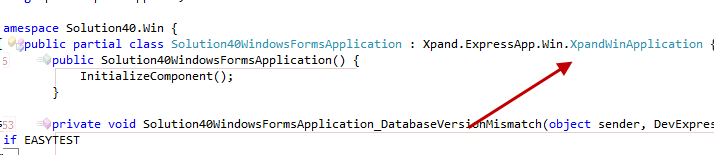
Additionally we need to reference Xpand.Persistent.BaseImpl and set its Copy Local attribute to true. Having similar architecture with XAF, eXpand modules use interfaces and their implementations are hosted in the BaseImpl assembly. Xpand modules know how to locate the Business Objects they require so this is all we need to do at this point.
Note; BaseImpl assembly has no references to DX BaseImpl and it is possible to use a replace it with a custom one .
Registering in Toolbox (Obsolete after v11.1.8.13 - Toolbox is autopopulated now)
Now, unless we are a XAF guru, we have to register the assemblies in the VS toolbox. I suggest creating the toolbox items within a new Xpand Tab as shown. At this point we don’t have the resources to create our own ToolBoxCreator utility. If any VS IDE guru wants to contribute such a tool, we owe him one!
 |  |
Registration
Registering and using a module is as easy as dragging and dropping it into the Application Designer. The designer will then add all required references and modules for us.

Give us your feedback
Was this post useful to you? Do you want to learn more about Xpand framework? We would love to hear your feedback!
Happy eXpanding!
Updated: 19/12/2012
Under folder Demos/Modules there is a set of solutions that can guide you how to install each module seperately
Free DevExpress Products - Get Your Copy Today
 Apostolis Bekiaris (DevExpress)