XAF Core Improvements – Using Entity Framework and XPO Data Models in One Application (Coming in 12.2.7)

The XAF team is constantly working to improve Entity Framework (EF) support for XAF. In the previous minor update (12.2.6), we extended the number of extra EF-compatible modules to include the Chart, Pivot Grid and Tree List modules, so the most popular modules are now compatible. In the upcoming 12.2.7 update, we introduce the capability to use both the Entity Framework and XPO business models in a single application. For instance, with this feature you can reuse the EF model from a non-XAF application in your existing XPO-based XAF project. As a result, your application will access two databases, the first one via XPO and the second via EF. Let’s take a look at an example.
Add an EF Data Model in Code
In the module project, reference the System.Data.Entity.dll, EntityFramework.dll and DevExpress.ExpressApp.EF.v12.2.dll assemblies and implement the following EntityFrameworkSampleObject and MyDbContext classes.
using System.ComponentModel;

using System.Data.Entity;
using DevExpress.Persistent.Base;
using DevExpress.ExpressApp.DC;
// ...
[DefaultClassOptions]
public class EntityFrameworkSampleObject {
    [Browsable(false)]
    public int Id { get; protected set; }
    public string Name { get; set; }
    [FieldSize(FieldSizeAttribute.Unlimited)]
    public String Description { get; set; }
}

public class MyDbContext : DbContext {
    public MyDbContext(string connectionString) : base(connectionString) { }
    public DbSet<EntityFrameworkSampleObject> SampleObjects { get; set; }
}
To enable the automatic collection of EF Code First entities, add the following code to the module's constructor located in the Module.cs file.
using DevExpress.ExpressApp.EF;
// ...
public MySolutionModule() {
    // ...
    ExportedTypeHelpers.AddExportedTypeHelper(new EFExportedTypeHelperCF());
}
Add an XPO Data Model in Code
In the module project, implement the following BaseObject descendant.
using DevExpress.Xpo;
using DevExpress.Persistent.Base;
using DevExpress.Persistent.BaseImpl;
using DevExpress.ExpressApp.DC;
// ...
[DefaultClassOptions]
public class XpoSampleObject : BaseObject {
    public XpoSampleObject(Session session) : base(session) { }
    private string name;
    public string Name {
        get { return name; }
        set { SetPropertyValue("Name", ref name, value); }
    }
    private string description;
    [Size(SizeAttribute.Unlimited)]
    public String Description {
        get {return description; }
        set { SetPropertyValue("Description", ref description, value); }
    }
}
Populate the DefaultObjectSpaceProviders Collection
By default, the CreateDefaultObjectSpaceProvider method implemented in the WinApplication.cs and WebApplication.cs files assigns an XPObjectSpaceProvider instance to the ObjectSpaceProvider parameter. Instead, you can add multiple Object Space Providers to the ObjectSpaceProviders parameter. XAF will automatically determine what Object Space Provider should be used to create an Object Space for each particular business object type. Modify the default implementation of the CreateDefaultObjectSpaceProvider method for both Windows Forms and ASP.NET application projects in the following manner.
using DevExpress.ExpressApp.DC;
using DevExpress.ExpressApp.EF;
// ...
protected override void CreateDefaultObjectSpaceProvider(CreateCustomObjectSpaceProviderEventArgs args) {
    args.ObjectSpaceProviders.Add(new XPObjectSpaceProvider(
        ConfigurationManager.ConnectionStrings["ConnectionStringXpo"].ConnectionString, null));
    args.ObjectSpaceProviders.Add(new EFObjectSpaceProviderCF(
        typeof(MyDbContext), (TypesInfo)TypesInfo, null,
        ConfigurationManager.ConnectionStrings["ConnectionStringEF"].ConnectionString));
}
Specify Connection Strings for EF and XPO
The code in the previous section reads connection strings for each Object Space Provider from the configuration file (App.config in a Windows Forms application project and Web.config – in an ASP.NET application project), so specify the ConnectionStringXpo and ConnectionStringEF connection strings in both files.
<connectionStrings>
    <add name="ConnectionStringXpo"
    connectionString="Integrated Security=SSPI;Pooling=false;Data Source=(local);Initial Catalog=MultipleORMsExampleXpo" />
    <add name="ConnectionStringEF"
    connectionString="Integrated Security=SSPI;Pooling=false;Data Source=(local);Initial Catalog=MultipleORMsExampleEF" />
</connectionStrings>
Run the Application
You can now run the Windows Forms or ASP.NET application to see that both EF and XPO objects are accessible.
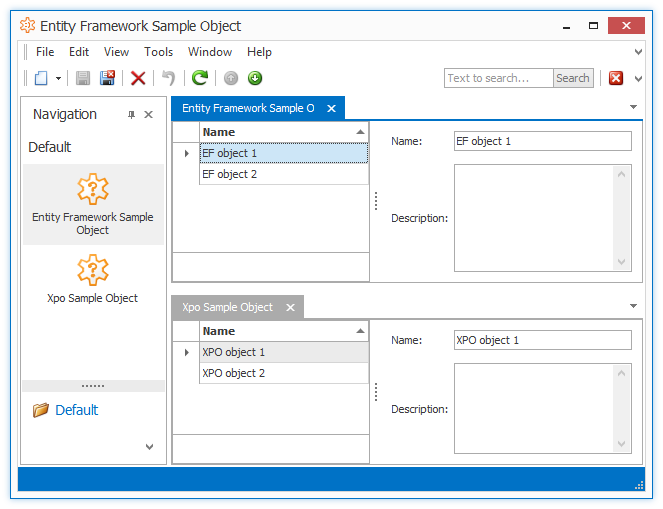
The EntityFrameworkSampleObject objects persist on the MultipleORMsExampleEF database, and XpoSampleObject objects persist on the MultipleORMsExampleXpo database.

This small feature is helpful when you have a task similar to the one described in Q433494.
Free DevExpress Products - Get Your Copy Today
 The DevExpress Team