Blogs

Rory Becker - DevExpress CodeRush Blog

Community Callout – Change Target Framework


This week my attention was called to a plugin written by one of our community.

Steven Rasmussen has recently updated his “Change Target Framework” plugin to support .NET 4.0

You can find a link to Steven’s plugin in an XAF thread in our forums.

After installation, you will find a couple of extra menu options on the project and solution context menus in the solution explorer.
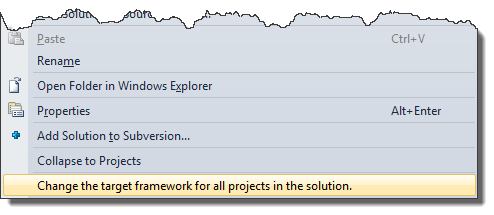
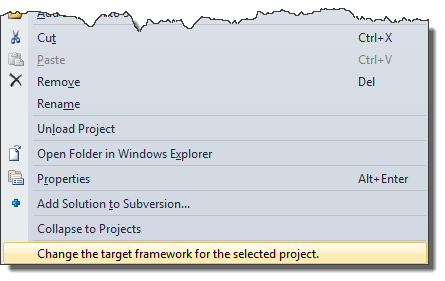
ChangeTargetFrameworkSolutionChangeTargetFrameworkProject

After selecting one of these options you’ll be presented with a choice of frameworks to select from:
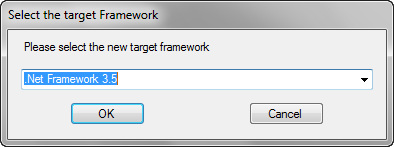
ChangeTargetFrameworkSelection
Note: This list allows you to pick any framework 2.0 through 4.0 and includes options for client profiles.

Pick the framework you’d like to change to, and click Ok.

After a few moments (depending on the size of your project/solution) your designated project(s) will have had their framework version altered, and will be ready to continue working with.

And you’re all done. It’s that simple.

Life has been made that little bit easier, thanks to Steven Rasmussen and CodeRush.

Published Nov 19 2010, 11:42 AM by Rory Becker - DevExpress
Filed under: , ,
Technorati tags: DXCore, Plugin, Community
Bookmark and Share

Comments


Crono said:

Does it allow to choose client profile for 3.5 and 4.0?

November 19, 2010 8:15 AM
 

Rory Becker - DevExpress said:

Indeed it does. I should have said as much originally. Sorry :)

I have added a caption under the image of this box, to indicate this is so.

November 19, 2010 8:45 AM
 

Steven Rasmussen said:

Thanks Rory!  I just hope it helps someone else out.  I have really gleaned a lot of knowledge from everyone here in the DevExpress community so I'm glad to finally be able to give back.

November 19, 2010 12:58 PM
 

Matthew K' said:

Any idea whether there might be an update of the ChangeTargetFramework dll? I've tried several times to use the available version (and it loads) but I haven't seen the context menu item in VS 2010.

December 28, 2011 11:45 PM
 

Matthew K' said:

I was able to do a minimal amount of debugging to determine that this extension requires that you load Visual Studio (wait for the extension to load) and then load your solution.

December 28, 2011 11:47 PM
 

Rory Becker - DevExpress said:

@Matthew I think Steve Rasmussen (The original author) would be your best bet for information on future versions of this plugin.

January 2, 2012 6:36 AM
More from DevExpress
Live Chat
Have a pre-sales question?
Need assistance with your evaluation?
We are here to help.
Chat is one of the many ways you can contact members of the DevExpress Team. We are available Monday-Friday between 8:30am and 5:00pm Pacific Time.
If you need additional product information, require pre-sales assistance, or want help with your order, write to us at info@devexpress.com or call us at
+1 (818) 844-3383.