Blogs

Rory Becker - DevExpress CodeRush Blog

New Plugin: CR_StringFormatter


Another CodeRush Feature Workshop (Part 1 and Part 2) has yielded a plugin, and this one is truly awesome.

String Formatter works in 3 separate ways to increase your productivity:

Tab to Next Reference Extension

Tab among references to a string token and variable/expression whose value will replace it at runtime.

Simply place the caret on a String.Format token (ie {0}) and then press the Tab key.

TabToNextStringToken
The Tab to Next Reference engine is engaged, and the user may now tab between references to the token, and the argument which will be used to fill it at run-time.

Note: For now, this new Tab To Next Reference functionality will require the presence of our previous CR_PrimitiveTab plugin and it’s required configuration. We hope to address this in a future version of CodeRush.

CodeIssue - Format Item Index Too Large

Wouldn’t it be useful, if studio could let you know when you reference a token inside a String.Format, but then fail to supply a corresponding argument to fill it. The “Format Item Index Too Large” CodeIssue, highlights when the index of a token in a String.Format string references an argument which is not present.

In this example, note how the string contains references to 3 distinct tokens, {0}, {1} and {2}. However there are only 2 further arguments.

StringFormatterCodeIssueBefore

This will crash at runtime and Studio does nothing to warn you of this. CR_StringFormatter to the rescue…

See below, how CR_StringFormatter’s CodeIssue highlights the offending token as an error, and provides a message to help you understand what is wrong..

FormatItemIndexTooLarge

The ‘Format String’ Builder

Do you have all the FormatString notations memorized? You do ? … Really? … Wow.. Well good for you.

I don’t… Sad smile 

…but then l I don’t need to. I have CR_StringFormatter Open-mouthed smile

[Are you ready? This is even more awesome than the first 2 bits.]

The 3rd piece of awesome productivity that CR_StringFormatter provides you with, is a Format String Builder. This is a context sensitive FormatString Builder dialog.

It’s like our Color swatch dialog, only for format strings and is is available when the your caret is within a String.Format token. (ie {0})

Simply choose "Format Item..." from the Code SmartTagMenu. 
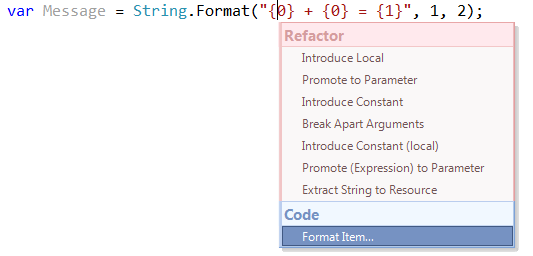
FormatItem


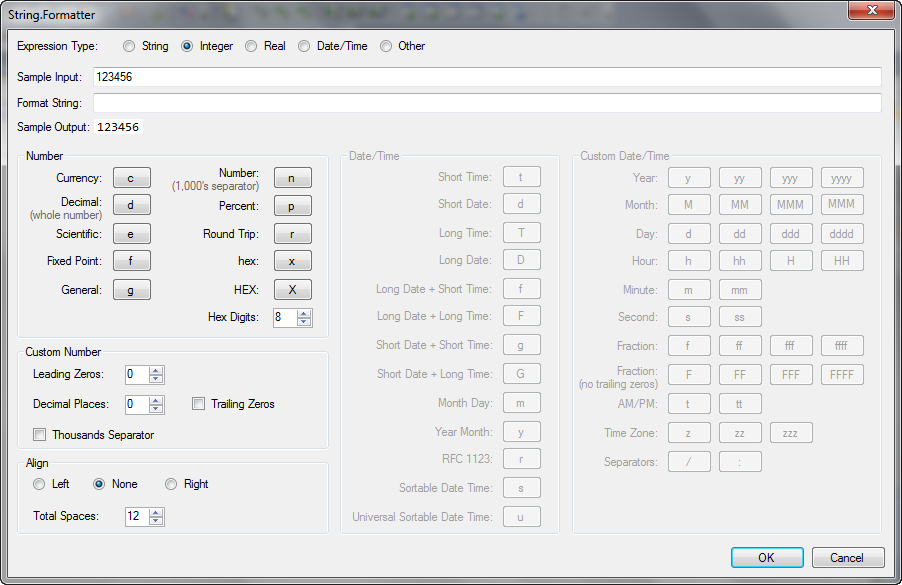
When “Format Item…” is chosen, the user is presented with a dialog designed to aid them in the building of a Format String suitable for their needs.

This dialog works with String, Ints, Real (floating point) numbers , Dates and Times. Depending on the type of data being dealt with, you can expect to be given help with alignment, leading or trailing zeros, decimal places, currency, hex conversion and more.

Go on, drink it in…
StringFormatter

Upon acceptance, this carefully crafted string will replace the original token in the string from which the dialog was requested.

Isn’t that awesome. Yet more information that you don’t have to remember (or go look up) every time you need it.

Now download from the community site, and be sure to keep an eye out for more CodeRush Feature Workshops

Comments


Bradley Uffner said:

I can't get the format builder dialog to open.  The options dialog says that the plugin is loaded, but the smart tag never contains the "Format Item" menu.

My code looks like "Dim s As String = String.Format("The date is {0}", #3/11/1979#)"

with the cursor on the {0}.

July 25, 2011 5:33 PM
 

Rory Becker - DevExpress said:

I'm going to look into this straight away. Can you file an issue on the community site so we can track this a little better. Thanks

July 25, 2011 5:54 PM
 

Bradley Uffner said:

Just a quick test.  It works fine in C#, but not in vb.net.  at least for me.

Going to go open that issue for you now.

July 25, 2011 6:05 PM
 

Rory Becker - DevExpress said:

Just to confirm, that issue is now fixed and published as build 1946. this is now available as the default build for this plugin.

July 26, 2011 4:49 AM
 

Mark DuCharme said:

Nicely done Rory and Mark. Good stuff!

July 26, 2011 10:43 AM
 

Tim Shnaider said:

Thanks guys, very useful

July 27, 2011 5:28 PM
 

Imar_Spaanjaars said:

Nice plugin indeed.

I had trouble configuring the plugin at first though. This article says "this new Tab To Next Reference functionality will require the same little configuration fix as described in our previous post" but that's not enough. You also need that very plugin installed, or the InPrimitive scope is not available.

Hope this helps anyone running into the same issue.

Cheers,

Imar

July 29, 2011 6:14 AM
 

Rory Becker - DevExpress said:

@Imar_Spaanjaars

A very good point. Thanks very much. I've amended the instructions appropriately.

July 29, 2011 6:48 AM
 

Johnny K said:

seems really nice,

will it help me make a concat string and align it in 4 colums?

like

Johnny          123           value

Jak                25666       value2

is it possible to do that with this plugin? :(

VB.net always :D

July 29, 2011 3:31 PM
 

Karel Kral_1 said:

Nice, but what about other contexts where formatting is used? There are many methods which take format string and arguments as parameters. I.e. Debug.Print.

August 3, 2011 7:27 AM
 

Rory Becker - DevExpress said:

@Karel: That's a good point. Could you file an issue on the community site listing as many as you can think of.

August 4, 2011 10:39 AM
 

Imar_Spaanjaars said:

Hi Rory,

Seems like this is now part of Code Rush 11.2.8? I can see the plugins being loaded in the options dialog.

However, despite the presence of the plugin, I can't seem to tab from a string.Format token to its value. I just get a tab inserted instead.

Any ideas? I tried this on a clean machine without older CodeRush settings or plugins, and it doesn't seem to work. Also, I had to enable "InIdentitfier" on the Tab shortcut to get Tab to Next Reference to work at all. Is this by design?

Best regards,

Imar

February 11, 2012 4:19 AM
 

Rory Becker - DevExpress said:

Hi @Imar.

Indeed this functionality was included in the official 11.2 release of CodeRush. If you are using this version or later, (especially on a clean machine with no previous settings) then it should 'Just work'.

If this is not the case, I suggest contacting support either via support@devexpress.com or via our Support Center (www.devexpress.com/.../Center)

March 5, 2012 4:19 PM
 

MichaelHachen said:

Hi Rory,

I would like to use this plug-in. I have installed Refactor!Pro 11.2.10. However there is no smarttag menu "Format item..." Is is possible that this plug-in doesn't work in VS 2008 with vb.net? It works in VS 2010 with c# (without the Tab to Next Reference Extension).

Thanks for your help!

Mike

April 16, 2012 2:14 AM
 

Rory Becker - DevExpress said:

Hi Michael,

Yes I believe this plugin only works with CodeRush installed rather than Refactor Pro only.

Typically Refactoring only plugins will work with RefactorPro, but this is not such a plugin. Indeed it provides no refactoring functionality.

April 16, 2012 3:33 AM
 

MichaelHachen said:

Hi Rory

I have installed DxCore 11.2.10, CodeRush 11.2.10 and Refactor!Pro 11.2.10.

Do I understand you correct: CR_StringFormatter doesn't work on VS 2008 with vb.net?

April 16, 2012 5:17 AM
 

Rory Becker - DevExpress said:

Sorry Michael,

I understood from your previous message, that you only had Refactor Pro installed rather than CodeRush.

This plugin was written for CodeRush 11.1 and does indeed support both VS2008, VS2010 and both C# and VB.Net

However this plugin also shipped as a part of the full  version of CodeRush 11.2, so you should no longer need the Community plugin version.

If after removing the Community plugin version of this plugin, you still cannot get the functionality to work, I suggest contacting support@devexpress.com

April 16, 2012 6:16 AM
More from DevExpress
Live Chat
Have a pre-sales question?
Need assistance with your evaluation?
We are here to help.
Chat is one of the many ways you can contact members of the DevExpress Team. We are available Monday-Friday between 8:30am and 5:00pm Pacific Time.
If you need additional product information, require pre-sales assistance, or want help with your order, write to us at info@devexpress.com or call us at
+1 (818) 844-3383.