11.1 Feature Days (from TechEd) – New ASP.NET MVC Reporting Extensions

Update: Available now for download are the DevExpress ASP.NET MVC Reporting Extensions. See a live online demo here: http://dxpr.es/kQ94or
For our third day here at TechEd, I thought I would show you the new ASP.NET MVC reporting extensions coming in our v2011.1 release. These include a report viewer extension as well as a report toolbar extension.
There are a couple of things to keep in mind when using these extensions. The first is how you decided to pass the report from the controller to the view. In ASP.NET MVC you can use any of the traditional models available: whether it be passed to the View through the model or the ViewData dictionary exposed to the View. Here is an example of the former:
1: public ActionResult Index()
2: {
3: ViewBag.Message = "Welcome to DevExpress Extensions for ASP.NET MVC!";
4: return View(new ProductReport());
5: }
The next thing to keep in mind is how the ReportViewer extension actually works (in conjunction with the report toolbar extension). Since the report viewer uses asynchronous requests to the server in order to refresh its content, the report viewer extension is best used when exposed in its own partial view. The following snippet shows the partial view markup/code used to generate the viewer. Notice that the Model property inside of the partial view corresponds to the model passed to the View from the Index controller method above.
1: @Html.DevExpress().ReportViewer(settings =>
2: {
3: settings.Name = "reportViewer";
4: settings.Report = (DevExpress.XtraReports.UI.XtraReport)Model;
5: settings.CallbackRouteValues = new { Controller = "Home", Action = "ReportViewerPartial" };
6: settings.ExportRouteValues = new { Controller = "Home", Action = "ReportViewerExportTo" };
7: }).GetHtml()
The first two settings above are pretty self explanatory: they define the name of the control along with the report source (in this case the actual Model property in the View). The second two have to do primarily with how the report viewer interacts with the controller to refresh itself. The CallBackRouteValuse setting deals primarily with refreshing elements within the report as it is displayed while the ExportRouteValues deal primarily with the task of exporting the actual report. The following code snippet highlights this distinction:
1: public ActionResult ReportViewerPartial()
2: {
3: return PartialView("_reportViewer", new ProductReport());
4: }
5:
6: public ActionResult ReportViewerExportTo()
7: {
8: return ReportViewerExtension.ExportTo(new ProductReport());
9: }
Notice on line 3 in the snippet above that the controller actually returns the partial view entitled “_reportViewer” that contains the report viewer extension as shown above.
The last portion is to actually create a view that consumes the report viewers partial and adds the toolbar functionality:
1: @{
2: ViewBag.Title = "Home Page";
3: }
4:
5: <div class="title">@ViewBag.Message</div>
6: <div id="report">
7: @Html.DevExpress().ReportToolbar(settings =>
8: {
9: settings.Name = "toolbar1";
10: settings.ReportViewerName = "reportViewer";
11: }).GetHtml()
12:
13: @Html.Partial("_reportViewer")
14: </div>
The only significant snippet to consider here is found on line 10. It corresponds the the actual name of the report viewer that is being rendered.
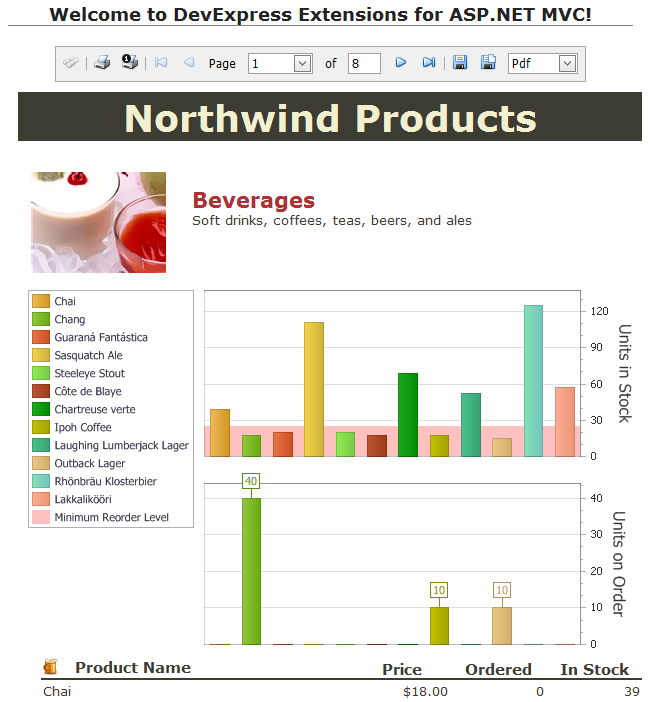
Here is the example from above fully rendered (elided bottom portion for brevity):
This is indeed great news for those of us who use MVC heavily.
As always, if there are any comments and/or questions, feel free to get a hold of me!
Seth Juarez
Email: sethj@devexpress.com
Twitter: @SethJuarez
DXperience? What's That?
DXperience is the .NET developer's secret weapon. Get full access to a complete suite of professional components that let you instantly drop in new features, designer styles and fast performance for your applications. Try a fully-functional version of DXperience for free now: http://www.devexpress.com/Downloads/NET/
Free DevExpress Products - Get Your Copy Today
The DevExpress Team