Blogs

Thinking Out Loud

Docking Control for WPF


Those of you who have been asking us about our Docking Control for WPF will already know that it did not make the first beta of DXperience v2009 vol 1. We are still planning to release it once DXperience v2009 vol 1 officially ships.
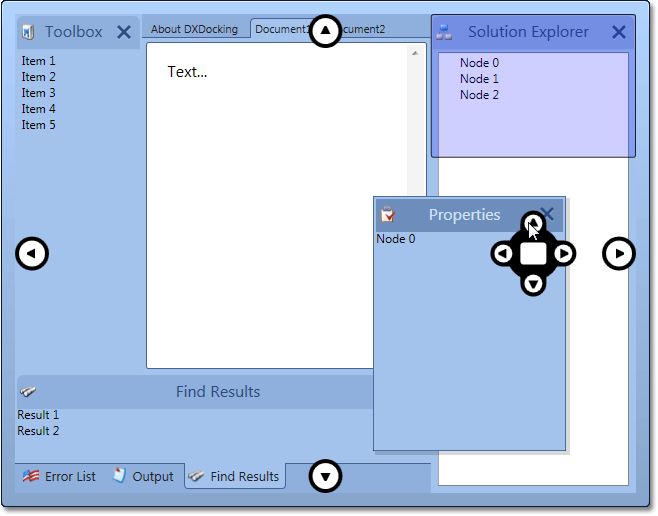
 WPF Docking Control by DevExpress

DXDocking for WPF will ship with the following capabilities:


Microsoft Visual Studio style glyphs used during drag and drop operations. These glyphs serve as drop targets and thus provide an intuitive way in which to dock windows.
Dock windows can be organized into tabbed containers.
Built-in close buttons allow end-user to hide unnecessary windows.
Float state is supported.
Automatically created splitters allow you to resize dock windows placed side-by-side.

If you need more information or need further assistance, feel free to drop me a note.

Published Mar 17 2009, 12:57 PM by Ray Navasarkian (DevExpress)
Filed under: ,
Technorati tags: WPF, DXDocking
Bookmark and Share

Comments


Chris Walsh [DX-Squad] said:

Looking good Ray, cant wait to see them in the release!

March 17, 2009 11:37 PM
 

Linton said:

Looking good, Ray. Thanks for the update.

In WPF, all things visual should be dynamic. Will we be able to change and animate the glyphs used to display docking points?

March 18, 2009 10:41 AM
More from DevExpress
Live Chat
Have a pre-sales question?
Need assistance with your evaluation?
We are here to help.
Chat is one of the many ways you can contact members of the DevExpress Team. We are available Monday-Friday between 8:30am and 5:00pm Pacific Time.
If you need additional product information, require pre-sales assistance, or want help with your order, write to us at info@devexpress.com or call us at
+1 (818) 844-3383.