Blogs

Thinking Out Loud

WinForms Pivot Table - Updates Coming to the XtraPivotGrid


With DXperience v2009 vol 2, we've introduced the following new features/options to our Pivot Grid control.

Excel 2007 Style Customization Window
The XtraPivotGrid's customization window can now mimic the appearance and behavior of Microsoft Excel 2007 Pivot Tables.
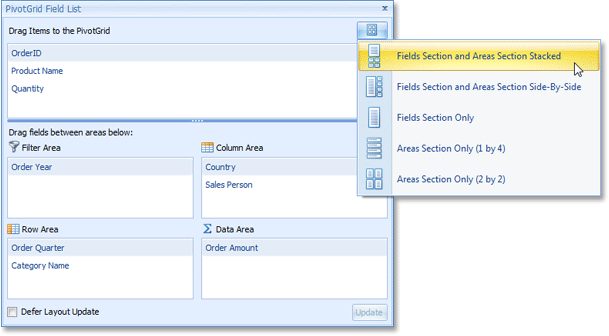
WinForms Pivot Table Excel Style Look and Feel

New Filter Dropdown Capabilities
This release extends the Pivot Grid's filter dropdowns with the following new features:

- Incremental Search Support.
- Context menu allowing end-users to inverse the currently applied filter.
- An optional combo box specifying whether to show or hide selected items.
- The capability to select multiple items by pressing the SHIFT or CTRL key. After required items have been selected, their check state can be reversed simultaneously by pressing SPACE.
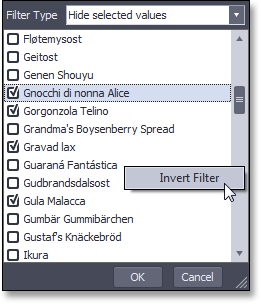
WinForms Pivot Grid Filter

Suppressing Empty Columns When Displaying Trends
When displaying trends (summary variations), the first column or row in each group is always empty because there are no preceeding values to calculate the difference. You can now suppress these empty cells by toggling a single option.

Published Jul 13 2009, 03:18 PM by Ray Navasarkian (DevExpress)
Filed under: ,
Technorati tags: v2009.2, XtraPivotGrid
Bookmark and Share

Comments


Cigdem Hiz said:

good news !

July 14, 2009 2:05 AM
 

Microsoft Updates | All Days Long said:

Pingback from  Microsoft Updates | All Days Long

July 14, 2009 5:41 AM
 

Robert Chaffe said:

The Customization window looks nice.  Can source fields be dropped multiple times into the Row or Column area?  Can a field's group interval or any other properties be changed via this dialog?

July 14, 2009 8:43 AM
 

Arturo Martínez said:

How about implementing this feature in the VCL PivotGrid? It would be great if we Delphites could have these goodies too.

July 14, 2009 11:41 AM
 

Tomas Mohapl said:

Looks great. Will be there also tree view like in MS Pivot Grid?

July 14, 2009 4:39 PM
 

Bassam Abdelaal said:

Hello,

is this all the new features ? will it be any OLAP features ?

waiting for it for a loooong time!

Bassam

July 15, 2009 9:31 AM
 

Kevin Killion said:

Since I got to this page by following a link on an email from you, it took me a while to figure out what I was seeing here.  You really should make it clear at the start of the page that this is related to some .NET stuff you have.

The first line on this page says, "we've introduced the following new features/options to our Pivot Grid control." That makes it sound as if this is the ONLY "Pivot Grid" control you have.  I assume that your

ExpressPivotGrid is still supported, right?

July 15, 2009 10:56 AM
 

Rick Schultz said:

Under "new filter dropdown capabilities" you mention, "Incremental Search".  What is that?  By any chance are you saying that only values currently available (based on existing filters) show up in the filter dropdown?  For example, if you've filtered a "country" field to show only Country = Canada, would you then see, in a "state" field filter dropdown, only Canadian Provinces, or would all values still show?

July 15, 2009 4:23 PM
 

Mark Chimes said:

Rick,

That would depend entirely on the structure and relationships between your data.

July 16, 2009 5:55 PM
 

Martin Ehlers said:

Will it be possible to refresh/update a single cell - not always the whole data bound to the grid?

July 22, 2009 9:55 AM
 

ctodx said:

We're just about to release v2009.2 and it would be a good idea to have an "accumulator"

August 20, 2009 8:29 PM
More from DevExpress
Live Chat
Have a pre-sales question?
Need assistance with your evaluation?
We are here to help.
Chat is one of the many ways you can contact members of the DevExpress Team. We are available Monday-Friday between 8:30am and 5:00pm Pacific Time.
If you need additional product information, require pre-sales assistance, or want help with your order, write to us at info@devexpress.com or call us at
+1 (818) 844-3383.