Blogs

Thinking Out Loud

WinForms Office 2010 Theme and Ribbon (Skin) - v2010 vol 1


A couple of weeks ago, I posted a couple of images of our upcoming WinForms Office 2010 Skin. That image demonstrated our WinForms RichEdit control...Here's a look at how other controls look when this theme is applied.
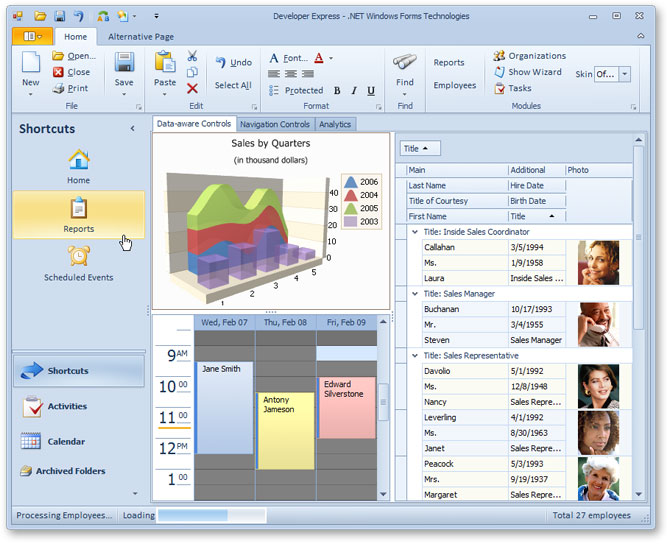
WinForms Office 2010 Theme (Skin) DevExpress

For those who are wondering about the application menu.

We now have an application menu content property - if you assign a menu to the property, you'll be able to maintain Office 2007 behaviors. If you assign any other control to the property, you'll have an Office 2010 full page view with the control embedded into it (for instance, place anything on a panel and then set the panel as the dropdown control).

The following image demonstrates how this will look at runtime - note the orange effect in the right-bottom corner - it is a DevExpress Skin element. It will appear automatically (if not overlapped by non-transparent items).
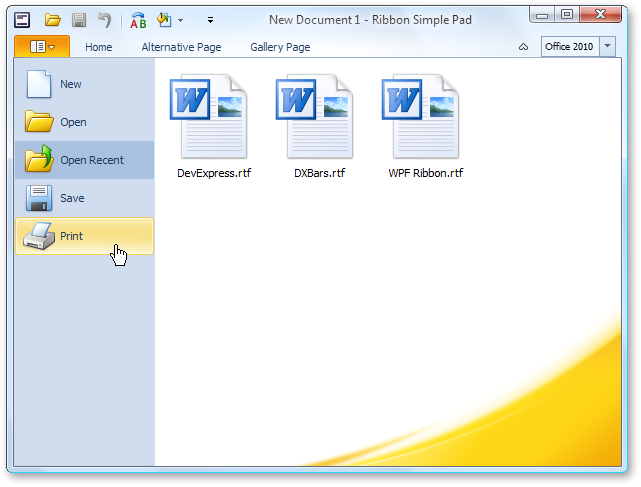
WinForms Ribbon App Menu


Published Apr 08 2010, 02:14 AM by Ray Navasarkian (DevExpress)
Bookmark and Share

Comments


Frank said:

Very nice Skin. Could become the favorite for my next Tool.

April 9, 2010 3:29 AM
 

MM said:

Please make the orange effect optional and allow for a different graphic to be used, or at least allow for color changes to it. Most people do want an Office 2010 look, but not a replication of the Microsoft specific branding elements (These might be protected trademarks anyway).

I really like the effect in the Office 2010 Startup screen as well as in the App Menu, but need to implement the same effect with our own branded graphics.

April 9, 2010 5:25 AM
 

aWaescher said:

This looks great!

Excuse the question but can the developer change the color of the AppButton/AppTab without creating a new skin?

As you said, you can overpaint the bottom right corner with an image. So it's not possible the give a kind of basecolor and the corner is painted accordingly, is it?

April 9, 2010 5:38 AM
 

Nate Laff said:

Hey Ray,

This leads me to believe the new ribbon style is skin driven? Is that correct? Or can I use the new ribbon style in all skins by setting a RibbonStyle property on the RibbonForm or something along those lines? That would obviously be ideal.

April 9, 2010 12:24 PM
 

Josh Einstein said:

I've always been impressed with the accuracy of your themes. I gotta say though, when demo'ing an Office 2007 or Office 2010 theme you should really go the extra mile and use Office 2007 or 2010 icons. The ones in your screen shot are definitely not of the Office 2010 style and thus really subtract from the "wow" factor. But still, good job on the theme.

April 9, 2010 1:05 PM
 

Alex Danvy [DX-Squad] said:

Hi Ray, It's to see that you follow the move. Office 2010 brings nice refinements to the ribbon. Can you tell us what's your plan for the application menu. Will we have to do it by hand or will you provide a component for that purpose ?

April 9, 2010 1:35 PM
 

Waqar Aijaz said:

Hi,

Has anybody got a video or tutorial of actually how to create such interface using DEVEXPRESS. A project or something ????

June 24, 2010 10:31 AM
More from DevExpress
Live Chat
Have a pre-sales question?
Need assistance with your evaluation?
We are here to help.
Chat is one of the many ways you can contact members of the DevExpress Team. We are available Monday-Friday between 8:30am and 5:00pm Pacific Time.
If you need additional product information, require pre-sales assistance, or want help with your order, write to us at info@devexpress.com or call us at
+1 (818) 844-3383.