Blogs

Thinking Out Loud

ASP.NET Menu Scrolling (coming in v2010 vol 2)


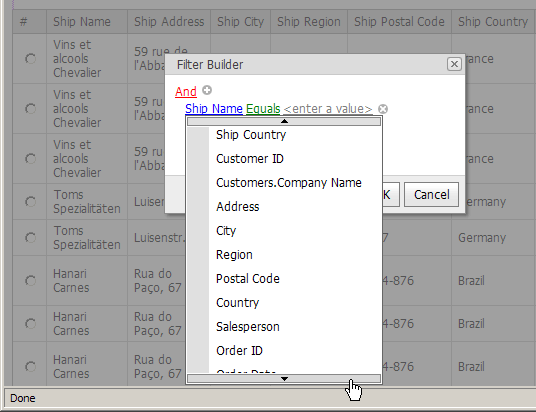
In the upcoming release of DXperience, our ASP.NET team will be introducing a new sub menu scrolling feature - making it easier for end-users to navigate large lists.

ASP.NET AJAX Menu Scrolling   

ASP.NET AJAX Filter Scrolling

How it works...

As you can imagine, this capability is useful for popup menus that contain large lists. Vertical scrolling of popup menu items can be enabled by displaying specific scroll buttons within popup menus. If scroll buttons are enabled, a popup menu (that does not fit the visible area) automatically adjusts its height to fit the area and displays scroll buttons, allowing popup menu items to be scrolled vertically. To scroll, hover the mouse pointer over a scroll button or click it to scroll faster.

In the ASPxMenu control, scroll buttons can be displayed for all submenus using the menu's EnableSubMenuScrolling property.
In the ASPxPopupMenu, the EnableScrolling property controls the availability of scroll buttons within all popup menus (including the root level menu).
In both menu controls (the ASPxMenu and ASPxPopupMenu), the display of scroll buttons within an individual submenu is controlled by its parent menu item's EnableScrolling property.

When using the ASPxFilterControl, the EnablePopupMenuScrolling property activates vertical scrolling within popup menus.
In addition, descendants which are used as built-in filter controls within the ASPxGridView and ASPxPivotGrid will include similar properties - controlling vertical scrolling availability:

Visit http://www.devexpress.com/Products/NET/Controls/ASP/ for more information on our entire ASP.NET product line.

Want MVC - Learn about our upcoming MVC HTML Editor: http://community.devexpress.com/blogs/aspnet/archive/2010/08/04/new-asp-net-mvc-extensions-html-editor-2010-vol-2.aspx 

Published Aug 11 2010, 11:27 AM by Ray Navasarkian (DevExpress)
Filed under: , , ,
Technorati tags: v2010.2, Filter, Menu, ASP.NET
Bookmark and Share

Comments


Haithem said:

Will the ASPxNavBar have this feature as well???

August 11, 2010 2:48 PM
 

Tito Toro said:

When should we expect to see v2010 vol 2

August 11, 2010 2:51 PM
 

Boris Bosnjak said:

Nice!

August 11, 2010 4:31 PM
 

Leon Meijer (Capgemini NL) said:

Can we use this also in XAF ?

August 12, 2010 2:47 AM
 

Rinaldo Ferreira Junior said:

Really nice!!

Is there anything new to the CS49701 suggestion?

August 12, 2010 12:18 PM
 

Dennis (DevExpress Support) said:

Hi Leon,

Thanks for the feedback. I see that this functionality can be used in the filter editor and possibly in the Quick Create menu, because unless I am mistaken there aren't any other large menus in XAF. Do you think that menu scrolling should be set for all the menus in XAF by default? However, please track a corresponding suggestion in this regard: www.devexpress.com/issue=S35485

August 17, 2010 8:14 AM
 

Mehul Harry (DevExpress) said:

@Tito,

The DXperience 2010 vol 2 release is expected around late October/early November time frame.

August 18, 2010 2:09 PM
 

Mehul Harry (DevExpress) said:

@Mohamed,

The ASPxNavBar will not have scrolling but I recommend creating a suggestion in the support center:

www.devexpress.com/.../CreateIssue.aspx

August 18, 2010 2:20 PM
 

Mehul Harry (DevExpress) said:

Thanks Boris!

There's a preview video of this feature coming soon on my blog:

http://devexpress.com/mehul

August 18, 2010 2:34 PM
 

Mehul Harry (DevExpress) said:

@Rinaldo,

Thanks!

As for the suggestion, I'll talk with team about it.

August 18, 2010 3:48 PM
More from DevExpress
Live Chat
Have a pre-sales question?
Need assistance with your evaluation?
We are here to help.
Chat is one of the many ways you can contact members of the DevExpress Team. We are available Monday-Friday between 8:30am and 5:00pm Pacific Time.
If you need additional product information, require pre-sales assistance, or want help with your order, write to us at info@devexpress.com or call us at
+1 (818) 844-3383.