Blogs

Thinking Out Loud

.NET Reporting - a Preview of Report Templates for WPF Silverlight WinForms and ASP.NET


As I'm writing this, I realized that though we put out a press release about our Silverlight Report Designer Wizard, I have not actually blogged about it (will do so shortly)

In any event, among the most interesting new features we'll introduce for our Reporting Platform in the upcoming release of DXperience v2011 vol 2 is the DevExpress Report Template Gallery - a way in which to obtain pre-built report templates for use in your applications. 

Backstory... 

I think we can all agree that one of the more "painful" aspects of LOB apps is having to create countless reports for end-users...No need to elaborate other than to say creating reports can be back breaking work. 

To address the dislike so many of us have with traditional report design we've created products like the XtraPrinting System - allowing you to render your UI to paper and in so doing, knock out a myriad of different "reports" without using a reporting tool. Of course, rendering a UI is not going to address all customer reporting requirements ...which means we must address the problem within the XtraReports Suite, so it is a more productive and effective tool.

Our Solution - the Report Gallery

First, let me say that the idea of a template gallery is not new - templates exist all over the place but for the first time, we've created a vehicle wherein we can share pre-built report layouts with you and provide a means for community-sourced production of useful report templates. 

With that - let's get to the pictures that demonstrate how it will all work (note that this is still a work in progress and the final implementation may differ from what you see here)

The Report Template Gallery on the Web


.NET Report Template Gallery

Loading a Report Template in the IDE

.NET Report Template IDE

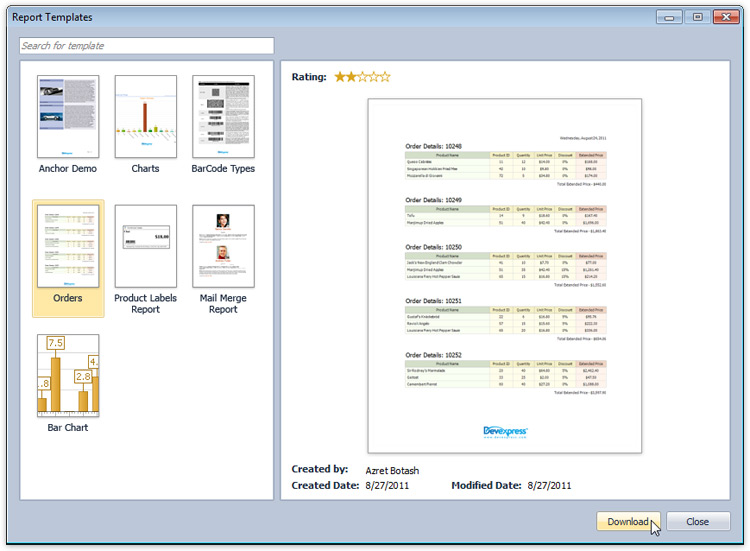
Report Template Chooser

.NET Report Template Chooser

 And finally...The Loaded Report
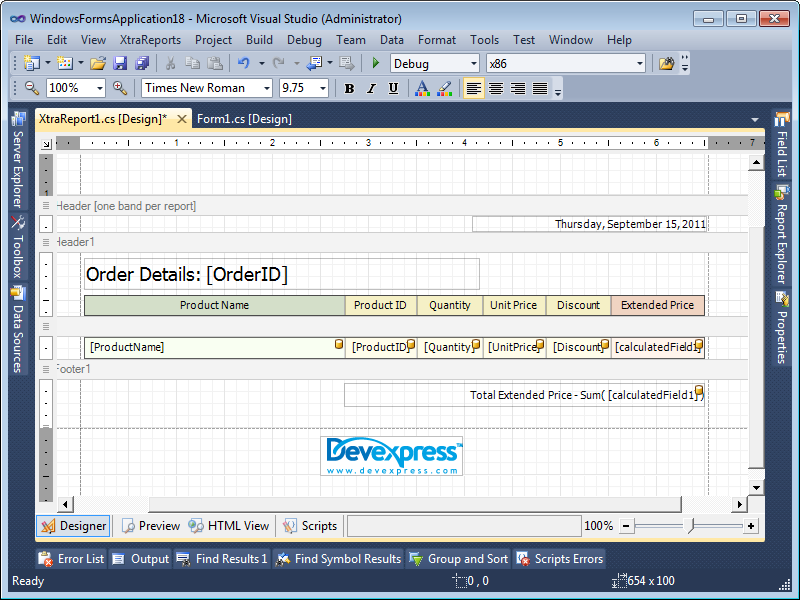
.NET Report Template Loaded in the IDE

Azret and Seth will be blogging and describing the details of the DevExpress Report Template Gallery in due time - so keep tuned for the details and in the meantime, have fun...DXperience v2011 vol 2 is going to be an exciting release.  

Published Sep 21 2011, 11:51 PM by Ray Navasarkian (DevExpress)
Bookmark and Share

Comments


Glen Harvy said:

This is going to be for me the most productive and useful addition to Winforms that I have seen in quite a while.

Thanks Ray. I no longer have to wade thru webinars, talkfests, videoed advertising etc to understand, let alone implement the great reporting functions bundled with my subscription of DevEx.

Please try to add more templates for your other great tools.

Keep up the great work Ray ...

September 22, 2011 5:44 AM
 

Ray Navasarkian (DevExpress) said:

Thanks Glen - credit goes to our Team not me. Of course, this is something we need to port over to our RTF control as well...

Dave has some specific ideas on this front across the spectrum of controls we offer...and we'll work towards that as well.

Hopefully you'll help us spread the good word...

September 22, 2011 5:57 AM
 

Garry Lowther said:

This looks excellent. Our end-users will be able to easily create their own reports just as easily as creating a new word document from one of the many office templates.

Can't wait for 2011.2...

September 22, 2011 6:12 AM
 

Scott Blood_1 said:

Seriously the reporting suite is getting better and better with every release and i think julian should take the whole reporting team out for a meal to say thank you from his customers.

Only 2 missing features to go and this will be the best reporting tool on the market.

Missing features i hear you say???  Simply it needs to be able to read from \ output to RDL and have some drill down capabilities within the reports.

We have a full reporting server wrote around the DevExpress reporting suite and the only missing thing that is stopping us from rolling it out across our multiple call centres is the drill down abilities.

September 22, 2011 10:21 AM
 

Robert Fuchs said:

Can the end user report designer also load these templates?

September 22, 2011 6:22 PM
 

Sigurd Decroos said:

+1 for simplified drill down like crystal

Also, multiple 'bands' for the same level, like multiple detail bands for the same data. Much needed, long requested...

September 22, 2011 7:05 PM
 

George (DevExpress) said:

@Robert: No, with this version we only plan to provide this feature in our Visual Studio designer. You can start tracking the corresponding suggestion at devexpress.com/issue=S38139.

September 23, 2011 4:20 AM
 

Rahmat S said:

+2 for drill down capability

September 23, 2011 5:10 AM
 

John01 said:

I am waiting for the day when selected fields in report can be exported as adobe acroform fields in PDF export.

September 23, 2011 7:24 AM
 

Robert Fuchs said:

@George: Bad idea. This is actually a great end-user feature but end-users can't use it. Great. Why not ive versa? First for end-user report designer and then for VS designer. Would make more sense for me.

September 24, 2011 5:56 PM
 

Robert Fuchs said:

@George: Also, how should I then use this in XAF? XAF forces me to use the XtraReport designer - I can't use VS to design the reports.

September 24, 2011 5:57 PM
 

Mark Bissett 2 said:

I've got to agree with Robert here - surely this should be available in the end-user report designer where it will be of most use to those people who need it most. It's a real disappointment to hear that this is only available in the VS designer - seems a bit pointless now!

September 25, 2011 4:59 AM
 

Scott Blood_1 said:

I have to agree with the comments above by Mark and Robert.  When i read this article i stupidly assumed that templates would be available to my end users :( this is pretty much a pointless feature to me personally as we have a blank report that is already used as a template when i am designing reports in XtraReports.

September 26, 2011 7:44 AM
 

Ray Navasarkian (DevExpress) said:

Mark, Robert and Scott - of course, this feature is slated for the end-user report designer...I did not imply otherwise :-) As you know, Rome was not built in a day and were this the only new feature we were working on in this release cycle, we'd have both capabilities available in 2011.2.

September 26, 2011 9:11 AM
 

Azret Botash (DevExpress) said:

Robert, no worries on that front.... :) We are planning a way to allow for end users to use templates. This is something we believe  is needed as well. And this is something we will be working towards for the release after.

September 26, 2011 12:23 PM
 

Mark Bissett 2 said:

Ray, Azret, glad to hear it - I'm happy to wait  a release or 2 for it, so long as I know it is in the pipeline then I'm delighted.

September 27, 2011 4:41 PM
 

Alex Boston said:

First thanks for your wonderful work, As I was planning to do something a like in future.

But since you are doing it can I share my ideas and compare them with yours:

1- In my application (mainly XAF) in reports view the end user will click a button.

2- End user then will be able to browse a custom url (based on config or code).

3- Then user can select a report to download.

4- After download user can colon the report and edit it in the designer.

5- Application can check for new versions of downloaded reports from the URL configured.

So now how that compare with what you will do?

And We write the missing parts? Or we will wait to 2012?

October 2, 2011 11:30 PM
 

Seth Juarez (DevExpress) said:

How about this guys: I can personally write the code that integrates the EUD with the template engine by our 11.2 release. The reason why I am so confident in this is because I've already done it ;)

Look for a blog post this week.

October 3, 2011 1:33 PM
 

Phil Kestenbaum 1 said:

This looks very interesting. WHat I have to do is map legacy reports (text) can I do that with this new product?

We are thinking of going to an excel sheet first with the legacy program providing formatting codes.

October 7, 2011 2:35 PM
More from DevExpress
Live Chat
Have a pre-sales question?
Need assistance with your evaluation?
We are here to help.
Chat is one of the many ways you can contact members of the DevExpress Team. We are available Monday-Friday between 8:30am and 5:00pm Pacific Time.
If you need additional product information, require pre-sales assistance, or want help with your order, write to us at info@devexpress.com or call us at
+1 (818) 844-3383.