Application Security — Project Dependency "Version Bumps" Demystified or Modern Security Realities in .NET / NuGet Ecosystem

In this post, I want to show you how to effectively upgrade vulnerable third-party dependencies in your projects, highlight .NET industry best practices, and also clarify how DevExpress helps you mitigate security-related risks in general. For illustration purposes, I will use a System.Security.Cryptography.Xml-related security advisory, which Microsoft published in the GitHub Advisory database last week.
You probably already know about this report from NuGet, Visual Studio, or DevExpress Support Center. And if not, it's important to note that such reports impact every NuGet package, which has direct or transitive dependencies on the highlighted package version (it's not specific to DevExpress directly). Ultimately, even if such external advisories do not originate from DevExpress, they may impact DevExpress packages and DevExpress customers via a chain of system or third-party sub-dependencies. Hence, it's still our responsibility as a component vendor to inform our customers, improve transparency and awareness of the best practices, update problematic dependencies of affected DevExpress packages in our new releases.

As a result of this System.Security.Cryptography.Xml advisory, you might see warnings in your Solution Explorer, NuGet Package Manager or just build output (example for .NET 8 projects). Since we also build .NET projects and use the same development tools daily, we knew about this new report right after its publication in the GitHub Advisory database on April 13-14th 2026 (much like you, other vendors or anyone else). Fortunately for all, a general fix (upgrade to the latest package version) is also available for all affected DevExpress and other vendor packages that were released prior to publishing such advisories (for example, DevExpress v25.2.6 released on 07 Apr 2026 - a week before this particular report).
DevExpress.Blazor imports the transitive package of System.Security.Cryptography.Xml

General Fix Idea (Applicable to All Solutions)
The beauty of such simple "version bump" vulnerabilities is that you can easily fix it yourself immediately - without awaiting anyone (vendors, new package versions, etc).
You can bump the version right in your project for affected third-party dependencies (such as Microsoft .NET System.XXX or others), as described in the "How do I fix the issue?" section of the official advisory. Anyone can apply this fix at their convenience (even "within hours" of publication of the original security advisory in the CVE / GHSA database), because in this instance it's literally one line of code in one or a few places only.

I also want to emphasize that when a vulnerability occur in a system or core .NET library, many other dependent system, .NET BCL, and vendor libraries are impacted. For example, System.Security.Cryptography.Xml is used by System.ServiceModel.Http, System.ServiceModel.Primitives, System.ServiceModel and others. They are also used directly or indirectly in a dozen more packages - all are often used in many apps of even medium complexity (I am not even talking about complex apps). You will have to update those dependencies anyway, regardless DevExpress or any other impacted package vendor/third-party.
Notwithstanding the negative effects of dealing with a vulnerability, NuGet and its best practices such as Central Package Management (CPM) exist in the development world - all to deal with such incidents quickly and to address modern realities effectively.
Solution #1: You Have a Few Projects Only or Are NOT Using CPM
Urgency: High (apply immediately).
Complexity: Medium - Copy and maintain one code line in X files (the number of your projects).
Risks: Low.
If you have no CPM, the standard Microsoft solution is to:
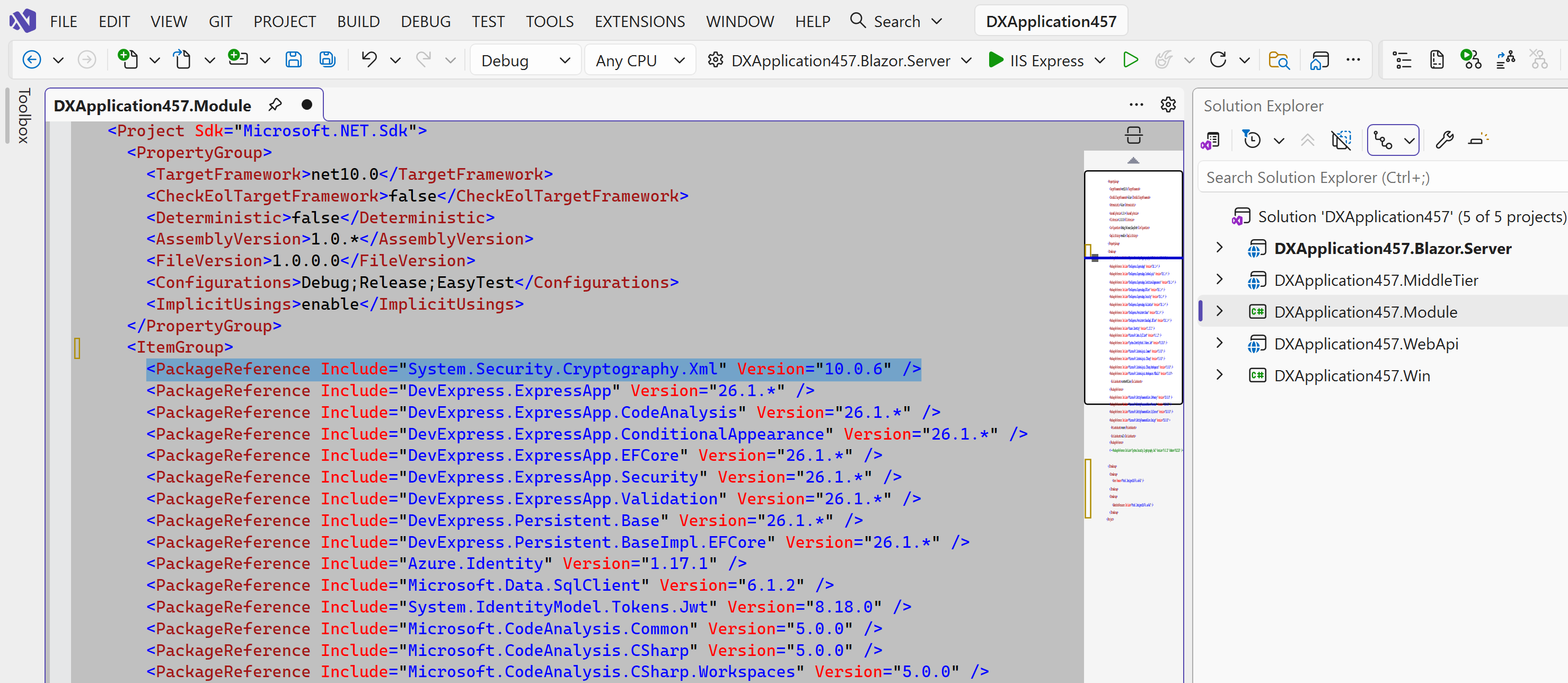
1. Add a direct NuGet package reference (PackageReference) to your required projects (CSPROJ/VBPROJ);
2. Set the patched version (Version) from the advisory (for example, 8.0.3 for System.Security.Cryptography.Xml and .NET 8 in this case, but it can be another third-party package/version):
- .NET 8:
<PackageReference Include="System.Security.Cryptography.Xml" Version="8.0.3" /> - .NET 9:
<PackageReference Include="System.Security.Cryptography.Xml" Version="9.0.15" /> - .NET 10:
<PackageReference Include="System.Security.Cryptography.Xml" Version="10.0.6" />
As you can see, this is a one-line solution, which you can copy into required projects where problematic direct or transitive dependencies were detected. In my example, I copied it into 1 project only (so, 1 code line in total to maintain).
Solution #2: You Have Multiple Projects or Are Using CPM
Urgency: High (apply immediately).
Complexity: Low - Copy and maintain one code line in one file.
Risks: Low.
If you have too many projects so that even the one-line solution is not practical to copy/maintain, then you must seriously consider using CPM with the Directory.Packages.props file (<ManagePackageVersionsCentrally>true</ManagePackageVersionsCentrally>). CPM is the best or recommended development practice regardless this vulnerability discussion anyway.
Regardless how many projects you have in your .NET solution (5, 100, 200, etc.), this is always a one-line solution to maintain - that is the beauty of CPM in action.CPM is nowadays also super-fast to add to your non-CPM solution with AI assistants.

Solution #2.1 (PackageVersion)
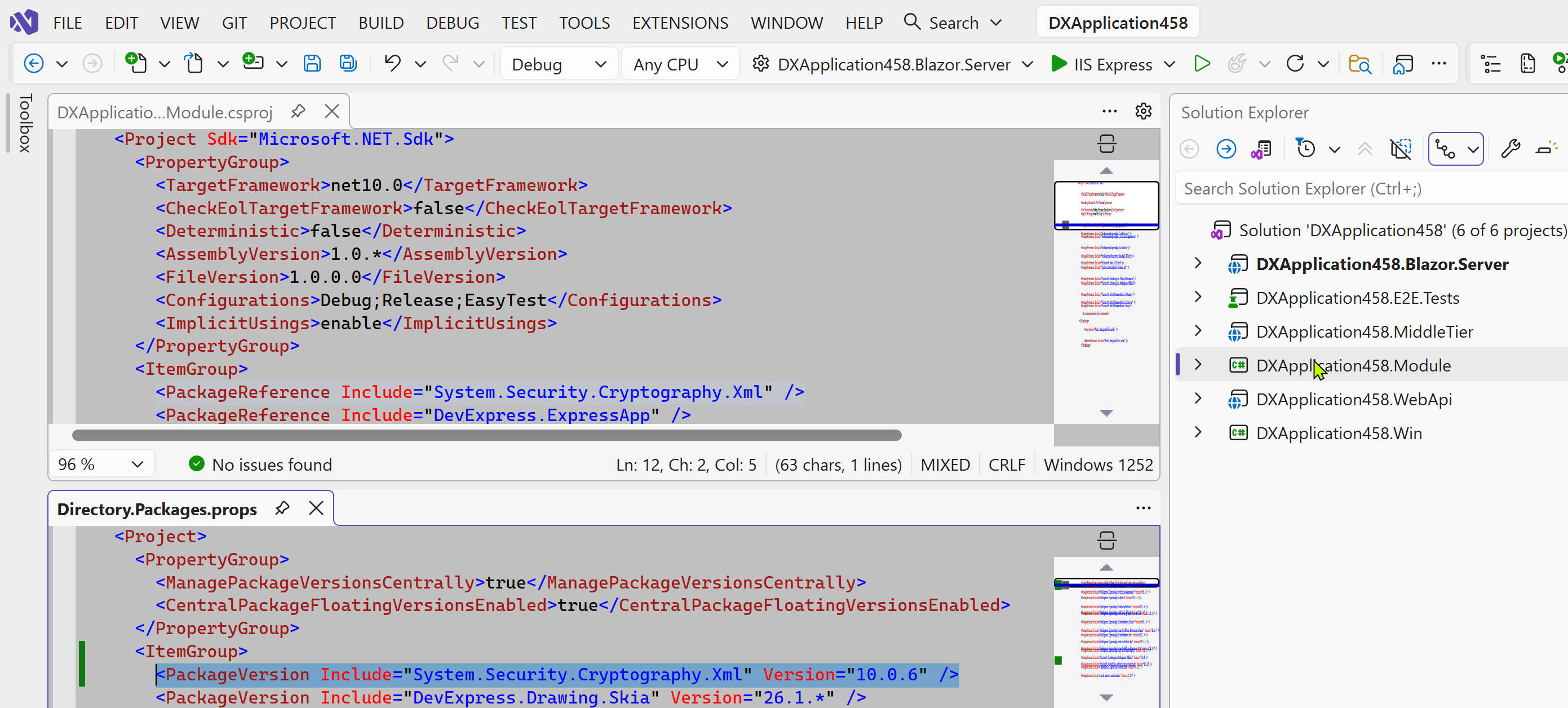
If CPM is enabled and you need common dependencies for many different projects (not all) in a repository, the standard Microsoft solution is to:
1. Define a PackageReference element without the Version attribute in your required projects (CSPROJ/VBPROJ):
<PackageReference Include="System.Security.Cryptography.Xml"/>
2. In your Directory.Packages.props file, add a package version entry (PackageVersion) and set the patched version (Version) from the advisory (for example, 8.0.3 for System.Security.Cryptography.Xml and .NET 8 in this case, but it can be another third-party package/version):
- .NET 8:
<PackageVersion Include="System.Security.Cryptography.Xml" Version="8.0.3" /> - .NET 9:
<PackageVersion Include="System.Security.Cryptography.Xml" Version="9.0.15" /> - .NET 10:
<PackageVersion Include="System.Security.Cryptography.Xml" Version="10.0.6" />
Solution #2.2 (GlobalPackageReference)
If CPM is enabled and you need to specify a package to be used by every project in a repository, the standard Microsoft solution is to:
1. Add a global package reference (GlobalPackageReference) to your Directory.Packages.props file.
2.Set the patched version (Version) from the advisory (for example, 8.0.3 for System.Security.Cryptography.Xml and .NET 8 in this case, but it can be another third-party package/version):
- .NET 8:
<GlobalPackageReference Include="System.Security.Cryptography.Xml" Version="8.0.3" /> - .NET 9:
<GlobalPackageReference Include="System.Security.Cryptography.Xml" Version="9.0.15" /> - .NET 10:
<GlobalPackageReference Include="System.Security.Cryptography.Xml" Version="10.0.6" />

If you already maintain a Directory.Packages.props file, replacing "PackageVersion" with "GlobalPackageReference" is fast too with or without AI.

Solution #2.3 (VersionOverride)
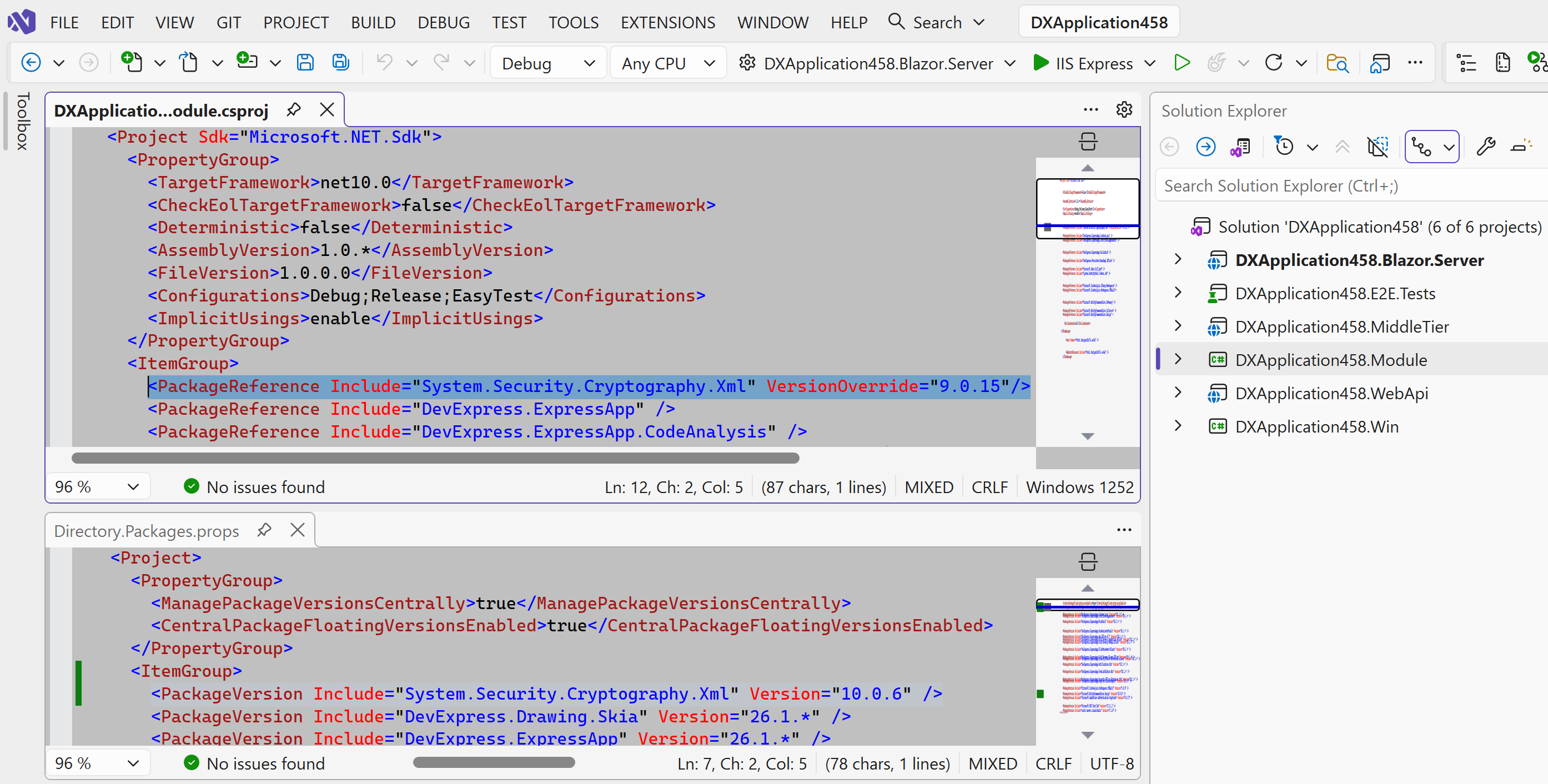
If CPM is enabled and you need to ignore the centrally defined package version in a specific project of your repository, the standard Microsoft solution is to:
1. Add a direct NuGet package reference (PackageReference) to your required projects (CSPROJ/VBPROJ);
2. Set the patched version (VersionOverride) from the advisory (for example, 8.0.3 for System.Security.Cryptography.Xml and .NET 8 in this case, but it can be another third-party package/version):
- .NET 8:
<PackageReference Include="System.Security.Cryptography.Xml" VersionOverride="8.0.3" /> - .NET 9:
<PackageReference Include="System.Security.Cryptography.Xml" VersionOverride="9.0.15" /> - .NET 10:
<PackageReference Include="System.Security.Cryptography.Xml" VersionOverride="10.0.6" />
You can disable this feature in your project or Directory.Packages.props / Directory.Build.props files: <CentralPackageVersionOverrideEnabled>false</CentralPackageVersionOverrideEnabled>(in that case VersionOverride causes error NU1009).
Solution #3: Await & Install a New/Fixed DevExpress Build
Urgency: Low (await a few weeks).
Complexity: Medium - Download a new version and re-test your application completely.
Risks: Low - for the official maintenance update; High - for a hot-fix/intermediate build.
Affected DevExpress packages are typically updated in the next minor release according to our Security Advisories and Product Update Process. This usually takes a few weeks or so. If you wish, you can request a hot-fix/intermediate build as well. For example, for this particular System.Security.Cryptography.Xml vulnerability we updated our packages and published a fixed night build at https://downloads.devexpress.com/HotFixes/DXP/v25.2(review our hot-fix policy first before applying).
.NET 8 is the minimally supported modern .NET / .NET Core version for DevExpress v25.2 and v26.1 NuGet libs. Due to various reasons, we currently publish only a single .NET 8 package set, which is compatible with multiple .NET frameworks (.NET 9 and .NET 10).
.NET 8-based Projects
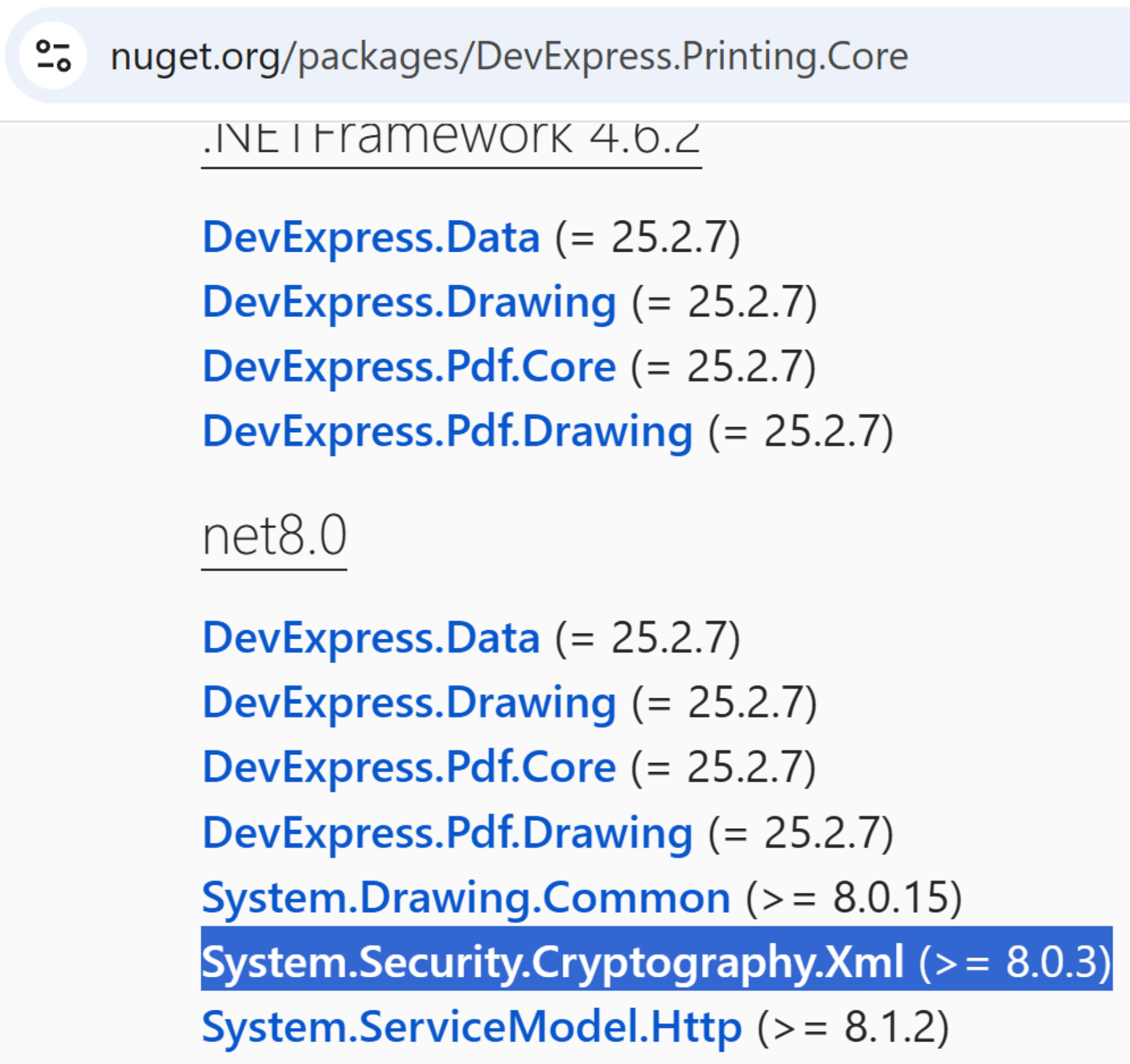
If your project targets .NET 8: our DevExpress.Printing.Core (v25.2.7+) and other affected DevExpress packages will use a non-vulnerable System.Security.Cryptography.Xml dependency (>= 8.0.3 for .NET 8) after the official fix automatically. Once you upgrade your DevExpress dependencies, the previous Solutions #1 or #2 (manual version pinning) are no longer required - remove them from your projects.
.NET 9/10-based Projects
If your project targets .NET 9/10, your solutions depend on the target project SDK and target framework:
- Microsoft.NET.Sdk (the base SDK for .NET without additional targets like net10.0-windows): Implement the Solutions #1 or #2 (manual version pinning), because they are still required and recommended due to how NuGet resolution operates. How NuGet/IDE restores third-party dependencies or which versions are used eventually in your project on your target machine are out of DevExpress control. NuGet has its own rules where in a dependency tree with multiple parents, the "lowest wins" for the target framework of your end app. For example, DevExpress path → System.Security.Cryptography.Xml (>= 8.0.0) and ServiceModel path → System.Security.Cryptography.Xml (>= 10.0.0), then the result for net10 is >= 10.0.0 → choose 10.0.0 - lowest.
When it comes to built-in .NET dependencies (a part of the distributed .NET runtime on your machine), another "framework" layer is also considered (see this example situation). It's even more interesting when it comes to your third-party dependencies, which are unique for each customer app - there will be numerous dependency trees with System.ServiceModel.Http, Microsoft.Identity.Web, and other libs, for which it will be necessary to find a common denominator or override package versions. Ultimately, third-party dependencies and .NET runtimes are unique for each customer app and environment - this falls under the responsibility of the app developer eventually.
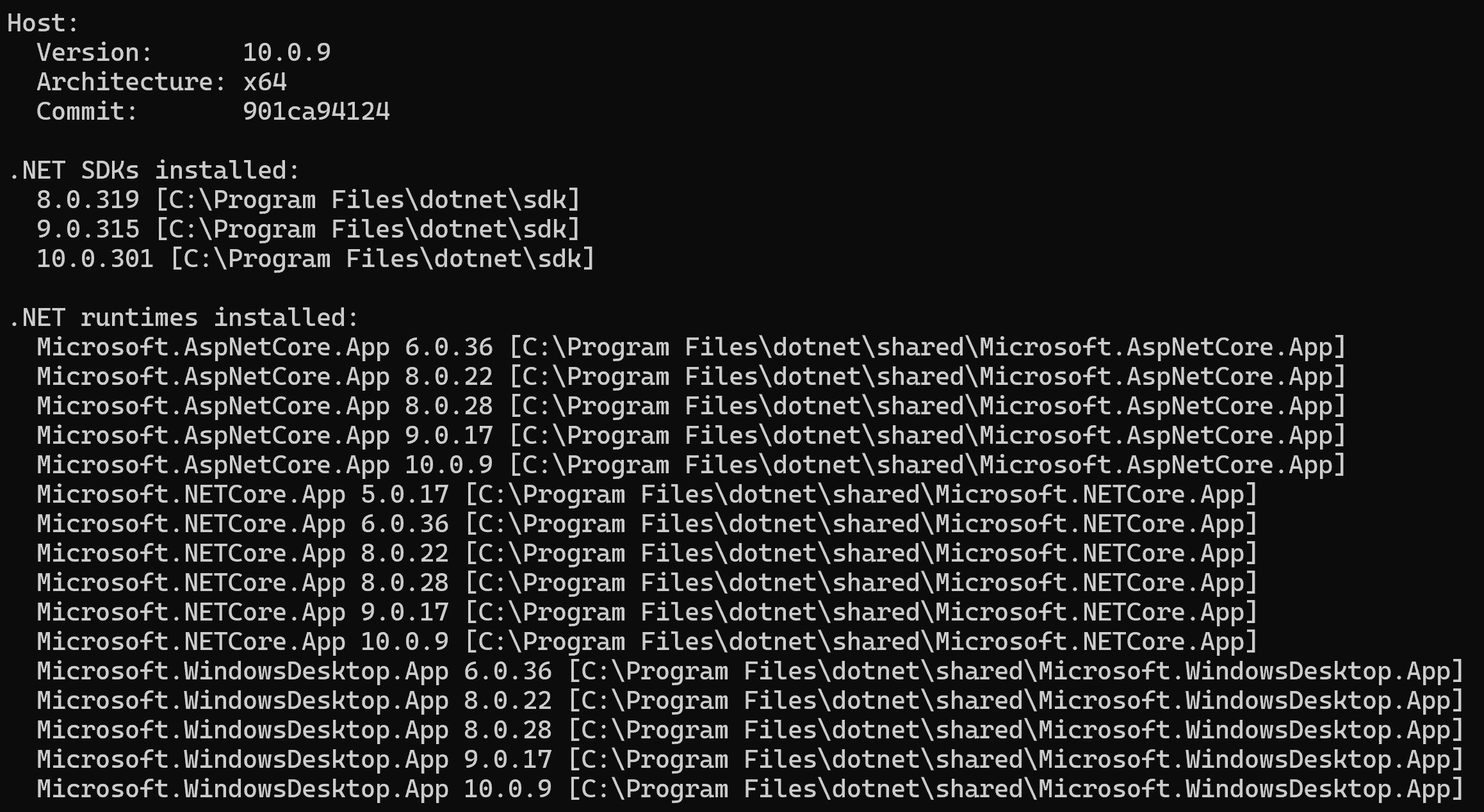
- Microsoft.NET.Sdk.Web, Microsoft.NET.Sdk.Razor, or Microsoft.NET.Sdk + net10.0-windows: No manual action needed, because the System.Security.Cryptography.Xml is correctly resolved to a non-vulnerable version from the SDK bundle automatically. This version (for example, v10.0.9, not 9.0.15) is bundled in your installed .NET 9/10 runtime for your build environment/machine (of course, if your .NET 9/10 is updated properly).
Frequently Asked Questions (FAQ)
Does DevExpress release builds when it already "knows" about a vulnerability such as System.Security.Cryptography.Xml 8.0.2?
No. In this instance, DevExpress v25.2.6 was released on 07 Apr 2026, many days before the aforementioned vulnerability was even published/known to the world.
DevExpress uses a multi-layered scanning strategy for every PR (code repositories and container images are continuously and automatically scanned for vulnerabilities during the CI/CD process) prior to release. This includes Static Application Security Testing (SAST) for product source code, Software Composition Analysis (SCA) for vulnerable third-party libraries/license compliance, antiviral software installation and artifact scanning. High-risk vulnerabilities trigger an automatic 'Build Fail'. DevExpress employs a combination of commercial and internally managed security tools (including, but not limited to Veracode, Dependabot, CodeQL, NuGet Audit, VirusTotal, etc).
For more information, please review Information Security and Security - What You Need to Know.
How often similar security advisories for system/core or popular 3rd-party packages are reported?
Quite many every day - it's best to estimate it for yourself at https://github.com/advisories (filter by NuGet, NPM, or other keywords). This is also not the first and not the last vulnerability in a system/core library. For example, 3 security advisories were published for System.Security.Cryptography.Xml alone in less than 2 years. And I am not even referring to others in popular SQL Client, JSON, OData, and other libraries with even more dependencies.
To better understand the situation, let's make a thought experiment: imagine that a vendor started publishing new official builds in response to each and every security advisory immediately. For this (in theory), one would need the previous official build, bump the affected NuGet package version (such as System.Security.Cryptography.Xml), re-build, re-run automatic tests and security checks, and publish a new official build. As a result of this experiment, customers would need to deal with 3-5 new minors a week. That rough number is only considering the current CVE/GHSA update rate for .NET - for JS/NPM it would be even more frequent. As you may understand, not many customers or businesses would want such an update carousel.

How often DevExpress "bumps versions" of their .NET packages internally in response to security advisories for external NuGet packages?
Multiple times every month or so. To give you a full picture, DevExpress v25.2 .NET packages depend on over 150+ system/core .NET packages (based on our "c:\Program Files\DevExpress 25.2\Components\Sources\Directory.Packages.props" file or our public SBOM artifacts, which you can check for yourself). Our .NET packages often include our JS packages as assets, these JS packages depend on external JS/NPM packages, and so on - you got the idea or the high chances of a "version bump" at such a scale.
Good news is that we heavily rely on CPM, so this "version bumping" itself is now a mechanical routine - it just takes time and discipline from our product teams. This is basically what every developer of any serious or complex application/solution is doing nowadays, because security matters.
Why does not DevExpress release a new/fixed build within hours after a security advisory is published?
As noted in Method #3, we follow our Security Advisories and Product Update Process and update affected DevExpress packages in the next minor release (in a few weeks or so on purpose). All our builds must pass standard testing procedures. We do our best to test our software and it takes time (for example, we intentionally did not release v25.2.7 "within hours"). We simply do not want our customers rely on poorly tested software (and potentially experience bigger issues with the upgrade).
Fortunately, the current release cadence suits the majority of our customers and proved itself over the years well. In urgent cases, customers can either apply a one-line solution in their projects or request a hot-fix/intermediate build. That is also why Microsoft has Patch Tuesday monthly and NOT "hourly", and many other vendors follow similar security and testing protocols. Otherwise, it would be a mess for all vendors and customers in the .NET ecosystem, for JS ecosystem it would be even worse due to a different NPM package update strategies and the number of updated packages. In other words, the solution should never be worse than the original problem.
See Also
Microsoft clarified this general pattern in their blogs and docs, because this version upgrade is needed regularly:
- NuGetAudit 2.0: Elevating Security and Trust in Package Management (see the "How to upgrade transitive packages" section)
- Overriding Package Versions
We also described how to fix this and similar customer issues at .NET — About NuGet Package Audit and "False-Positive" Security Warnings.
Please let me know if you have any DevExpress-related questions or suggestions.
Thanks,
Dennis Garavsky
Principal Product Manager
dennis@devexpress.com