Blogs

News

Email Subscriptions

Mehul Harry's DevExpress Blog

ASPxGridView Screencast: Unbound Columns

     

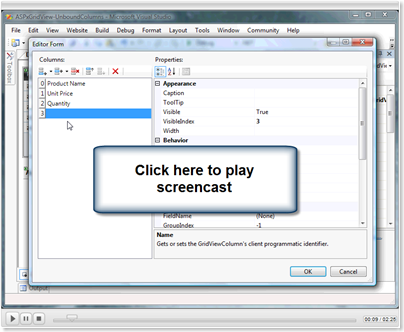
In this screencast you’ll learn how to display unbound data using unbound columns.

Unbound data is typically data that does not come from your datasource. Data like calculated columns which you can easily define in the ASPxGridView.

Check out the screencast and then let me know your thoughts. A how-to is also posted below. Thanks!
image


How to create Unbound Columns in the ASPxGridView

To add an Unbound column just follow these easy steps:

  1. Add a new column to the ASPxGridView
  2. Assign the data value in the CustomUnboundColumnData event

Add the new unbound column

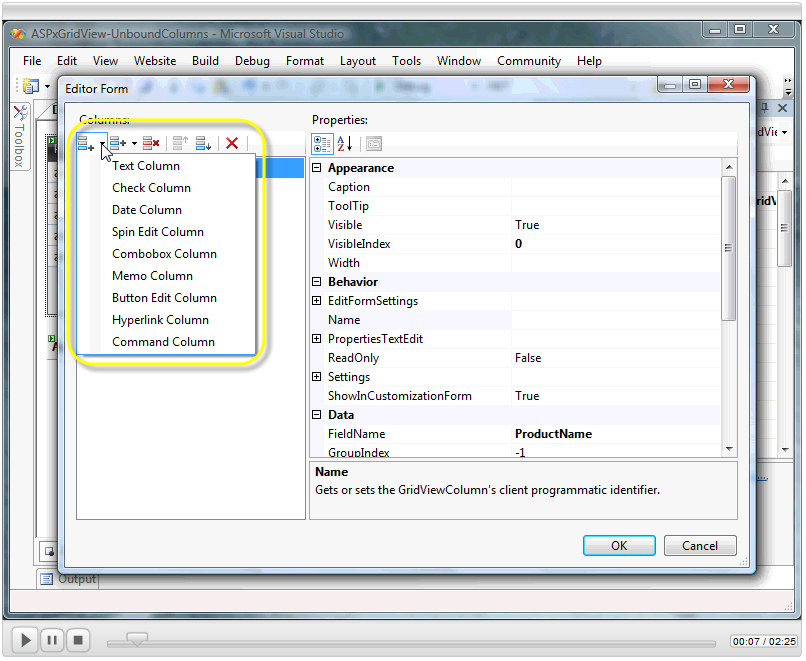
Click on the smart tag of the ASPxGridView and select Columns from the menu. The columns editor form you see below will appear. Use the two icons on the top left corner of the form to add or insert a new column. When clicking on one of these buttons, a dropdown will appear that let's you select the type of column to add. You can select any type that fits your column/data type but the Text Column is the general type:
image

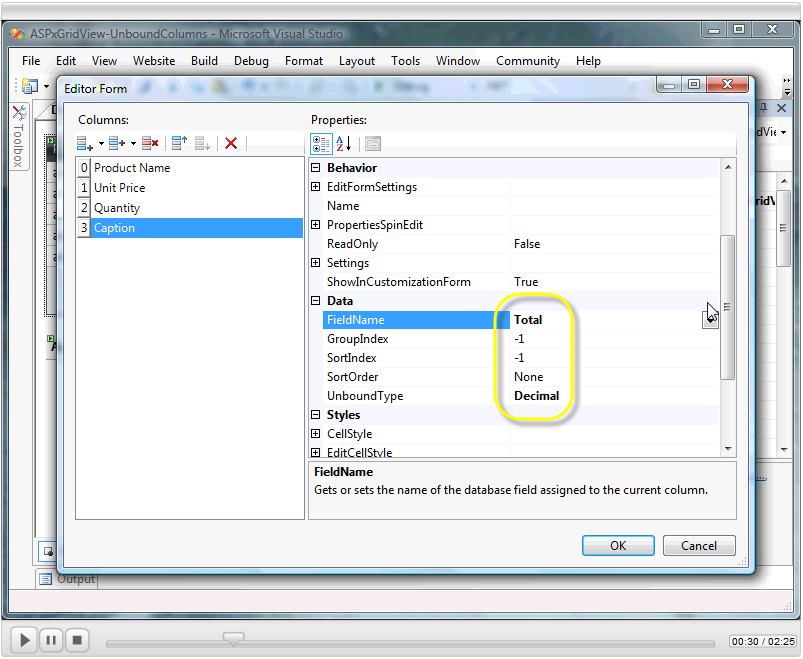
Now define some properties for the column like the Caption(header), FieldName, UnboundType, and possibly DisplayFormatString. Since this is an unbound column, you should define UnboundType to match the data type you'll be adding to the field. The FieldName will be used when filling the value and must be unique from any other fields in your datasource.
image

Assign a value to your unbound column

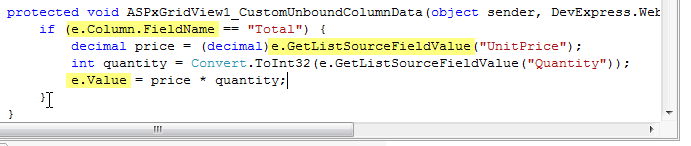
To fill the new column with data, you should handle the CustomUnboundColumnData event. Here you can assign the data value using the e.Value property. In the sample, note the e.GetListSourceFieldValue method and e.Column.FieldName property. You can use these items to check for the column and field values in the method.
image

Now run the application and you have the unbound column you just created with just a few easy steps.

Published Nov 29 2007, 01:19 AM by Mehul Harry (DevExpress)
Bookmark and Share

Comments


John Frost2 said:

Bravo.  This is precisely what is needed.  Please keep them coming.

November 30, 2007 10:43 AM
 

Shankar said:

Great Show. Just Waiting for It

November 30, 2007 12:36 PM
 

Mehul Harry (DevExpress) said:

Thanks Guys, there are some more in the pipeline.

November 30, 2007 5:07 PM
 

Danilo Cruz said:

Hi,

I need to create a new unbound column (Button) and implement an event to it at server. How can I do that?

Thank you.

February 19, 2008 5:34 PM
 

Edgard Penado said:

How Calculate Column on selected row or on change an Control NumericBox ?

May 27, 2009 7:44 PM
 

Tor Anders Johansen said:

How can I bind to a unbound column in a EditForm-Template? I want a literal to display the value also when editing, but Bind("unbound") returns a empty string...

November 10, 2009 12:04 PM
 

Tor Anders Johansen said:

I found a solution, binding to Text-property of <dxe:ASPxLabel> instead of Text-property of <asp:Literal> worked.

November 11, 2009 6:43 AM
 

Reddy Ojili said:

Please update the screencast link. it's broken.

March 19, 2010 5:58 AM
 

Mehul Harry (DevExpress) said:

@Reddy,

Fixed the link in the post. Screencast should point here now:

tv.devexpress.com

March 19, 2010 3:15 PM

About Mehul Harry (DevExpress)

Mehul Harry is an ASP.NET technical evangelist at Developer Express. You can reach him directly at mharry@DevExpress.com. You can also follow him on Twitter: http://twitter.com/mehulharry
More from DevExpress
Live Chat
Have a pre-sales question?
Need assistance with your evaluation?
We are here to help.
Chat is one of the many ways you can contact members of the DevExpress Team. We are available Monday-Friday between 8:30am and 5:00pm Pacific Time.
If you need additional product information, require pre-sales assistance, or want help with your order, write to us at info@devexpress.com or call us at
+1 (818) 844-3383.
