Blogs

News

Email Subscriptions

Mehul Harry's DevExpress Blog

Sneak Peek: ASP.NET HTML Editor Table Support

     

The ASPxHTMLEditor component lets you easily drop a high quality editor into any page. The next major DXperience release will add HTML Table support to the ASP.NET HTML Editor, the ASPxHTMLEditor.

image 

Featuring a toolbar icon to create, edit, and delete table items, the ASP.NET HTML Editor easily manage tables through the front-end.
image

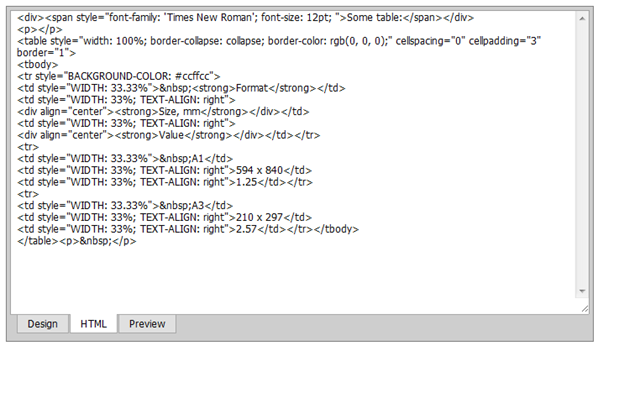
If your users are more comfortable with HTML then there is also the HTML source view option.

The ASPxHtmlEditor is part of the DXperience ASP.NET Subscription. You can start playing with the table support feature when the DXperience 2009 volume 2 released in a few weeks.

DXperience? What's That?

DXperience is the .NET developer's secret weapon. Get full access to a complete suite of professional components that let you instantly drop in new features, designer styles and fast performance for your applications. Try a fully-functional version of DXperience for free now: http://www.devexpress.com/Downloads/NET/

Published Jun 17 2009, 04:38 PM by Mehul Harry (DevExpress)
Bookmark and Share

Comments


Chris Walsh said:

OMG!!!!!

June 17, 2009 7:52 PM
 

Waqas Zahoor said:

good works

June 18, 2009 7:59 AM
 

Alex Danvy [DX-Squad] said:

Why do you use "Style" attribute instead of dedicated attributes like "Width" ?

June 18, 2009 8:53 AM
 

Alberto Cortes said:

Great!!!

June 18, 2009 1:10 PM
 

Grant Dunoon said:

Thank you, thanks you, thank you.. can't say it enough! We are really up against the wall when it comes to real estate. Having the table options on a dropdown icon is just fantastic!  Now for the wishlist: order the ASPxGrid by dragging rows.

June 18, 2009 10:53 PM
 

Andrew R (Developer Express) said:

Hi Alex!

This behavior is by design. We place all appearance attributes in the css style. Also, principally there is no difference between css attribute "width" and table's attribute "width".

June 19, 2009 3:35 AM
 

Nick (DevExpress Support) said:

Grant: While the row drag-and-drop feature is welcome in the ASPxGridView, it won't be available in forthcoming version 2009 vol 2, we apologize. However, the ASPxTreeList allows you to drag-and-drop rows. Please check, if you can substitute it for the grid. If so, the following example may come in handy:

How to reorder ASPxTreeList nodes via drag-and-drop

www.devexpress.com/example=E1505

June 19, 2009 3:18 PM
 

Grant Dunoon said:

Thanks Nick, we have the wait for it in the ASPxGridView.

June 20, 2009 4:23 AM
 

Krzysztof said:

Great! It is necessary to have the option of merger of columns and rows.

July 2, 2009 4:02 AM
 

Brendon Muck [DX Squad] said:

All it needs is a "merge cells" option.

July 2, 2009 8:49 AM
 

asp.net development said:

Great stuff. Thanks for sharing such a useful information.

July 6, 2009 1:04 AM
 

Alex c said:

I found the ASP.NET editor. It is rather impressive.

Thanks for the post.

Alex C

July 7, 2009 6:02 PM
 

Valerio said:

Hi Andrew,

We need to develop a software using the ASPxHtmlEditor but I need to know when exactly the tables support will be available. Unfortunately this is feature is fundamental in our software and we are thinking to change for another editor.

Thank you in advance,

Valerio

July 10, 2009 1:54 AM
 

Mehul Harry (DevExpress) said:

Valerio,

The tables support is in the 2009 volume 2 release which will be officially released in a few weeks.

July 10, 2009 2:01 AM
 

The ASPx Blog - Mehul Harry's DevExpress Blog said:

The ASP.NET team has just finished a very important table feature for an HTML editor: cell split and

July 12, 2009 6:04 PM
 

ctodx said:

We're just about to release v2009.2 and it would be a good idea to have an "accumulator"

August 20, 2009 8:29 PM
 

Jude Wong said:

Hi Mehul,

Is the HTML table editor feature available when ASPxHTMLEditor is activated as the SharePoint rich text editor?

I replaced the default SharePoint rich text editor with ASPxHTMLEditor but could not see the table button on the toolbar.

Any idea how to resolve?

Thanks.

April 21, 2010 11:07 AM
 

Mehul Harry (DevExpress) said:

@Jude,

Please contact our support team who can help you with this issue:

www.devexpress.com/.../CreateIssue.aspx

April 21, 2010 3:31 PM

About Mehul Harry (DevExpress)

Mehul Harry is an ASP.NET technical evangelist at Developer Express. You can reach him directly at mharry@DevExpress.com. You can also follow him on Twitter: http://twitter.com/mehulharry
More from DevExpress
Live Chat
Have a pre-sales question?
Need assistance with your evaluation?
We are here to help.
Chat is one of the many ways you can contact members of the DevExpress Team. We are available Monday-Friday between 8:30am and 5:00pm Pacific Time.
If you need additional product information, require pre-sales assistance, or want help with your order, write to us at info@devexpress.com or call us at
+1 (818) 844-3383.
