ASP.NET HTML Editor Validation (coming soon in v2010 vol 2)

Check out the ASP.NET HTML editor’s powerful built-in validation feature coming soon in the DXperience v2010 volume 2 release:
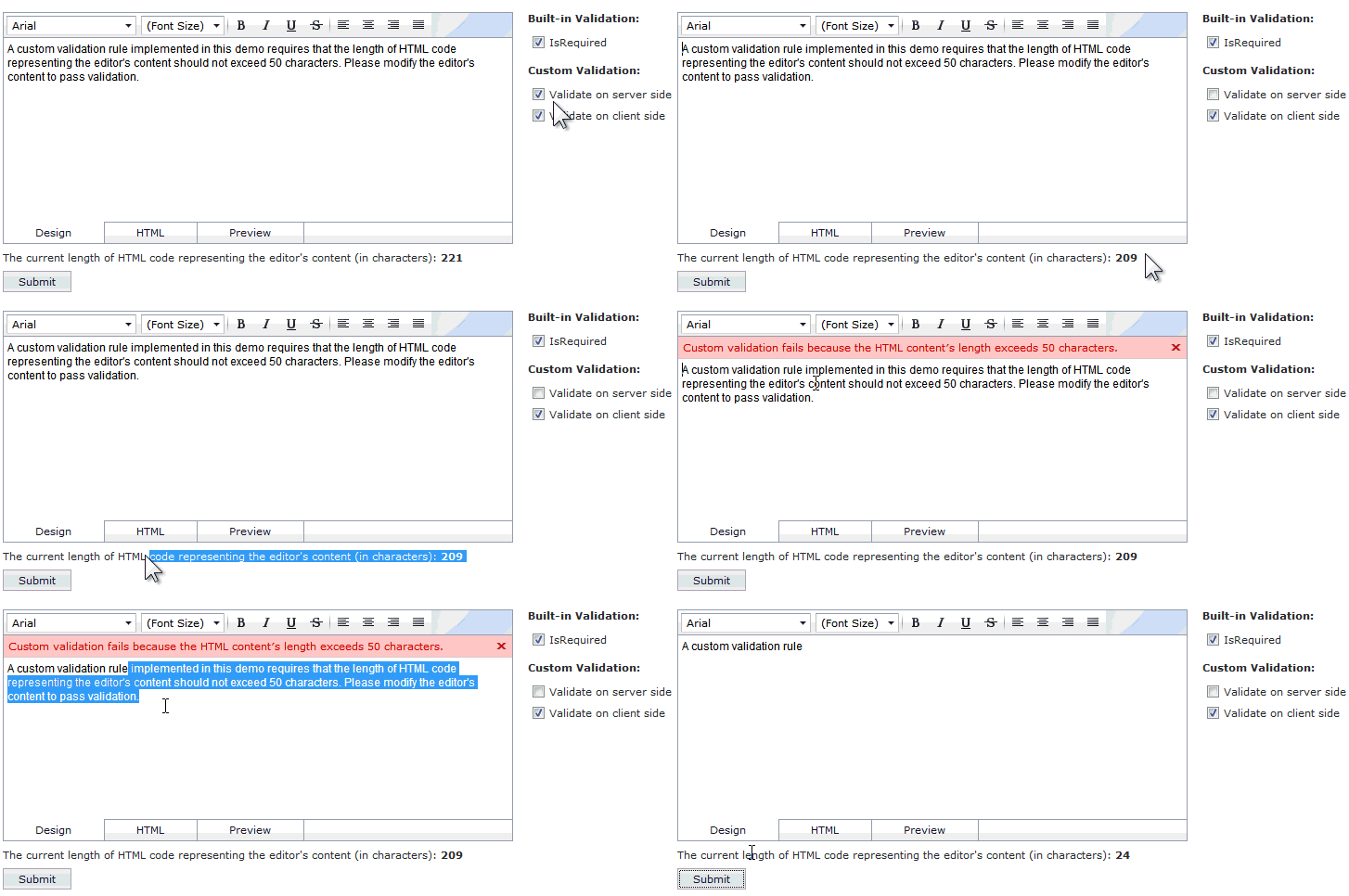
Flexible Validation
The ASPxHtmlEditor will provide a built-in means to perform powerful validation of its content, both on the client and server side. Different validation settings are available for customization through the editor's SettingsValidation property.
Easy-To-Use Methods
Easy-to-use methods are provided to define editor validation logic. These methods can be combined together for extensive validation:
- The SettingsValidation.RequiredField property can be used to force an editor to require input, and give you the ability to display an error message if an input is not received
- The editor's Validation event (client or server, or both) can be handled to setup custom editor validation
Client-side Validation
The ASP.NET HTML Editor will feature Client-side input validation. You can manually initiate the editor's client validation by using the editor's Validate client method. Or specific static client methods are also available such as the:
- ASPxClientEdit.ValidateEditorsInContainer
- ASPxClientEdit.ValidateEditorsInContainerById
- ASPxClientEdit.ValidateGroup
Server-side Validation
The ASP.NET HTML editor will also feature server-side input validation. The editor's server validation will always be performed during processing of an external postback, if the editor's content has been changed. The server validation can also be initiated programmatically by using the editor's Validate server method, or a specific static server method ASPxEdit.ValidateEditorsInContainer.
You are also allowed to validate the editor's content programmatically (when required), and indicate the validation result manually, by either setting the editor's IsValid server property or using the SetIsValid client method.
Custom Error Text and Display
When an editor fails validation logic, a specific error frame containing the error description can be displayed within the editor's Design, Preview and HTML View. The error frame's appearance is customized through the SettingsValidation.ErrorFrameStyle property.
This error text can be specified by using the SettingsValidation.ErrorText property, in the Validation event's handler, or via the editor's ErrorText property (depending upon the validation method used).
Coming soon in v2010 volume 2
The new ASP.NET HTML Editor’s Validation feature will be part of the upcoming DXperience v2010 volume 2 release soon.
Are you excited about all the new and exciting feature enhancements that the ASP.NET HTML Editor is bringing you? Drop me a line below with your thoughts on the powerful new validation feature. Thanks!
Want to experience a better Visual Studio?
Install CodeRush by downloading the free lite version here: CodeRush Xpress
Or better yet, try the full blown package free for 30 days – CodeRush and Refactor Pro Download!
Free DevExpress Products - Get Your Copy Today
 The DevExpress Team