Dynamic member aliases from Application Model

Updated: Feb 4 (see end of post)
Although I promised to talk about Stephen Manderson’s Dashboard module I feel that I must discuss dynamic member aliases instead. The reason is that cross data source filtering provided by the Dashboard Suite does not permit aliases for our aggregated members. I already went over the dynamic members subject at the calculated members creation—Pros and Cons blog. However today will detail the steps involved in creating member aliases through XAF’s Application Model. You will find a sample at the bottom of this post.
In the following image, you can see existing implementations from our community project eXpand as discussed in the calculated members creation—Pros and Cons blog.
![image_thumb[14]](http://community.devexpress.com/blogs/eaf/image_thumb14_thumb_03AD71AD.png)
This particular post will cover only the RuntimeCalculatedMember entry.,
Extending the model
Following our documentation to the letter (How to: Extend the Application Model) first we need to define an interface that will extend our Application Model.
public interface IModelRuntimeCalculatedMember : IModelMember {
[Required]
string AliasExpression { get; set; }
}
The context popup menu
You probably noticed that instead instead of deriving from IModelNode interface as suggested in our docs, we used the IModelMember in the IModelRuntimeCalculatedMember. This is an already registered interface that describes the model members. So we don’t need to re-extend our Application Model with the IModelRuntimeCalculatedMember. XAF knows how to create a popup menu with the correct entry:
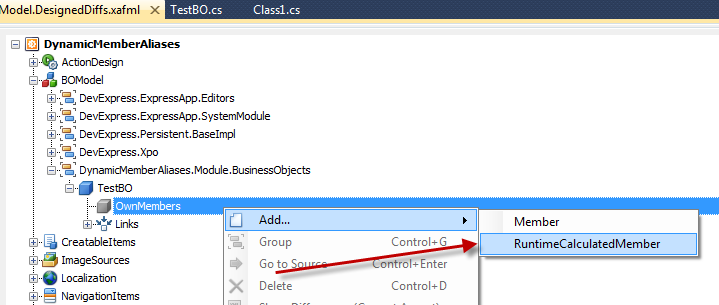
Changing Model Editor’s behavior
AliasExpression
In the IModelRuntimeCalculatedMember, we marked the AliasExpression property with the RequiredAttribute because an empty alias is not valid. The XAF Model Editor will notify you that this is a mandatory property with an asterisk icon as shown.

Editable Type at Runtime
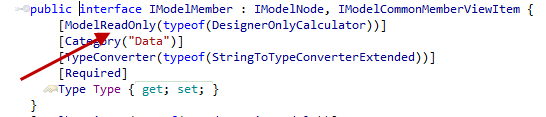
Since our IModelRuntimeCalculatedMember derives from the IModelMember and not from the IModelNode it inherits all its properties. This, however raises a conflict with XAF’s native support for design time custom members. The conflict refers to the IModelMember Type property which is by design is editable only in design time. As the next image illustrates the property is marked with a ModelReadOnlyAttribute which tells the Model Editor what to do.
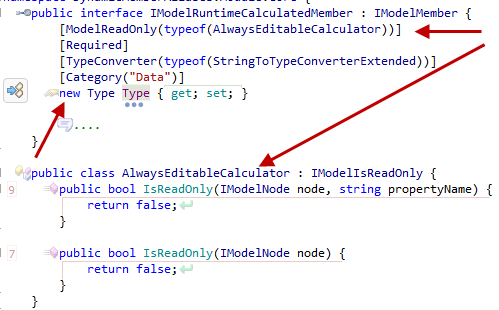
In XAF, everything is overridable! So to change the Type property, we need to create a new Type property in our IModelRuntimeCalculatedMember and mark it with the new keyword. In addition we need to create and use an AlwaysEditableCalculator instead of the DesignerOnlyCalculator:
Remember the IsCustom functionality
As I already mentioned XAF has native support for runtime members only if the Model Editor is at design time. For this we need to add a new IModelMember and set IsCustom to true as shown:
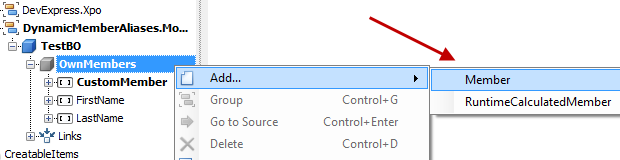

The IModelRuntimeCalculatedMember inherits from the IModelMember. This means when we create a new IModelRuntimeCalculatedMember, XAF will set IsCustom to true as it would for a simple IModelMember. To override this, we can follow the Convert Application Model Differences help document and implement the following Node Updater.
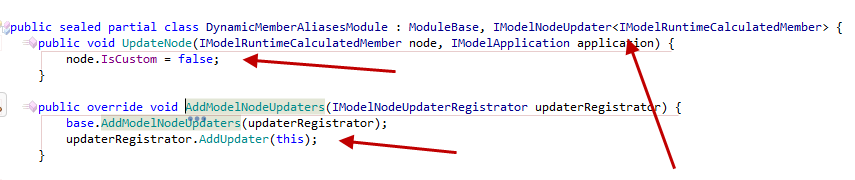
NodeUpdaters are another powerful tool provided to us by XAF. NodeUpdaters are designed to get us out of trouble. As the image above illustrates this a fairly easy task.
- We make our module or any class a NodeUpdater by implementing the IModelNodeUpdater<T> interface.
- We register the new NodeUpdater by overriding the AddModelNodeUpdaters or our module.
- Implement our logic inside the UpdateNode method
The Dessert
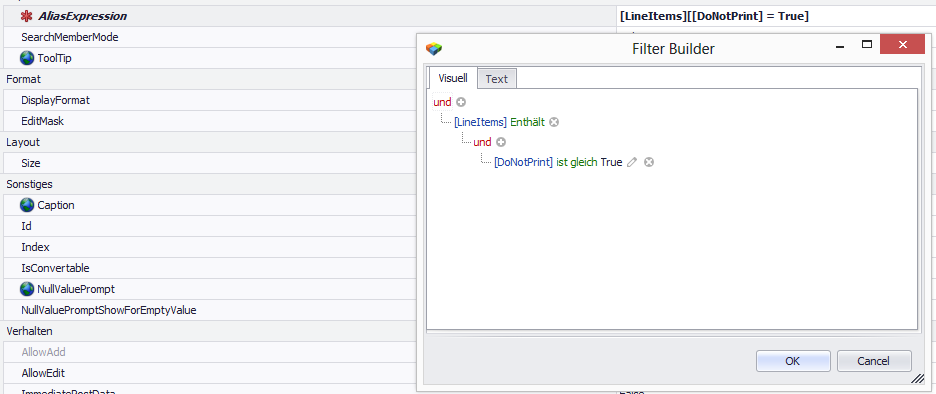
The AliasExpression property will hold basic criteria + complex criteria, as well as aggregated function. Right now there is no editor associated with the property. However, we can easily associate a CriteriaModelEditorControl editor as shown:

The CriteriaModelEditorControl offers great features:
The Coding part
Up to now we modeled a new Application Model member type the IModelRuntimeCalculatedMember. What remains is to write the algorithm to create that member in our TestBO object. Unfortunately we cannot use the standard place for extending our business objects as suggested by our knowledgebase. This is because the Application Model is not fully constructed at this point. However, it is possible to write this algorithm in any place we like (e.g: Application SetupCompleted event).
private static IEnumerable<IModelRuntimeCalculatedMember> GetCustomFields(IModelApplication model) {
return model.BOModel.SelectMany(modelClass => modelClass.AllMembers).OfType<IModelRuntimeCalculatedMember>();
}
static void AddRuntimeMembers(IModelApplication model) {
foreach (IModelRuntimeCalculatedMember modelRuntimeMember in GetCustomFields(model))
try {
Type classType = modelRuntimeMember.ModelClass.TypeInfo.Type;
XPClassInfo typeInfo = _dictionary.GetClassInfo(classType);
lock (typeInfo) {
if (typeInfo.FindMember(modelRuntimeMember.Name) == null) {
new XpandCalcMemberInfo(typeInfo, modelRuntimeMember.Name, modelRuntimeMember.Type, modelRuntimeMember.AliasExpression);
XafTypesInfo.Instance.RefreshInfo(classType);
}
}
Now let’s touch the unknown XpandCalcMemberInfo class:
- XPO allows non persistent calculated properties with the use of the PersistentAliasAttribute.
- To create a dynamic member we simply need to instantiate an XPCustomMemberInfo derivative like the XpandCalcMemberInfo.
public class XpandCalcMemberInfo : XPCustomMemberInfo {
public XpandCalcMemberInfo(XPClassInfo owner, string propertyName, Type propertyType, string aliasExpression)
: base(owner, propertyName, propertyType, null, true, false) {
AddAttribute(new PersistentAliasAttribute(aliasBLOCKED EXPRESSION;
}
public override object GetValue(object theObject) {
var xpBaseObject = ((XPBaseObject)theObject);
return !xpBaseObject.Session.IsObjectsLoading && !xpBaseObject.Session.IsObjectsSaving
? xpBaseObject.EvaluateAlias(Name)
: base.GetValue(theObject);
}
protected override bool CanPersist {
get { return false; }
}
}
Therefore, we added a PersistentAliasAttribute in the constructor using the AddAttribute method of the XPCustomMemberInfo. In addition, we had to modify the returned value of the member by overriding the GetValue method and using an approach similar to the EvaluateAlias docs,
Best place to create the dynamic members
Choosing the best place may varry because it depends on our requirements. However I can suggest a solution we used in eXpand for many years without problems. Because we need to take into account the user Application Model a good place to create the dynamic members is just after user login.
public sealed partial class DynamicMemberAliasesModule : ModuleBase {
public override void Setup(XafApplication application) {
base.Setup(application);
application.LoggedOn += (sender, args) => RuntimeMemberBuilder.AddFields(application.Model);
}
The check please!
So we covered in detail all the steps needed for dynamic member aliases. A sample is available in DynamicMemberAliases.zip.
To implement the rest of the dynamic members (RuntmeNonPersistent, RuntimeOrphanedCollection, RuntimeMember) follow one of the steps bellow:
- Use the Core or ModelDifference module of the eXpandFramework (see: How to use an eXpand module with an existing XAF application)
- Copy the RuntimeMemberBuilder, all interfaces from the IModelRuntimeMember.cs and extend the Application Model with the included IModelMemberEx interface.
That’s all you need, to have a few productive and happy hours with XAF  . I really enjoy working with such a flexible framework and I am sure the XAF team will continue to surprise us in the future!
In the next post, I will talk about the integration of XAF + Dashboard suite so stay tuned.
We are happy to read your feedback about anything you read today!. Remember that your questions are the best future posts .
Until next time, happy XAF’ing!
Update Feb 4
The sample DynamicMemberAliases.zip was updated to:
- Support the Delete action in the IModelRuntimeCalculatedMember (similar with The context popup menu paragraph)
- Allow true runtime aliases without the need of application restart!
Free DevExpress Products - Get Your Copy Today
 Apostolis Bekiaris (DevExpress)