Blogs

Mark Miller

What's New in CodeRush & Refactor! Pro 9.1

     

9.1 is out. Here's what's new in CodeRush and Refactor! Pro since 3.2:

New Version Number. We are now synchronizing our version numbers and releases with the rest of the DXperience product line. Here's how you can make sense of the version number:

91

Faster Performance. Performance should be noticeably faster in most areas of the product, especially on large projects. Startup time, project opening time and editing performance have all been affected by this work.

Reduced Memory Footprint. Memory usage has been reduced significantly, and should be especially noticeable when working with large projects.

Code Issues. Code issue technology is now shipping. This new technology shows redundant code, hints, warnings, errors, and design-related problems (a.k.a. "code smells") while you work, and also binds to CodeRush's CodeProvider technology and Refactor! Pro's refactoring technology, so you can quickly apply fixes to a number of detected issues.
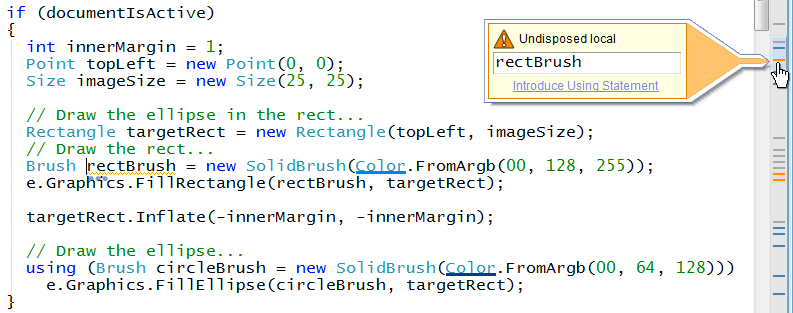
CodeIssues


Feature Control. Now when a CodeRush feature executes, you'll get confirmation and an instant way to keep that feature active or disable it. For example, if our default shortcut conflicts with an existing Visual Studio shortcut, you'll have an opportunity to decide which feature wins. Here's an example:

When the modeless feature control window appears, you can:

  • Ignore it and simply continue to work.
  • Click one of the "Always do this" links to enable or suppress the feature.
  • Click one of the shortcut links (e.g., "Tab" in the screen shot above) to change the shortcut binding to something else.

Note: If you disable a feature, you can re-enable it on the Core\Features options page.

HTML Selection Embedding. You can embed HTML selections in a variety of useful tags, including:

  • Bold (<strong>)
  • Italics (<em>)
  • Underline
  • Anchor
  • Div
  • Paragraph
  • Table

Just select the text you want to embed and press the CodeRush/Refactor key (Ctrl+` by default), select "Embed Selection" and the tag you want to wrap with.
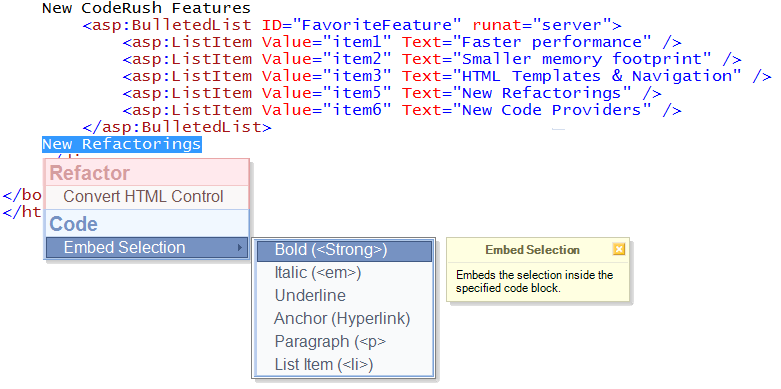
EmbedBold

HTML Templates. We've added powerful new templates for HTML developers. These templates appear in the CodeRush Training window (DevExpress | Tool Windows | CodeRush). Supporting both ASP.NET and raw HTML, these templates make it much easier to create content from the source window. Here's a partial list of HTML templates in this release (use the CodeRush Training window to see them all):
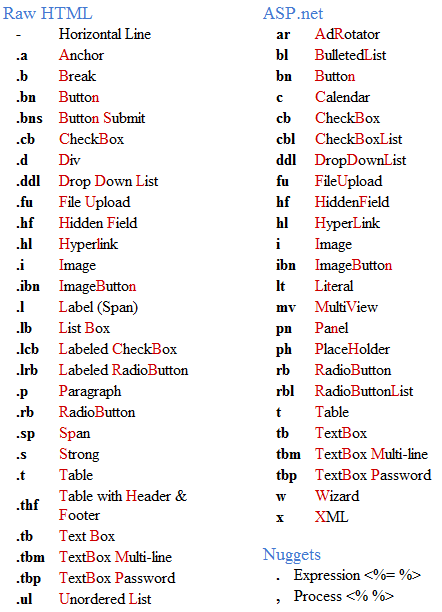
HtmlTemplates

These HTML templates are smart and will generate unique values for the ID, Name, and Value properties as needed.

The table templates (.t, .thf, and t appearing in the screen shot above) include UI that makes it easy to create tables of any size. For example, I can create a 2x5 raw HTML table in four keystrokes (".t", Space to expand, followed by Enter to accept the table dimensions).
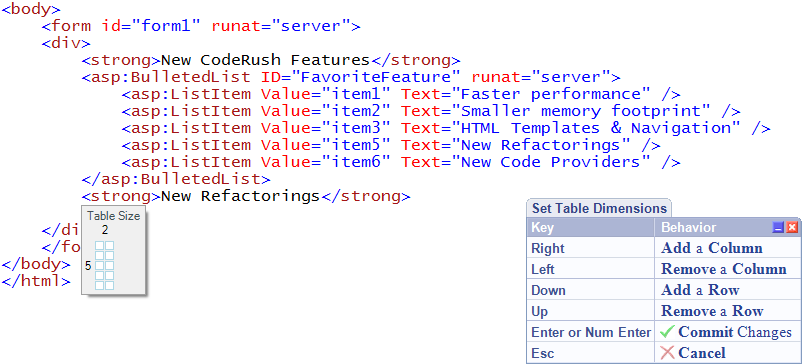
TableSize 

HTML Cell Navigation. Once you have your table, you'll want to navigate through its cells. We've made this easy, too. Just press the Tab key when the caret is inside a table cell, and Cell Nav will take you to the next cell in the table.
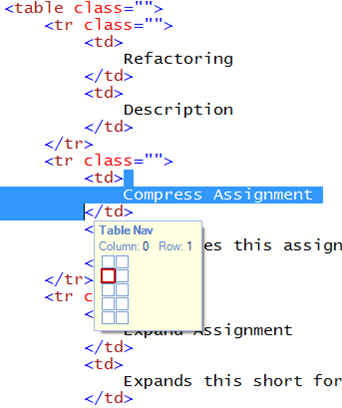
 TableNav

And of course Shift+Tab takes you to the previous cell.

Cell Nav even understands cells that span multiple columns:
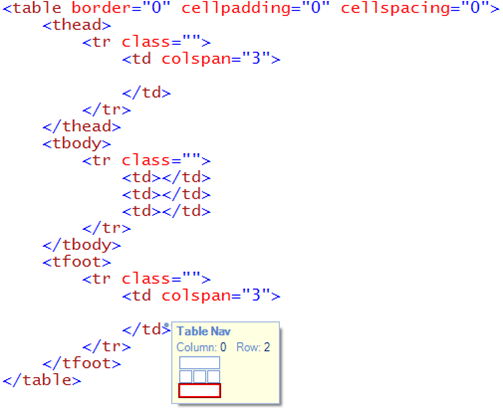
ColSpan

And you can use the mouse to get to the cell you're interested in.
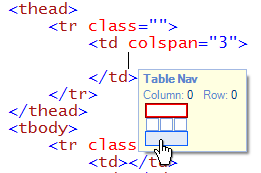
MouseToCellNav

Now that you can navigate quickly through your tables, we thought you'd also want to be able to navigate just as efficiently through the items in your list controls (e.g., DropDownList, BulletedList, select, etc.). And so you can. Just press the Tab key to navigate through the items.
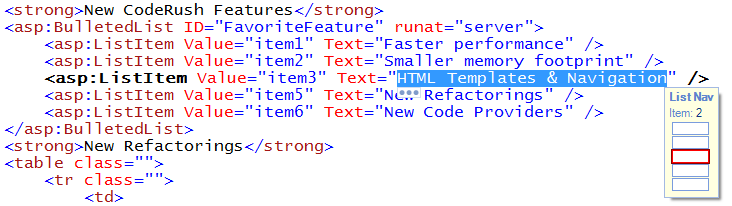
ListNav

CodeRush developers familiar with Tab to Next Reference are no doubt beginning to detect a pattern here. :-)

New Refactorings. This release includes a few new refactorings:

  • Compress Assignment. Compresses this assignment to a short form assignment. For example, converts "a = a + b;" (in C#) to "a += b;".
  • Expand Assignment. Expands this short form assignment to a full assignment.  For example, converts "a += b;" (in C#) to "a = a + b;".
  • Split Using Statement. Splits this multi-declaration using statement into two or more neighboring using statements.
  • Sort Namespace References. Sorts namespace references in the current file.

Code Providers. There are some powerful new code providers (including a spell checker!) as well:

  • Declare Properties. Generates auto-implemented properties for an object initializer expression.
  • Declare Fields with Initializers. Adds fields and initializes it to each parameter of a constructor.
  • Declare Property with Initializer. Adds an auto-implemented property and initializes it to the parameter under the caret.
  • Declare Properties with Initializers. Adds auto-implemented properties and initializes them to each parameter of this constructor.
  • Declare Method (abstract). Generates an abstract method for the method call with appropriate parameters.
  • Convert to Procedure. Converts a function that returns an object into a method that returns void (or a Sub in VB).
  • Convert to Function. Converts a method that returns void (or a Sub in VB) into a function that returns an appropriate type. Note: I use this one frequently. Just add a value to a return statement inside a proc, place the caret on the return keyword, and press the CodeRush/Refactor key.
  • Convert to Auto-implemented Property. Converts an unimplemented property into an auto-implemented property.
  • Convert to Property with Backing Store. Converts an unimplemented property into a property with backing store.
  • Spell Checker. Corrects a spelling error in a comment or string.

We hope you enjoy this new release. We're not finished with our work on performance and memory. We expect the 9.2 release to be even faster with an even smaller footprint. Looking forward to your feedback on 9.1.

Oh, one more thing! CodeRush, Refactor, and a host of other DevExpress products are in the running for the asp.net PRO readers choice awards. Please vote for your favorite tools and controls. Thanks to everyone in advance!

Published Apr 01 2009, 04:31 PM by Mark Miller (DevExpress)
Filed under: ,
Technorati tags: CodeRush, Refactor
Bookmark and Share

Comments


Juan Carlos Chávez Trinidad said:

Excelent Product !!!!

April 1, 2009 9:36 PM
 

awake said:

Great Stuff...

Can you guys update the cheat sheet from community.devexpress.com/.../source-documents-for-the-coderush-quick-start-sheet.aspx also?

April 1, 2009 9:56 PM
 

Grant Levy said:

I'm thrilled that CR and R! Pro are finally going to synchronize their releases with the rest of the DXperience products.  Hopefully this means that we won't have to wait so long for public bug fixes and new features since the DXperience updates normally come about every 3-4 weeks.  Fantastic!

April 1, 2009 10:07 PM
 

Topics about Technology » What’s New in CodeRush & Refactor! Pro 9.1 said:

Pingback from  Topics about Technology  » What’s New in CodeRush & Refactor! Pro 9.1

April 1, 2009 11:04 PM
 

MESUT KOSUCU said:

Hello Guys..

This product sometimes teaches me how to write a nice and cleand code... Marvelous product.. Thanks.

April 2, 2009 2:19 AM
 

Kevin said:

I've never used CodeRush before (but am interested). What is the performance impact when using Visual Studio? Is there any documentation on this issue?

April 2, 2009 2:20 AM
 

MESUT KOSUCU said:

Kevin;

In terms of my laptop fearures, I can surely say that my computer is crap... (needs to be changed thou.. Soon:))  However, I have not dealth with any negavice performance impact when using in VS. I have been using it since mid of 2008, it is a great tool.. As I have said on my previous post, it is a good code helper first of all... and helps you to write code quickly with the coding standards... Also, it enouth resources on www.devexpress.com

Personally, I highly recomment you to have this tool..

have fun!

April 2, 2009 2:49 AM
 

Reflective Perspective - Chris Alcock » The Morning Brew #320 said:

Pingback from  Reflective Perspective - Chris Alcock  » The Morning Brew #320

April 2, 2009 3:26 AM
 

Kris-I said:

There had an impact, small impact on Visual Studio (2008). But I feel a difference with this version in the good sense.

Mark could you check this :

www.devexpress.com/.../S131481.aspx

April 2, 2009 4:21 AM
 

DotNetKicks.com said:

You've been kicked (a good thing) - Trackback from DotNetKicks.com

April 2, 2009 5:46 AM
 

Mark Miller (DevExpress) said:

Kris,

Send me an email and let's discuss this further. markm at the DevExpress domain.

April 2, 2009 9:01 AM
 

Aaron Smith said:

+1 for what Kris said. I started tracking the feature request in there. We use mbUnit.

April 2, 2009 9:22 AM
 

Dew Drop - April 2, 2009 | Alvin Ashcraft's Morning Dew said:

Pingback from  Dew Drop - April 2, 2009 | Alvin Ashcraft's Morning Dew

April 2, 2009 9:34 AM
 

Steve Bohlen said:

+1 for other unit test frameworks support in the templates.  In the past its been (mostly) a simple matter of...

*exporting my CodeRush settings

*doing Search+Replace on Nunit --> MbUnit

*doing Search+Replace on TestFixture-->Fixture

*importing my settings again

...but as the unit test frameworks for .NET start to diverge more and more this becomes more and more difficult to 'apply' to every subsequent CodeRush release.

Mark:  I'd be VERY interested in some kind of community-supported submission model for unit-test-support CodeRush templates if in fact DevExpress doesn't want to commit the resources to support the growing (and steadily syntactically-diverging) .NET unit test frameworks that are out there.

I would be imagining a model where DevExpress could take a definition of unit-test-related template settings contributed by the community for each of the diff unit test Fx out there and then distro them with CodeRush (or even DXCore if approp).  Users would decide at install-time what Fx support they wanted and the proper parts of the template defs could be installed at that time.

This is (somewhat) similar to the model that is used for TestDriven.NET to support all of the different testing Fx out there and also the way the ASP.NET MVC guys permit the unit test fx authors to give MS a 'proivider' for their Fx that allows the "New MVC Projecet Wizard" to offer to support each of their testing Fx's in the 'select a test framework' combo box during project creation.

Does this make any sense --?  Looking for a balance that would allow passionate CodeRush adopters who just happen not to use NUnit to work with you guys to permit solution to this issue without DevExpress chasing every unit test fx author out there and asking them to provide a template collection.

Thoughts --? (sorry this is ALOT off-topic for your post~!)

April 2, 2009 10:10 AM
 

Crono said:

I. Just. Love. It. All.

April 2, 2009 10:30 AM
 

Mark Miller (DevExpress) said:

Steve, send me an email as well and we can discuss. I think we can apply the resources to supporting all the frameworks, but I also think it makes sense to involve the community as we move forward.

April 2, 2009 10:34 AM
 

Rory Becker - DevExpress said:

I can't believe how much I missed in my own attempt to describe the new features... -> rorybecker.blogspot.com/.../coderush-and-refactor-910-beta.html

April 2, 2009 10:45 AM
 

Unhandled Exceptions » Blog Archive » CodeRush + Refactor! Pro 2009.1 Update Just Released said:

Pingback from  Unhandled Exceptions  » Blog Archive   » CodeRush + Refactor! Pro 2009.1 Update Just Released

April 2, 2009 10:55 AM
 

ctodx said:

For fun, I quickly gathered some tweet-reviews of the first day of CodeRush 9.1: GaryLCoxJr : It's

April 2, 2009 12:23 PM
 

Kris-I said:

Code Issue :

In my code, in several place in the class, I have this error "Redundant this qualifier", it's possible to remove this one by one. May be add an option to correct this error only the current error for all these errors in the current document. Just an idea

April 2, 2009 12:57 PM
 

awake said:

Awesome stuff, just got done testing some of the features in detail.  I don't have to hear any more BS from the RoR guys and their TextMate type tools any longer (except the argument that their tools are cheaper :-))

April 2, 2009 2:02 PM
 

Crono said:

You're on the way to succeed in making CodeRush a must-have for every .NET development team. Soon, not having CodeRush will be like not having Visual Studio: senseless.

April 2, 2009 3:43 PM
 

Sanjay Sharma said:

The HTML goodies should be useful to web designers if it supports Expression Blend too...

April 2, 2009 5:10 PM
 

DotNetShoutout said:

Thank you for submitting this cool story - Trackback from DotNetShoutout

April 3, 2009 3:01 AM
 

www.babblr.de said:

Code Rush v9.1 (Visual Studio Plugin) veröffentlicht.

April 3, 2009 7:44 AM
 

Lars Christiansen said:

When can we expect DevExpress controls templates to be included in CodeRush ??

April 4, 2009 10:22 AM
 

Regan Campbell said:

Any thoughts of Delphi version? Loved CR when it was Delphi compatible....

April 5, 2009 2:11 AM
 

Boris Bosnjak said:

Having worked with the new CR now for a few days, I have to stay the real godsend is the "What just happened?" popups, allowing me to disable an action if required.  

Over the past few months I've been slowly going crazy with undesired expansions and bracketing and stuff occurring when I'm just overwriting some code (I was never successful in finding where to disable the particular expansions/substitutions that were plaguing me).

With the new "What's Just Happened", it's soooo very easy to immediately suppress the automatic stuff I don't want, while permitting the "good" stuff to continue.

Whoever thought of this feature deserves a case of beer! :-)

April 5, 2009 10:28 PM
 

Marcie said:

Code smells -- cool!!!

April 10, 2009 10:54 AM
 

The ASPx Blog - Mehul Harry's DevExpress Blog said:

Check out the new CodeRush features for web developers video which shows off some great additions in

April 24, 2009 4:11 PM
 

Cheater Checker. | 7Wins.eu said:

Pingback from  Cheater Checker. | 7Wins.eu

February 7, 2010 2:31 PM

About Mark Miller (DevExpress)

Mark Miller is a C# MVP with strong expertise in decoupled design, plug-in architectures, and great UI. Mark is Chief Architect of the IDE Tools division at Developer Express, and is the visionary force behind productivity tools like CodeRush and Refactor!, as well as the DXCore extensibility layer for Visual Studio. Mark is a popular speaker at conferences around the world and has been writing software for over two decades.
More from DevExpress
Live Chat
Have a pre-sales question?
Need assistance with your evaluation?
We are here to help.
Chat is one of the many ways you can contact members of the DevExpress Team. We are available Monday-Friday between 8:30am and 5:00pm Pacific Time.
If you need additional product information, require pre-sales assistance, or want help with your order, write to us at info@devexpress.com or call us at
+1 (818) 844-3383.