What's New in CodeRush 26.1: Mermaid Diagrams, LaTeX Formulas, and Smarter AI

This release adds support for embedding Mermaid diagrams and beautifully rendered formulas (math, chemistry, physics) into source code comments. This release also adds support for the latest AI models, improves AiGen's ability to work with diagrams and formulas, and introduces a new Test Runner feature that makes it easier to troubleshoot failing tests with AI assistance.
Let's take a look.
Mermaid Diagrams in Rich Comments
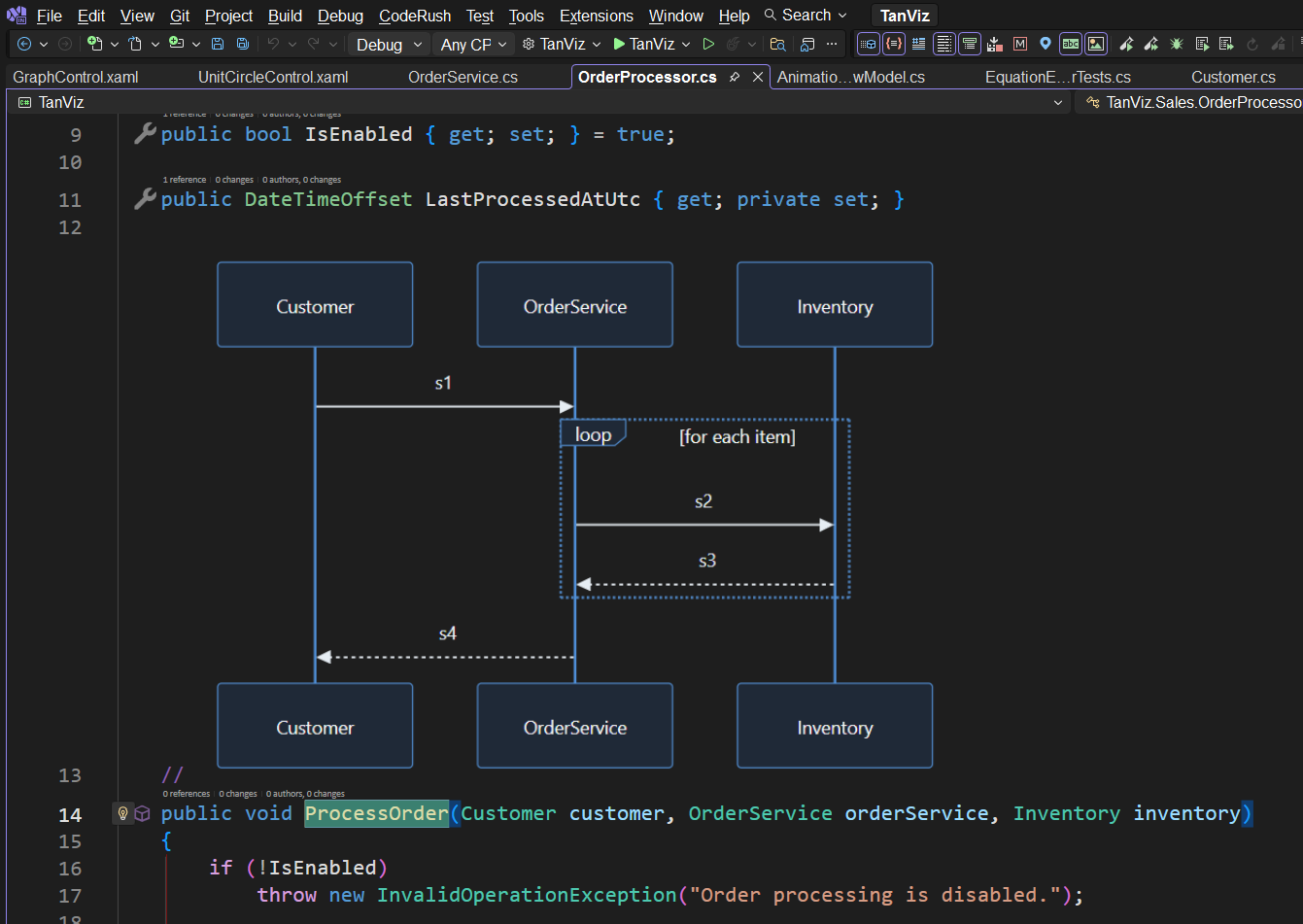
Rich Comments can now render Mermaid diagrams directly inside source code comments.
Instead of maintaining architectural diagrams in separate documentation systems that inevitably drift from the implementation, you can keep them alongside the code they describe. Mermaid source is stored in external .mmd files and referenced in the source code comment where it renders, allowing diagrams to participate naturally in source control and code reviews.
CodeRush renders Mermaid diagrams directly inside the editor, supporting a broad range of diagram types including:
- Flowcharts
- Sequence diagrams
- Class diagrams
- State diagrams
- Entity Relationship diagrams
- Git graphs
- Mind maps
- Timelines
- ZenUML
- And many more
]
Diagrams can be edited in place by right-clicking the rendered image and selecting Edit Diagram. The integrated editor provides a live preview while you modify the Mermaid source inside Visual Studio, eliminating the need to switch to external tools. You can even have AiGen generate and modify Mermaid source automatically -- more on that in a bit.
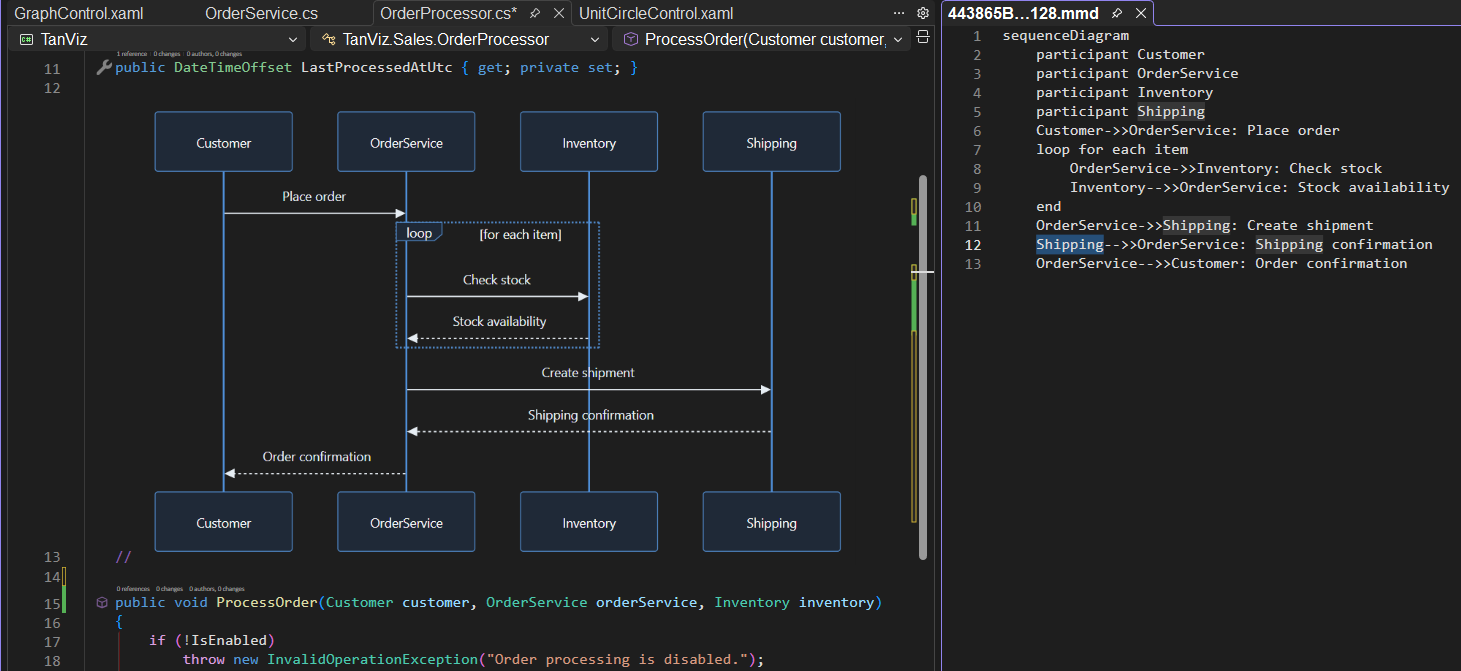
We added two display options make diagrams easier to manage in larger files.
Thumbnail Mode collapses a diagram into a compact preview that expands on demand, making it ideal for large architectural diagrams. Just click the thumbnail to see it in the full size image viewer.
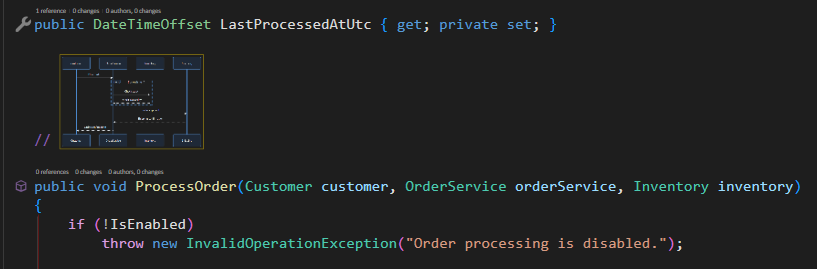
When a thumbnail expands, it appears in a special image viewer that makes it easy to explore large images. You can zoom in and out with the mouse wheel and you can click and drag to shift your view into the large image.
Fit in TextView automatically scales diagrams to fit the current editor window, helping them remain readable at a glance without introducing unnecessary scrolling.
Enhanced LaTeX Support
LaTeX support has graduated from beta and now provides sharper output, improved performance, and expanded support for complex mathematical notation, including matrices, piecewise functions, chemistry notation, physics symbols, and multi-line expressions.
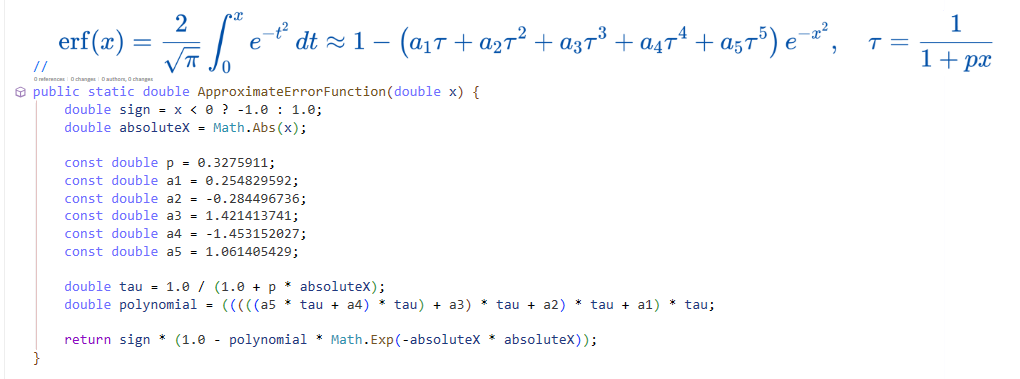
Formulas automatically scale with the editor font, allowing them to integrate naturally with surrounding code.
The following templates create formula placeholders inside code comments:
| Language | Template | Expansion |
|---|---|---|
| C# | /f | // <formula > |
| VB | ‘f | ‘ <formula > |
| XAML | !f | <!– <formula > –> |
After expanding one of the templates above in the appropriate source file, you can paste in the LaTeX equation (you can also use online LaTeX equation editors to create formulas)
Templates for LaTeX formula components:
| Template | Description | Expansion | Example |
|---|---|---|---|
| \. | Centered dot | \cdot |  |
| \.. | Three centered dots | \cdots |  |
| \8 | Infinity | \infty |  |
| \b | Braces | {} | |
| \bca | Big Cap | \bigcap_{lower}^{upper} |  |
| \bcu | Big Cup | \bigcup_{lower}^{upper} |  |
| \cp | Co-product | \coprod_{lower}^{upper} |  |
| \f | Fraction | \frac{numerator}{denominator} |  |
| \l | Limit | \lim_{x\to\infty} |  |
| \lr | Left & Right Parens | \left( \right) |  |
| \nr | nth Root | \sqrt[root]{value} |  |
| \o | Circle symbol | \circ |  |
| \oi | Contour integral | \oint |  |
| \p | Product | \prod_{lower}^{upper} |  |
| \s | Sum | \sum_{lower}^{upper} |  |
| \sq | Square Root | \sqrt{value} |  |
| \v | Vector | \vec{numerator} |  |
Together with Mermaid support, Rich Comments become an effective place to capture visuals of algorithms, mathematical derivations, engineering and architectural diagrams directly within the source code.
AiGen Works with Code, Diagrams, and Formulas
AiGen now understands not only your source code, but also the Mermaid diagrams and LaTeX formulas contained within Rich Comments.
This enables new workflows. You can ask AiGen to generate diagrams from existing code, generate code from diagrams, create LaTeX representations of algorithms, or analyze whether documentation and implementation remain consistent.
Here's an example of a Mermaid diagram in Visual Studio generated from the source code below it.
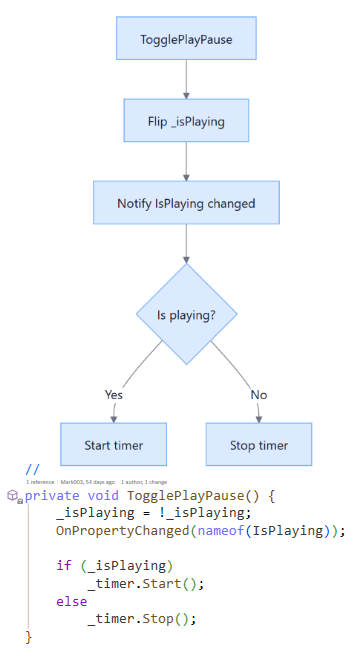
Keeping documentation synchronized with evolving code has traditionally been a manual process. Because AI can now reason across both implementation and in-source documentation (including diagrams and formulas), you can use CodeRush and AiGen to realign architectural drift over time.
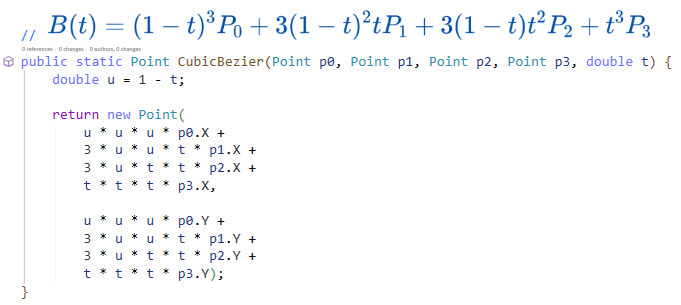
You can also ask AiGen to generate LaTeX formulas for expressions inside a method and have those placed inside a comment in the code. In the screenshot below notice that AI found the local variable u = 1 - t and substituted its expression everywhere the u variable appeared in the code. It also found coefficients and power equivalents and incorporated them into the formula.
Expanded AI Model Support
AiGen now supports the latest generation of AI models from multiple providers, including:
- Anthropic Claude 4.5 models
- Google Gemini 2.x and 3.x models
- OpenAI GPT-5.5 models
Support has also been added for advanced reasoning capabilities available on supported models.
Configuring providers, selecting models, and understanding model-specific capabilities is covered in a separate blog post dedicated to AI configuration.
Copy Failed Test Report
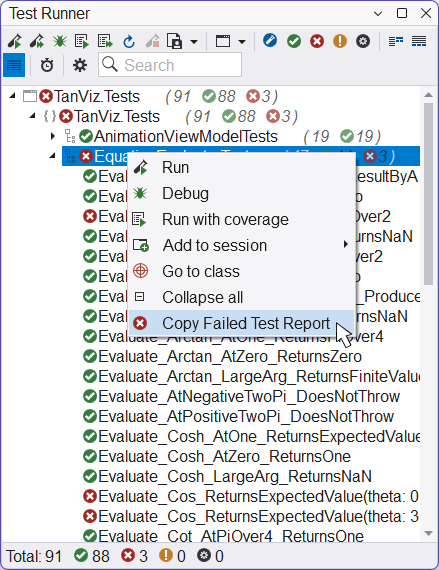
The Test Runner includes a new Copy Failed Test Report command.
Available from the context menu, this command copies detailed information for every failing test within the selected node (and child nodes) including fully-qualified test names, execution times, exception information, and complete stack traces.
The generated report is ideal for direct use with AI assistants, making it easy to send the clipboard results to AiGen or another LLM for analysis of failing tests and identification of common root causes.
Wrapping Up
The features in this release share a common goal: keeping more of your project's knowledge inside the source code itself.
Mermaid diagrams, LaTeX formulas, and AI-generated documentation all become first-class citizens, and AiGen gets the ability to reason across code and diagram documentation together. Along with expanded AI model support and improved developer tooling like Copy Failed Test Report, these new features streamline everyday development while helping in-source documentation stay in sync with implementation.
As always, we look forward to hearing your feedback.
Free DevExpress Products - Get Your Copy Today
Mark Miller (DevExpress)