Microsoft Multilingual App Toolkit (MAT) Has Been Deprecated: What’s Next for DevExpress-Powered App Localization?

As you probably know, Microsoft Multilingual App Toolkit (MAT) support ended on October 15, 2025. Since MAT is no longer supported, this post documents localization-related alternatives available to the Microsoft developer community.
What MAT Deprecation Means in Practice
- No future compatibility guarantees with new tooling or runtimes.
- Localization assets are not lost — MAT uses standard XLIFF / RESX formats, so translations remain reusable.
- Microsoft recommends moving to alternative localization tools.
What to Look for in a MAT Alternative
Key requirements for .NET apps:
- Centralized localization string management
- Validation and consistency checks
- Reuse of translations across versions
- Support for RESX/XLIFF-based workflows
New DevExpress Localization Tool at a Glance
All the aforementioned localization requirements are supported in the new DevExpress Localization Tool (available as Community Technology Preview or CTP in v25.2): Downloads | Get Started.
This new tool introduces enhanced collaboration capabilities, easier resource navigation/management, AI-powered translation services, support for multiple DevExpress products/platforms, and much more.
Key features include:
- Simpler localization string management
Use advanced data shaping capabilities available in our Data Grid control to locate resources, filter or group data, and more. - Enhanced translation consistency and coverage
Locate duplicate strings, find inconsistent translations using a built-in localization validator, review context information, and run batch operations. - Multiple export types
You can export translations as satellite assemblies, NuGet packages, a single merged RESX file for multiple products (replaces hundreds of assemblies), or JSON files for JS/TS-based products. - New collaboration capabilities
You can now use change tracking, reviews, import/export capabilities, and built-in backups. All DevExpress product localization resources are available on GitHub. You can either use our Windows-based tool, modify your translations directly in RESX/XML, or build your own tool. - Support for multiple products/platforms
The current version already supports numerous DevExpress UI libraries (WinForms, WPF, Blazor, ASP.NET Core, Reports, Dashboard, XAF). We plan to add support for .NET MAUI, DevExtreme, and VCL UI Controls in future release cycles. - AI-powered resource translation
Integrate your favorite AI service into our new Localization client.
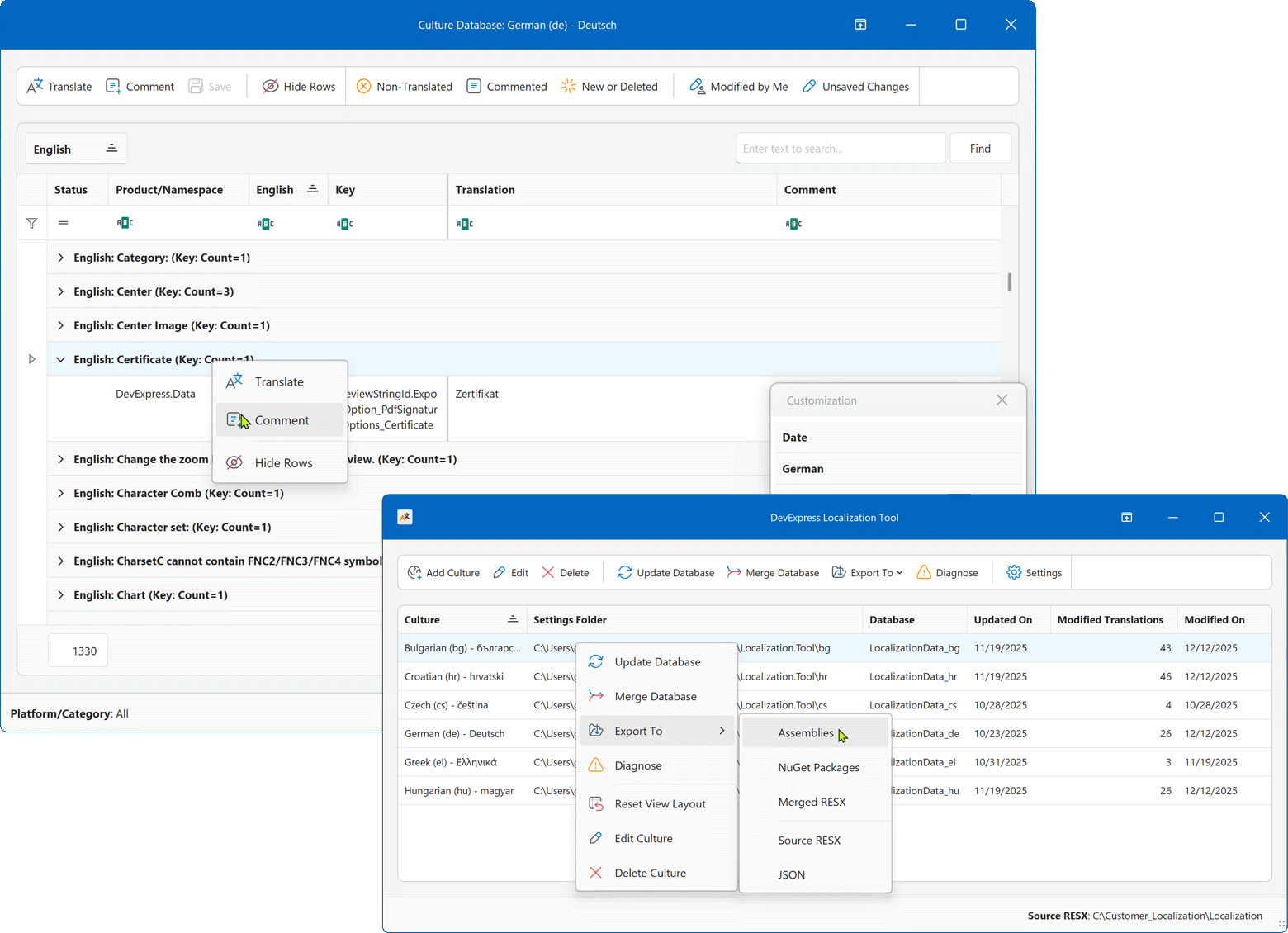
My favorite feature: a way to export all your multi-product translations to a single or merged RESX file. This is a huge time-saver or much simpler alternative to dozens of NuGet packages or satellite resources/assemblies (this standard .NET approach is still supported). A single RESX file under your control means fewer dependencies in projects: no accidentally forgotten references and no heavy maintenance later when you add a new component to the project.

The fact that the source translations reside on GitHub and the internal translation database (RESX/XML) is accessible for custom tools (yes, our customers did that too) or AI-based translations are nice additions as well. I also think that our powerful WinForms Data Grid speaks for itself.

Future Plans
Long-term goal: one unified localization platform (even for VCL and JS) instead of multiple overlapping tools. In 2026, we will improve ease of use/usability as follows:
- Automatic localization resource downloads vs manual copy/paste from GitHub;
- Automatic product selection for localization (based on application DLL)
- Better integration with DevExtreme JS / TS (Intl and custom dictionaries), XAF (XAFML files), VCL (INI files).
Ultimately, the new DevExpress Localization Tool offers a modern path forward for DevExpress-powered apps. Older DevExpress localization utilities are now in maintenance mode (see also this comparison). For example, we will continue to maintain the localization.devexpress.com service as we have no alternatives for older DevExpress product versions, but this service will only receive bug fixes. While you can use the service for new DevExpress versions, we recommend that you give the new tool a try for translation-related tasks (on Windows at least).
Your Feedback Matters!
Thanks,
Dennis Garavsky
Principal Product Manager
dennis@devexpress.com