DevExpress Agent Skills — October Update

DevExpress Agent Skills help your favorite AI coding assistant write accurate DevExpress code. Supported assistants include the following:
- GitHub Copilot (VS Code, Visual Studio 2026, and CLI)
- Claude Code
- Cursor
- Codex CLI
- JetBrains Junie
- JetBrains AI Assistant
In this post, I'll summarize the following v1.6.0-related updates:
- New DevExpress BI Dashboard skills
- DevExpress Reports skills for WinForms and WPF, plus a reworked ASP.NET Core Reports skill
- Four new WPF skills
- ASP.NET Core support for DevExtreme skills
If you installed plugins, your agent receives these updates from the marketplace. If you copied skill folders manually, see Get the Update.
DevExpress BI Dashboard Skills
Once you design a dashboard, three coding tasks typically remain: connect it to data, wire up parameters, and export results. DevExpress Dashboard APIs for web and desktop platforms share multiple member names but differ in signatures. As a result, an AI assistant can produce code that appears correct for one platform but does not compile on another.
Our new dx-dashboard plugin includes three skills for DevExpress BI Dashboard v26.1+ (for ASP.NET Core, Blazor, WinForms, and WPF apps). Each skill reads your project file first, detects the platform, and writes code for that platform.
| Skill | Tasks covered |
|---|---|
| Data Sources | Register SQL, Entity Framework, Object, JSON, Excel, MongoDB, OLAP, XPO, Extract, and Federation data sources in code. Switch databases at runtime. |
| Export | Export a dashboard or an individual item to PDF, image, or Excel with current filter and parameter state. The skill also checks that your app environment supports export on Linux and macOS. |
| Parameters | Create parameters with static or dynamic look-ups. Bind parameters to queries, filters, and calculated fields. Pass values from the signed-in user on the server side. |
These skills also guide AI assistants and help avoid issues such as:
- Missing database driver packages that pass the build but fail at run time (the skill starts the app and checks that the dashboard displays data)
- Per-tenant connections where a shared data cache displays one tenant's rows to another tenant
- Excel export code that does not reset the stream and produces an empty workbook
- Multi-value parameter filters that use
=instead ofIn (?p)and return no rows - Row-level security that trusts values sent from the browser
- Hidden parameters that remain visible in exported documents
In our tests, smaller models gained the most from Dashboard skills. On its own, a smaller model often passed an item's display name where the export API expects a component name. It also wrote data connections that built without errors but returned no data at run time. With Dashboard skills installed, it completed most export and data source tasks.
A mid-size model handled many of these tasks on its own, and our skills made its results more reliable. For export tasks, the mid-size model also used about half the input tokens.
Our Parameters skill helps with a common security task: each signed-in user must only view their own data. Without the skill, an assistant applied the same data filter to all users. With the skill, the assistant passed the user's identity to the dashboard on the server side.
To install the plugin, run the following command in GitHub Copilot CLI or Claude Code:
/plugin install dx-dashboard@DevExpress-agent-skills
In Codex CLI, run codex plugin add dx-dashboard@DevExpress-agent-skills.
DevExpress WinForms and WPF Reports Skills
Desktop reporting tasks appear simple but include details an assistant can miss. For instance, a WPF document preview may remain blank unless your code creates a report document. DevExpress Subscription types also matter. The DevExpress Reports Subscription allows you to open our built-in End-User Report Designer. A designer embedded in your own form or window requires a subscription that includes relevant UI controls (such as our WinForms or WPF Subscription).
Our new DevExpress Reports skills (for WinForms and WPF apps) ship withinthe dx-reporting plugin and addresses the following tasks:
- Report preview in a built-in form or in a viewer control on your form or window
- Built-in or embedded End-User Report Designer
- Custom report storage and SQL query validation for report authors
- Toolbar, Ribbon, and Parameters Panel customization
- Subscription requirements (Reporting Subscription vs. WinForms or WPF Subscription)
In our tests, a smaller model solved most WinForms and WPF reporting tasks with these skills and few tasks without them. On its own, the model often left the report preview blank, referenced earlier DevExpress packages, or called export APIs that do not exist.
The following prompts come from our test set and illustrate what you can ask for once you install these skills:
- "The preview on the main form is empty when the app starts. Make it display the Orders report."
- "Report authors can type their own SQL in the designer. Ensure they can't run anything that changes the database."
- "We only have a Reporting license for this app, not the WPF Subscription. Add a button that allows the user to edit the sales report's layout at run time, in a full report designer."
ASP.NET Core Reports Skill
We reworked our ASP.NET Core Reports skill so that an assistant verifies its result before it reports success. The skill follows a fixed workflow:
- Inspect your project: client libraries, bundler, authentication, and target OS (Linux and Docker require additional setup).
- Present a plan, then copy code from tested reference files.
- Run the app and confirm that every script and style loads, then examine the browser console. If the assistant cannot verify the page, it reports
NOT VERIFIED.
For small changes to a page that already works, the skill skips project setup and proceeds directly to the change. The skill also adds guidance for data sources (EF Core, JSON, MongoDB, and Object), error logging, the standalone Parameters Panel, and theming.
We also tested this skill on existing ASP.NET Core apps. A smaller model completed the following tasks:
- Customize our Report Designer
- Add a standalone Parameters Panel
- Add a Report Designer to an app that already displays reports in our Document Viewer
With the skill, the assistant completed each task from a single prompt and checked the result in a browser. For the last task, it also re-checked the existing Document Viewer page to confirm that nothing broke. Without the skill, the same model never ran the app, and a developer had to report each error back to it. The skill also helped the assistant finish much faster with about half the input tokens.
pwsh) to run this step.New WPF Skills
DevExpress Agent Skills v1.6.0 adds four WPF skills. Two skills help you generate your UI: From a screenshot mockup into a working DevExpress screen, and appearance-related changes to any DevExpress WPF control via Theme Customizer. The other two skills help you evolve existing apps. Grid Data Source binds grids to data of any size, and Dependency Injection moves an app to a dependency injection (DI) container. All four skills ship in the dx-wpf plugin.
AI-generated WPF code can build without errors and still behave incorrectly. For instance, a screen built from a mockup may appear correct but not allow users to edit grid cells. A grid bound to an ObservableCollection can load half a million rows at startup. A theme override with an invented resource key renders nothing, and a view model missing from the DI container opens an empty window.
Our new skills target these issues. Screenshot, Theme Customizer, and Dependency Injection also run the app and check results before reporting success.
| Skill | What your assistant can do |
|---|---|
| From Screenshot | Build a DevExpress WPF screen from a screenshot, an image, or a Figma frame. The skill selects a control for each region, writes XAML, runs the app, and compares the result with your mockup. |
| Theme Customizer | Change the appearance of any DevExpress WPF control. The skill tries public APIs first, then a scoped style, then a theme resource override, and verifies the result with before/after screenshots. |
| Grid Data Source | Bind GridControl or TreeListControl to your data. The skill reads your view model and DbContext, considers expected data volume, and selects a data binding mechanism (ObservableCollection, Server Mode, Instant Feedback, or Virtual Sources). |
| Dependency Injection | Add Microsoft.Extensions.DependencyInjection (optionally with .NET Generic Host) to an existing DevExpress WPF app. The skill moves view models and services to the container, replaces singletons and service locators, checks registrations, and starts the app to confirm that it runs. |
The following prompts illustrate these skills:
- "Here's a screenshot of an app screen. Build it in my app. I'm not sure which of your controls I should use for it."
- "I need to replace the default arrow in BarSplitButtonItem with a custom image."
- "NorthwindContext.Orders is expected to hold about 500,000 rows in production. Bind a DevExpress GridControl to this ViewModel's orders."
- "Get rid of the singletons and the AppServices helper in this project and register the services in a proper DI container instead."
These skills require the following:
- All four skills require Windows and the .NET SDK.
- Grid Data Source skill requires the DevExpress MCP Server. The other skills work best with the server configured because they use it to look up accurate control APIs.
- To build a screen from a Figma frame, From Screenshot requires a Figma MCP server.
- Dependency Injection uses the built-in
{dxmvvm:Ioc}markup extension with v26.1+ and adds a custom markup extension for earlier versions. For large projects, use a mid-size or frontier model.
Example: Re-create the DevExpress Mail Client
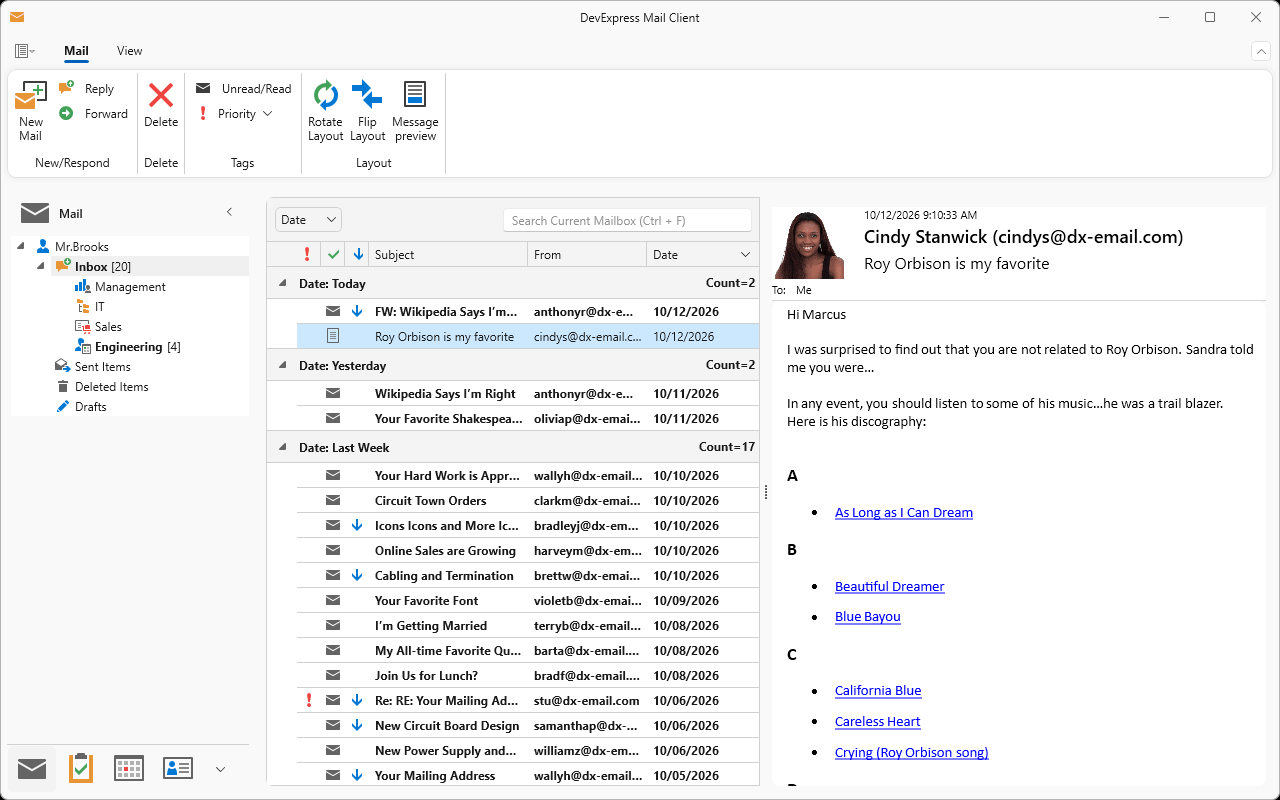
To test the From Screenshot skill, we took a screenshot of our DevExpress Mail Client demo. We then asked an assistant to rebuild its layout in a WPF app:
"Using the devexpress-wpf-from-screenshot skill, build the layout shown in mail.png in this app with DevExpress WPF controls."
Here is the source screenshot:
The assistant built the following screen:
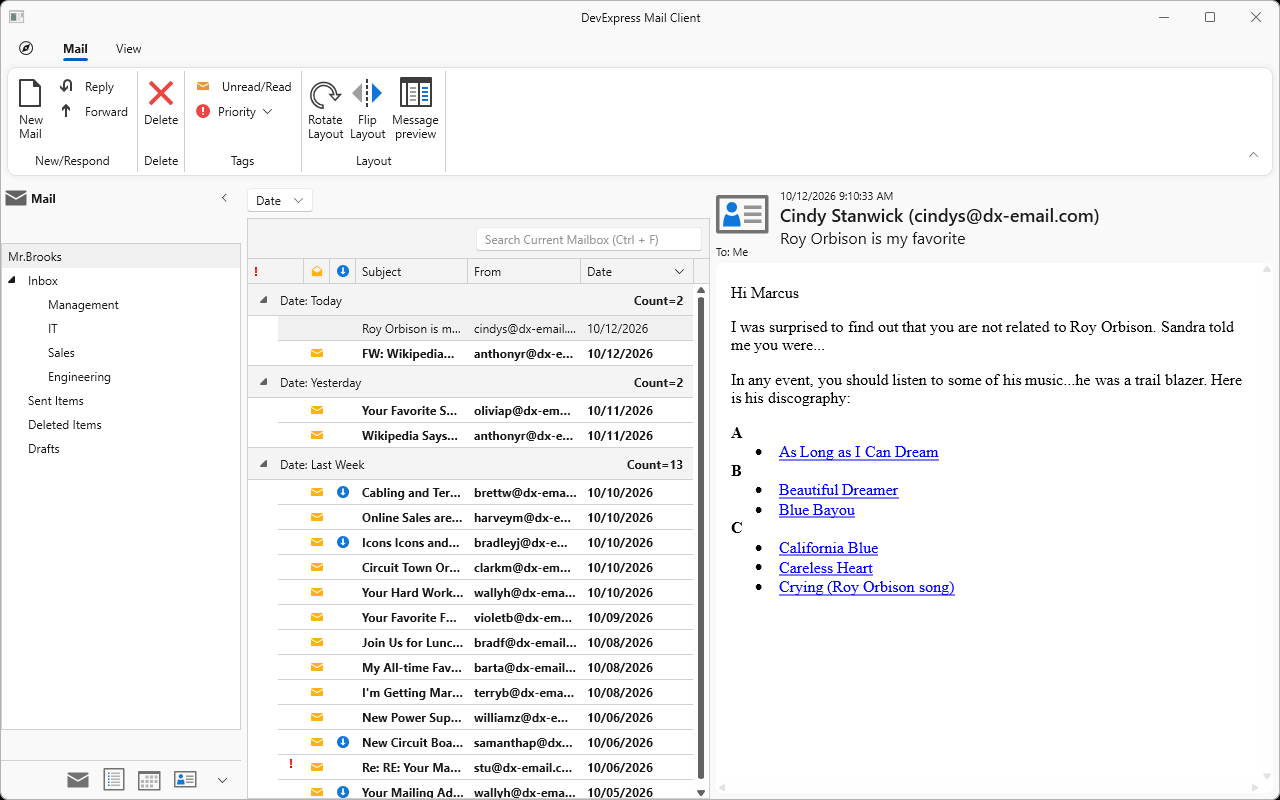
The result reproduces the Ribbon, the folder tree, the mail list grouped by date, the reading pane, and the navigation bar, all built from DevExpress WPF controls.
DevExtreme Skills: ASP.NET Core Controls Support
All 13 DevExtreme skills now support DevExtreme-based ASP.NET Core Controls in addition to Angular, React, Vue, and jQuery. These skills cover DataGrid, Scheduler, Form, Chat, Button, six Data Editors, DataSource, and Theming.
Razor builder syntax differs from JavaScript configuration objects. When an assistant copies JavaScript options into a Razor view, the code appears familiar but does not compile. Our updated skills address this issue as follows:
- In ASP.NET Core projects, the assistant builds the project and only fixes members that the compiler rejects.
- New template guides describe data that each template receives in Angular, React, Vue, jQuery, and ASP.NET Core.
- Generated templates use HTML-encoded output (
<%- %>) and reserve raw output for trusted HTML. - If your project already indicates the framework, the skill does not ask about it.
If you copied DevExtreme instruction files (instructions/*.instructions.md) from our earlier releases into your project, you can delete them. DevExtreme skills now include the same rules, updated for v26.1.
Also in This Update
- Skill for PDF Document API. We updated the skill for our PDF Document API. The API is available as a Community Technology Preview (CTP). Code examples in the skill compile against v26.1.5, so your assistant starts from code that builds. The skill now activates for common requests such as "merge these PDFs", "fill this form", and "redact this text". Setup guidance now covers redaction on Linux and macOS.
- Public documentation links. Skills now reference public docs.devexpress.com topics or instruct the assistant to query the DevExpress MCP Server.
Get the Update
A plugin is the simplest way to stay current. Most agents and IDEs check the marketplace for updates automatically. New Reports, WPF, and DevExtreme skills ship in existing dx-reporting, dx-wpf, and dx-devextreme plugins, so an update delivers them.
To update plugins manually, run the command for your agent:
- GitHub Copilot CLI:
copilot plugin update --all - Claude Code:
/plugin marketplace update DevExpress-agent-skills
To add BI Dashboard skills, install the dx-dashboard plugin as described in the DevExpress BI Dashboard Skills section.
If you copied skill folders directly into .github/skills/, .claude/skills/, or a different agent's skill folder, download fresh copies from our GitHub repository and replace those local folders.
Share Your Feedback
Try a new skill and tell us how it went. Open a ticket in the DevExpress Support Center and describe what worked well and what didn't. Flag issues in AI-generated code: a wrong API call, a missed step, or anything you had to fix manually.
Free DevExpress Products - Get Your Copy Today
 Dmitry Tokmachev (DevExpress)