Beyond Prompts: Teaching AI How to Build with DevExpress
AI Needs More Than Good Prompts
If you've paired Claude Code, GitHub Copilot or Cursor with DevExpress, you already know the moment I'm about to describe. It's the same one the team kept running into while building the DevExpress Office File API and Reporting Skills, and their evaluation notes are what this post is really about. The assistant starts strong. Clean C#, sensible class names, code that looks like it belongs in your solution. Then you read it a second time and something's off: the namespace is from a release two versions back, the API has been superseded, or the whole thing has quietly wandered off to a third-party library because that's what the model saw most often in training.
The interesting part wasn't that the AI got things wrong. Everyone expects that. What struck me about the team's findings was how convincing the wrong answers were. The ones that failed to compile cost them nothing; those get spotted immediately. The expensive ones looked completely reasonable right up until someone compared them with the current documentation. More often than not, they were yesterday's best practice dressed up as today's.
That single observation ended up shaping how the team designed the Skills.
As they worked through the results, the same theme kept coming back. When the generated code missed, the problem was almost never C#, and it certainly wasn't the model's ability to reason. It was product knowledge. The model didn't have the current namespaces, the right entry points or the small amount of framework-specific context it needed before it started typing. Hand it those things and the quality of the output jumped straight away.
We spend a lot of energy on prompt engineering, and good prompts genuinely help. But a prompt can only work with what the model already knows. No amount of clever wording fills a gap in product knowledge that isn't there to begin with. Every time, giving the assistant accurate context before it wrote anything beat trying to talk it back from a bad first answer.
That's the whole idea behind DevExpress AI Skills. They don't replace the model's reasoning, and they don't try to re-host the documentation. They hand the assistant a concise, product-specific starting point before it writes the first line of code, so it can spend its effort solving your actual problem instead of reconstructing an unfamiliar API from scraps of training data.
The easiest way to show you what I mean is to walk through the same prompts the team used during the review, with and without the Skill.
When Good Code Is Still Wrong
This showed up early in the team's evaluation. Completely made-up APIs were never the issue, because you catch those instantly. The answers that slowed them down were the believable ones: code that read like it came from someone who knew the framework reasonably well, but carried just enough stale or incorrect detail to send you chasing the wrong problem for half an hour.
That's the trap with specialised frameworks. They move constantly. Namespaces get reorganised, newer APIs replace older programming models, and products grow in directions that simply aren't in the model's training data yet. The assistant has no way of knowing a better approach exists unless something tells it, so it does the reasonable thing and fills the gap with the closest match it can find. Most of the time that match looks plausible enough to trust.
Across the Office File API and Reporting review, the team watched this happen again and again. Same prompt, same model, same task. The only thing they changed was what the assistant knew before it started. And the moment it started from accurate DevExpress guidance rather than memory, the code changed.
Here are three examples straight from that work.
Example 1: Generating a QR Code
Start with something ordinary.
Prompt
Generate a QR Code containing https://community.devexpress.com and save it as a PNG using DevExpress.
Without the Barcode Skill, the assistant reached for an older DevExpress API. The important thing to note, the Barcode functionality was NOT removed, simply improved and updated.
using DevExpress.BarCodes;

BarCode barCode = new BarCode();
barCode.Symbology = Symbology.QRCode;
barCode.CodeText = url;
barCode.Save("qr.png");
There's almost nothing to object to here. It reads cleanly, it follows normal C# conventions, and if you didn't already know the current Barcode API you'd have every reason to assume it was fine. That's exactly what makes this kind of error awkward. It doesn't look absurd. It looks sensible.
The trouble is the historical DevExpress.BarCodes namespace and an object model that no longer reflects the current API. The model hasn't invented nonsense; it has rebuilt a solution out of older fragments that showed up often enough in training to feel right.
With the Barcode Skill loaded, the same prompt lands on the current API.
using System.IO;
using DevExpress.Docs.Barcode;
using DevExpress.Drawing;

var qrOptions = new QRCodeOptions {
    ModuleSize = 4f,
    Dpi = 96
};

using var generator = new BarcodeGenerator(qrOptions);
using var output = new FileStream("qr.png", FileMode.Create, FileAccess.Write);
generator.Export("https://community.devexpress.com", output, DXImageFormat.Png);
Nothing changed except what the assistant knew going in. That matters more than it first appears, because the first answer becomes the foundation for everything after it. Start the conversation on an obsolete namespace and every follow-up (styling the barcode, switching the output format, dropping the image into another document) tends to stay on that same dead branch.
I'll be honest: these errors worry me more than a broken build ever has. A bad method name announces itself. Convincing code built on an old API doesn't, and it's easiest to trust precisely when you're moving fast and not looking closely. The Skill heads that off by putting the assistant on the right API before the conversation picks up speed.
Example 2: Exporting Large Excel Files
This one's trickier, because the "wrong" code isn't wrong in the usual sense. It compiles. It produces a perfectly valid workbook. The problem is that the assistant picked the wrong DevExpress product for the job.
Prompt
Export 100,000 rows to an Excel workbook efficiently using DevExpress.
Without the Excel Export Skill, most assistants reach for the Spreadsheet API.
using var workbook = new Workbook();

Worksheet sheet = workbook.Worksheets[0];

for (int i = 0; i < 100_000; i++)
{
    sheet.Cells[i, 0].Value = data[i];
}

workbook.SaveDocument("output.xlsx", DocumentFormat.Xlsx);
Functionally, this is a fair answer. It builds a workbook and writes data into it, and for most day-to-day work the Spreadsheet API is exactly what you want: it gives you a rich in-memory object model for creating, editing, formatting, calculating and analysing content.
But look at the prompt again. It says efficiently.
Building an Excel document and streaming out a large dataset are related jobs, not the same job. The Spreadsheet API holds the whole workbook in memory so everything stays editable for the life of the document. That's a strength when you're editing. At 100,000 rows it's mostly overhead, because once a row is written you're never going back to touch it, the formulas usually don't need recalculating mid-generation, and what you actually care about is memory that stays flat as the row count climbs. That's the exact problem the DevExpress Excel Export Library was built for.
With the Excel Export Skill in play, the assistant switches to the streaming API.
using DevExpress.Export.Xl;

IXlExporter exporter = XlExport.CreateExporter(XlDocumentFormat.Xlsx);

using var document = exporter.CreateDocument(stream);
using var sheet = document.CreateSheet();

foreach (var customer in customers)
{
    using var row = sheet.CreateRow();
    using var cell = row.CreateCell();
    cell.Value = customer.Name;
}
These two libraries aren't rivals. They solve different problems. One hands you a full workbook object model for manipulation; the other writes rows straight to the stream and keeps memory predictable no matter how big the export gets. On its own, the assistant has no real basis for preferring one over the other, because both technically satisfy the loose wording of the prompt.
That's the gap the Skill fills. It isn't fixing syntax; it's supplying the engineering judgement to match the API to the workload.
Example 3: Reporting Setup and Viewer Customisation
Reporting is a great stress test for AI-assisted development, because so much of it hinges on small platform-specific details. The code can look structurally perfect and still be missing the one registration call, callback or client-side API that makes the viewer actually work.
One evaluation prompt asked for the native DevExpress Report Viewer in a Blazor Server app. Without the Reporting Skill, the assistant registered services for the JavaScript-based viewer family instead of the native Blazor one.
builder.Services.AddDevExpressBlazorReporting();Easy mistake to make. The method name sounds right, it slots neatly into the ASP.NET Core service registration pipeline, and nothing about it raises a flag. But native Blazor Reporting needs a different call.
builder.Services.AddDevExpressServerSideBlazorReportViewer();This is the kind of thing that costs a disproportionate amount of pain. The app compiles, the page loads, and you're left staring at a blank viewer wondering what you did wrong. Nothing failed at the C# level. It failed at knowing which DevExpress Reporting viewer family the prompt was even talking about.
The same story plays out when you customise the viewer. Say you want to hide the Print button and limit exports to PDF. With no product guidance, assistants tend to invent APIs that feel plausible but don't exist.
previewModel.GetToolbarItemCommands().forEach(command => {
    if (command.id === "print") {
        command.visible = false;
    }
});

previewModel.GetExportFormatItems().forEach(item => {
    if (item.format !== "pdf") {
        item.visible = false;
    }
});
It reads like it belongs in a reporting viewer: sensible names, a clean split between toolbar and export customisation, the shape of a real client-side API. But the actual DevExpress callbacks use different entry points.
function customizeMenuActions(s, e) {
    var printAction = e.GetById(DevExpress.Reporting.Viewer.ActionId.PrintPage);
    if (printAction) {
        printAction.visible = false;
    }
}

function customizeExportOptions(s, e) {
    e.HideFormat(DevExpress.Reporting.Viewer.ExportFormatID.XLS);
    e.HideFormat(DevExpress.Reporting.Viewer.ExportFormatID.XLSX);
}
This is why specialised frameworks are hard for general-purpose assistants. The answer has the right shape and the wrong product knowledge, and in reporting, where so much of the setup is declarative or callback-driven, one wrong method name is the difference between a working viewer and a dead end.
When the Best Answer Is Another Question
Not every win comes from better code. Some of my favourite Skill behaviour shows up when the assistant decides not to write code yet.
AI assistants are heavily biased towards answering the prompt in front of them. When a requirement is underspecified, they'll usually make an assumption and press on. That keeps things moving, but it also produces software that satisfies the words of the prompt rather than what you actually meant.
Picture asking for "a chart using DevExpress." From a developer's point of view that request is wide open. Bar, line, pie, scatter? What's the data source? Who's the audience? Any experienced developer would ask a question or two before writing a line.
Most assistants won't. They'll pick whatever chart type seems most likely and start generating.
Several DevExpress Skills nudge the assistant the other way: when something essential is missing, ask first.
Developer
Create a chart using DevExpress.
AI with the Skill
Which chart type would you like to create? For example, Bar, Line, Pie, Area or Scatter?
That small shift makes the whole thing feel less like poking a code generator and more like working with a colleague. And it saves you the classic time-sink of unwinding an implementation built on an assumption nobody ever made.
You could bake this into your own prompts, of course, but then you're on the hook to remember it, repeat it across every assistant you use, and keep it in step with how your team works. Putting it in a Skill makes it part of the workflow instead of one more line you have to paste into every request.
Skills and the DevExpress MCP Server
One question comes up almost every time I talk about this:
If the DevExpress MCP Server already gives AI agents access to the documentation, why do we need Skills too?
Because they're solving different problems.
A Skill is the focused guidance the assistant gets before it starts: enough to recognise the right product area, follow the common implementation patterns, and sidestep the mistakes that come from leaning on training data alone. Skills are deliberately small, so they load fast and cover a lot of everyday work without sending the assistant off on several rounds of exploration.
The MCP Server plays a different role. It gives compatible agents live access to the current documentation, API details and examples. That's the shipping product, not whatever the model happened to memorise.
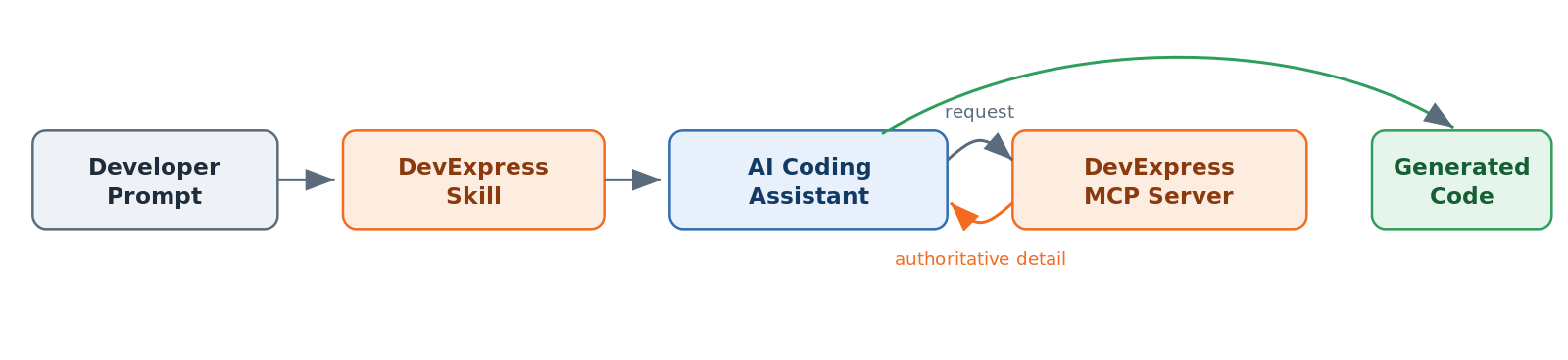 A Skill points the assistant to the right product area up front; the MCP Server supplies authoritative detail once the task gets specific.
In practice they hand off to each other. The Skill gets the assistant to the right place; when the task needs more depth, the MCP Server supplies the authoritative reference to carry it through. Together they cut the guesswork at both ends: the Skill keeps the assistant out of the wrong product area, and the MCP Server fills in the specifics once the work gets detailed.
That pairing also trims a lot of back-and-forth. Without a Skill, an agent can burn several tool calls just working out which API it should be using. With the right Skill loaded, those MCP calls go towards real implementation questions instead of correcting the assistant's starting assumptions.
There's a discoverability angle here too. In a recent customer survey, roughly a third of respondents didn't know the DevExpress MCP Server existed. Skills give us a natural way to reintroduce it as part of a broader AI-assisted workflow, rather than leaving it as a separate tool people may never stumble across.
Why Smaller Models Benefit Even More
The big frontier models are impressive even when their product knowledge is patchy. Claude Opus, Claude Sonnet and the latest GPT-class models can often reason their way to something that works, especially with documentation access or a patient developer steering. They still slip up, but they tend to recover.
Smaller and older models have a harder time. Compact models like Claude Haiku and Gemini Flash (and the local models more teams are running now) are built to be fast, responsive and cheap. They're a great fit for plenty of coding work, but they carry less specialised product knowledge out of training.
This is where Skills earn their keep. Rather than asking a compact model to reverse-engineer an unfamiliar API from a handful of examples, the Skill hands it the essentials up front: current namespaces, recommended entry points, the usual patterns and the traps worth avoiding, all dropped straight into its working context.
And it matters beyond the hosted services. More teams are looking at local models for privacy, compliance or cost reasons. Those models will keep improving, but they're never going to hold detailed knowledge of every commercial framework or every recently shipped API. Skills close that gap by supplying the DevExpress-specific context regardless of whether the model runs in the cloud or on the developer's own machine.
The aim isn't to make a small model behave like a large one. It's to let you choose the model that suits your workflow without giving up confidence that it understands the DevExpress APIs you're working with.
Skills Versus Custom Instructions
Most AI assistants already give you a way to shape their behaviour. Copilot has custom instructions, Cursor has rule files, Claude Code has project instructions, and just about every other agent has its own flavour. Useful, all of them, but also fragmenting: each one wants its guidance in a different format.
Work across a few tools and you end up maintaining the same advice in several places at once. Coding conventions, preferred APIs, project-specific practices, all copied between config files and quietly drifting out of sync.
Skills take a more portable route. They load when they're relevant and stay out of the way when they're not: a Reporting Skill turns up for reporting work, a Barcode Skill for barcode generation, spreadsheet guidance when you're in Excel territory. The assistant gets what it needs without dragging a giant instruction file into every unrelated conversation.
That on-demand behaviour is the point. Loading everything into every request eats context and pulls the assistant's attention off the task at hand. Progressive disclosure keeps the working context tight, which really shows when you've got several DevExpress products installed, or a project that mixes reporting, document processing and web UI.
Portability is just as valuable. Because Skills aren't tied to one assistant, the same guidance travels across every supported agent. And as plugin-based distribution matures, Skills give updates a path to evolve alongside DevExpress products, instead of leaving each developer to hand-maintain their own instruction files.
The takeaway is simple: you shouldn't have to teach every AI assistant how to use DevExpress from scratch. Install the relevant Skills, pair them with the MCP Server when you need more depth, and let the tooling carry consistent guidance wherever the work happens.
Looking Beyond the Prompt
A year ago, most of the conversation around AI-assisted development was about prompt engineering, with whole posts hunting for the magic phrasing that would unlock better code. Prompts matter, no argument. But they're only part of the story. An assistant can only work with what it knows, and no amount of elegant wording makes up for knowledge that isn't there.
That's the lesson that runs through the team's work on the Office File API and Reporting Skills. When the assistant only half-knew DevExpress, it papered over the gaps with educated guesses. When it started from accurate context, the output was more reliable, more current, and a lot closer to what an experienced DevExpress developer would actually write.
The MCP Server rounds out the picture, handing compatible agents the current documentation, examples and API details whenever the task needs more depth. Skills get the assistant to the right starting point; the MCP Server keeps it honest from there.
Assistants will keep getting better. New models, stronger reasoning, today's rough edges smoothing out. What won't change is the value of context. General-purpose models will always do better when they understand the frameworks they're building on, especially frameworks that move faster than any training run can keep up with.
That's the thinking behind both DevExpress AI Skills and the DevExpress MCP Server. Between them, the assistant gets immediate guidance and access to current product knowledge. The payoff isn't just cleaner code. It's a development experience that feels less like correcting a stranger and more like working alongside someone who already knows the framework you're using.
Further Reading
- DevExpress AI Skills on GitHub
- DevExpress AI Skills for Coding Agents (Getting Started)
- Configure the DevExpress Documentation MCP Server
- Introducing the DevExpress MCP Server (DevExpress Blog)
- Office & PDF File API Documentation
- DevExpress Reporting Documentation
Free DevExpress Products - Get Your Copy Today
 Paul Usher (DevExpress)