WPF — June 2026 Roadmap (v26.1)

Thank you for choosing DevExpress and for your on-going support. We value your business.
In this blog post, I’ll highlight WPF-related features/capabilities we expect to ship in our upcoming mid-year release (v26.1, June 2026).
As always, if you have questions or suggestions, feel free to share your thoughts in the survey at the end of this post or submit a ticket via the DevExpress Support Center.
New WPF Fluent Theme (CTP)
We are working on a new Fluent Theme built on a flexible design token–based architecture. This foundation is designed to unlock a number of key benefits across our WPF product line, including:
-
Enhanced appearance
-
Support for Mica material
-
Flexible resource management and built-in palette customization
-
Multiple UI density modes
-
System high-contrast support
-
Centralized global font settings
By adopting a design token–driven approach, we can deliver new themes more efficiently in the future and ensure a unified visual language across multiple product lines. For example, in DevExpress-powered Blazor Hybrid applications, Blazor and WPF views will share a "common" look and feel based on the same Fluent theme.

WPF Fluent Icons
We expect to ship a comprehensive set of Fluent icons. To simplify migration to these new icons, you will be able to switch the icon set across all DevExpress controls using a single global setting. Our new collection will include thousands of Fluent icons which can be used in any UI element with SVG support.

WPF Grid Control
Column Drag & Drop Customization Events
We expect to introduce a new event to control which drag-and-drop operations are permitted for WPF Grid Control columns. This capability will address the following usage scenarios:
-
Prevent a column from being dropped at specific positions
Disable column reordering while still allow columns to be dragged out of the Grid or into the Column Chooser
-
Enforce fixed grouping order (for example, ensuring a specific column always has
GroupIndex = 0)
You will be able to customize any column drag operation based on comprehensive information about the dragged column and the target area:
private void TableView_ColumnDragOver(object sender, ColumnDragOverEventArgs e) {
    if (e.TargetArea == HeaderArea.ColumnHeader) {
        e.Cancel = true;
    }

    // e.TargetArea
    // e.TargetIndex
    // e.SourceColumn
    // e.SourceIndex
    // e.SourceArea
    // ...
}
Expression Editor Support for Custom Format Conditions
With v26.1, users will be able to create advanced conditional formatting rules via custom expressions. This enhancement will allow users to define complex logic (such as [Created Date] > AddDays(LocalDateTimeToday(), -3) ) as requirements dictate (as you would expect, this feature/capability will offer increased flexibility when constructing formatting rules that rely on calculated values, functions, or advanced comparisons).

Dependency Injection Enhancements
With v26.1, we hope to enhance Dependency Injection (DI) support in our MVVM framework. We will introduce a new XAML markup extension that instantiates view models using a globally configured DI container:
var host = RegisterServices().Build();
IocServiceProvider.Default.ConfigureServices(host.Services);
<Window DataContext="{dxmvvm:Ioc Type={Binding ViewType}}" />HomeView will be created with IDataService and ILogger dependencies if they are registered in the container:public class MainViewModel {
private INavigationService NavigationService {
get { return this.GetService<INavigationService>(); }
}
public void OnViewLoaded() {
NavigationService.Navigate("HomeView", null, this);
}
}
public class HomeView {
public HomeView(IDataService dataService, ILogger logger) {
//...
}
}Prompt to Expression in Filter Editor and Expression Editor
We will add AI-powered expression generation to our WPF controls to help users create filter and unbound column expressions for data-aware WPF controls using natural language prompts. Instead of writing complex expressions, users describe the desired logic in plain text. The system will send the prompt to the configured AI service, which will generate an expression for the control.

WPF Charts – DateOnly / Time Only Support
The DevExpress WPF Chart Control will support .NET DateOnly and TimeOnly data types. You’ll be able to use these types to specify arguments, values, workday/work time options, strips, constant lines, and scale breaks, as well as to apply data filters, sorting, and summaries.

WPF Pivot Grid
DateOnly / TimeOnly Support
The DevExpress WPF Pivot Grid will support DateOnly and TimeOnly data types (in .NET applications). You'll be able to use these types with for all data operations, including: filtering, grouping, calculating summaries etc.
Filter Panel Navigation
We plan to enhance the Pivot Grid’s Filter Panel to support keyboard navigation when filters are applied. Users will be able to navigate to the Filter Panel to remove individual filter nodes or modify the entire filter.
Template Kit Enhancements
We plan to extend DevExpress Template Kit support to include Visual Basic templates:

In addition, we expect to introduce usability updates (such as search) to simplify navigation across our extensive template library.
WPF TreeList – Performance Optimization
The DevExpress WPF TreeList will operate much faster when data is updated with a custom filter applied (via the CustomNodeFilter event). We have identified a performance bottleneck in this usage scenario and found a way to eliminate it. Internal testing demonstrates speed gains of up to ~85%.
WPF AI Chat Control Enhancements
We plan to introduce a set of small but useful APIs to help customize the DevExpress AI Chat Control. For example, new properties will allow you to specify the text displayed in an empty chat view and in an empty text input field.
WPF Spreadsheet
Screen Reader Support
To help meet accessibility standards, we’re beginning work on screen reader for the DevExpress Spreadsheet. As you'd expect, this feature will allow users to access document content via screen readers, such as Narrator and NVDA.
New Excel Functions
We will enhance our Spreadsheet calculation engine by adding support for modern, dynamic array-based Excel functions, including functions like:
- XLOOKUP
- XMATCH
- SORT
- FILTER
- UNIQUE
WPF Reporting
Accessibility & Export Compliance
DOCX/HTML Export — AccessibleDescription Support
Organizations subject to WCAG 2.2 and Section 508 requirements will be able to include meaningful alternative text for all embedded images and graphical elements in exported Word documents and HTML pages. With v26.1, DevExpress Reports will apply a report control's AccessibleDescription property value to DOCX and HTML export output. This capability is especially relevant for controls exported as images, such as XRPictureBox, XRBarCode, XRShape, and XRChart, where assistive technologies rely on alternative text to describe visual content.

PDF/UA Export Enhancements
Government agencies and enterprises that must comply with PDF/UA standards will benefit from the following PDF export capabilities in v26.1:
- XRRichText content will use proper semantic tagging and group continuous text into logical paragraphs instead of word-by-word
<P>tags. - The
AccessibleDescriptionproperty will apply to PDF signatures and AcroForm controls so that digitally signed or form-enabled PDF documents meet accessibility requirements. - XRPageInfo controls will support paragraph-level semantic markup.
Data Source Enhancements
DateTimeOffset Support
Applications that store time zone-aware timestamps, such as financial transaction logs, audit trails, and event scheduling systems, require DateTimeOffset support to preserve the original offset for accurate data representation. With v26.1, the Report Designer's Field List will display DateTimeOffset fields and allow data binding, filter, group, and sort operations across SqlDataSource, EFDataSource, and ObjectDataSource.
XRLabel & XRPanel — Custom Border Styles Example
Invoice layouts, financial statements, and reports with visually distinct section separators often require independent border configuration per side. We will extend the How to Create a Custom DevExpress Report Control GitHub repository with a new example that demonstrates custom XRLabel and XRPanel controls. These custom controls will allow you to define distinct border styles and width for top, bottom, left, and right sides independently.

IDE Integration
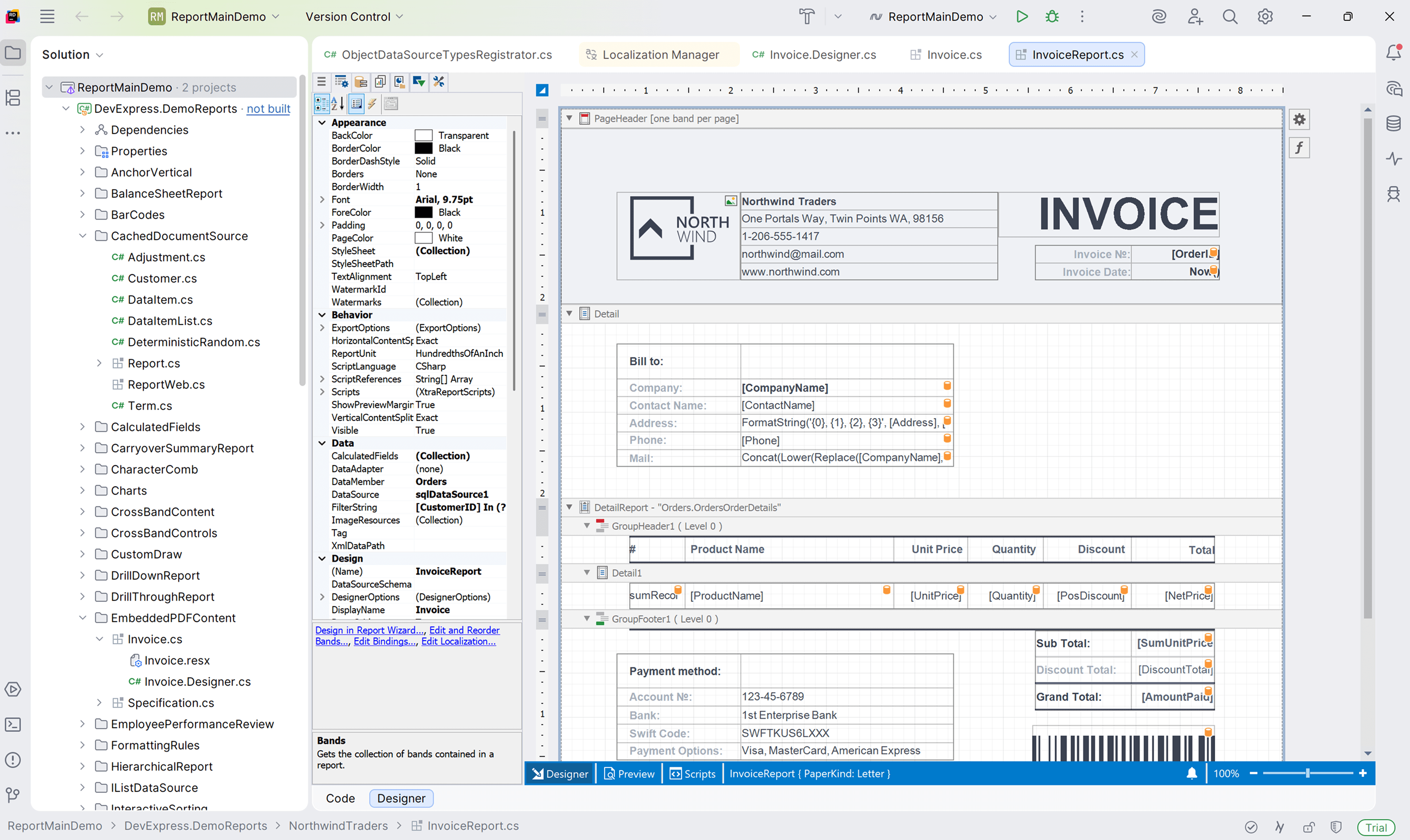
DevExpress Report Designer for JetBrains Rider — .NET Projects Support
In v25.2, we released the DevExpress Report Designer for JetBrains Rider with .NET Framework support. v26.1 will extend this integration to .NET-based projects. We also expect to deliver enhancements such as property search and reset in the Properties panel, along with light/dark theme support to match the Rider IDE.
AI-powered Enhancements
WPF Report Designer — AI-powered Expressions
The DevExpress WPF Report Designer will support expression generation via natural language queries, and will match the AI-powered expression capabilities already available in WinForms and Web Report Designer components. Report creators can describe the desired logic in plain text, and the AI assistant will generate the appropriate expression syntax. This update achieves AI-powered expression parity across all supported desktop and web platforms.
AI Prompt-to-Report Wizard — Optimization
We will optimize the AI Prompt-to-Report Wizard so that users can input shorter prompts and generate more consistent, production-ready report output. Our updated implementation will use a multi-agent workflow and will also reduce token consumption per report generation request.

