How To Create A Google Like Captcha Control In ASP.NET

Want to get that same great look that Google’s Captcha has? Check out how easy it is to set up the ASPxCaptcha control to get that same look and feel:
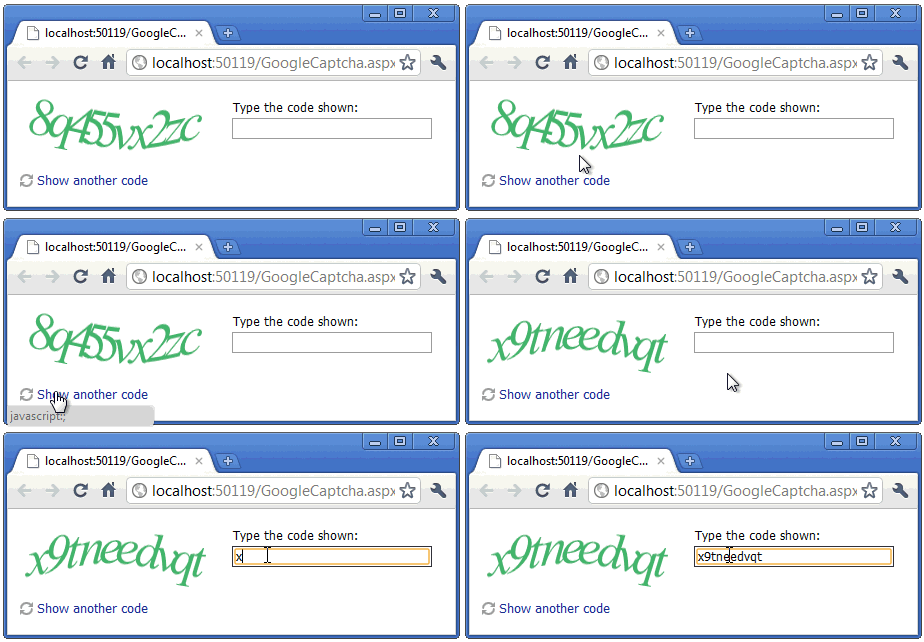
How?
Here’s 3 easy steps for the ASPxCaptcha:
- Set a CodeLength property to 10
- Set the ChallengeImage's BackgroundColor property to 'Transparent'
- Set the ChallengeImage's ForegroundColor property to '#43B468' (you can also dynamically change the ForegroundColor on PageLoad to get different text colors just like in Google's Captcha).
Here’s the ASPX markup:
<dx:ASPxCaptcha ID="captcha" runat="server" CodeLength="10">
    <ChallengeImage ForegroundColor="#43B468" BackgroundColor="Transparent" BorderWidth="0">
    </ChallengeImage>
</dx:ASPxCaptcha>
Customer Request
One of the readers of this blog, John, emailed me and asked:
Mehul, In your blog re ASPxCaptcha, you show the green Captcha characters similar to Google's version. How did you do that? Would like to try it. Thanks, John
Thanks for the question John! I’m sure this post will help others too.
Appearance and Customization
The ASPxCaptcha is made of 3 key functional sub-elements:
- ChallengeImage – An image displayed to the user
- RefreshButton – A button to change the image and generate a new code (in case it’s too difficult for the user)
- TextBox – To enter the code displayed in the ChallengeImage
Each functional element has a wide range of properties for customization.
CodeRush’s Helpful ColorPicker
Here’s another reason CodeRush is super helpful in ASP.NET.
The handy new Color dialog in CodeRush which pops up a dialog that let’s you choose your own color:

Part of ASPxEditors Suite
The ASPxCaptcha control is part of the ASPxEditors Suite which comes with either:
- The ASPxGridView & Editors Library
- The ASPxHtmlEditor Suite
- The ASPxTreeList Suite
- The DXperience ASP.NET, Enterprise and Universal Subscriptions (<—Best deal)
Try the Google look with your ASPxCaptcha. Then drop me a line below with your thoughts. Thanks!

Want to experience a better Visual Studio?
Install CodeRush by downloading the free lite version here: CodeRush Xpress
Or better yet, try the full blown package free for 30 days – CodeRush and Refactor Pro Download!
Free DevExpress Products - Get Your Copy Today
 The DevExpress Team