ASP.NET File Manager - Data Bind using Data Source (available now in v2011.1)

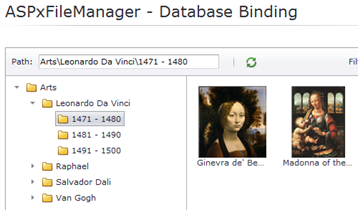
Check out the new feature of our ASP.NET File Manager that allows you to data bind to a database using a DataSource.
Yes, our ASP.NET File Manager control can connect to a database backend and generate the file system user interface. You can use any data source components too like the SQLDataSource!
Here's the markup code with the ASPxFileManager and an XPO Data Source:
<dx:ASPxFileManager
    ID="fileManager"
    runat="server"
    DataSourceID="XpoDataSource1">
    <Settings
        ThumbnailFolder="~/Content/FileManager/Thumbnails"
        ThumbnailSize="100"
        InitialFolder="Salvador Dali\1936 - 1945" />
    <SettingsDataSource
        KeyFieldName="Id"
        ParentKeyFieldName="Pid"
        NameFieldName="Name"
        IsFolderFieldName="IsFolder"
        FileBinaryContentFieldName="Data"
        LastWriteTimeFieldName="LastWriteTime" />
    <SettingsUpload
        Enabled="false"></SettingsUpload>
</dx:ASPxFileManager>
<dx:XpoDataSource
    ID="XpoDataSource1"
    runat="server"
    TypeName="PersistentObjects.ArtsEntity">
</dx:XpoDataSource>
File System Providers
 The ASPxFileManager supports any file system:
- stored on the physical disk
- net shared disk
- in a database
- custom storage
To work with these file systems, we introduced a special API called a 'File System provider'. And the DevExpress ASP.NET File Manager control, the ASPxFileManager, has two predefined file system providers:
- PhysicalFileSystemProvider
- DataSourceFileSystemProvider
What is a file system provider? A file system provider is an API for access to the virtual file system in the ASP.NET File Manager control.
This API provides the definition of methods for getting a file and folder hierarchy. We also provide the methods for editing the FileManager's items like creating a folder, renaming files/folders, deleting files/folders, etc. The File Manager control uses the provider for all operations in the file system.
Databinding to DataSource
You can use any datasource component, such as:
- SQLDataSource
- XpoDataSource
- Entity Framework Datasource
- and more…
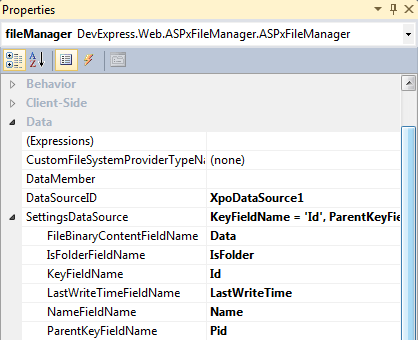
Use any datasources for the ASPxFileManager's file system. Configure the SettingsDataSource section’s properties and set the DataSource or DataSourceID property. The DataSourceFileSystemProvider will be created inside ASPxFileManager and the file system stored in the datasource. Here's a screenshot of the properties:
File Management
The ASPxFileManager's providers give you a definition of methods for getting a file and folder hierarchy. We also provide you methods for editing the FileManager's items. This includes:
- creating a folder
- renaming files/folders
- deleting files/folders
- moving files/folders
- file upload
In the next blog post, I'll tell you about the process of customizing the FileManager’s file system provider.
Available now in v2011 volume 1
The new data source file system provider is available now in the DXperience v2011 volume 1 release.
What do you think of the new capability to data bind and give your end-users a powerful file manager control on your websites? Drop me a line below. Thanks!

DXperience? What's That?
DXperience is the .NET developer's secret weapon. Get full access to a complete suite of professional components that let you instantly drop in new features, designer styles and fast performance for your applications. Try a fully-functional version of DXperience for free now: http://www.devexpress.com/Downloads/NET/
Free DevExpress Products - Get Your Copy Today
 The DevExpress Team