Listening to Clipboard Change Events and Creating the ClipboardHistory Class

Welcome to Part 2 of the series showing how to build plug-ins for Visual Studio using DXCore.
So far we've:
In today's post we'll spend just a bit of time visualizing the clipboard history feature we want to build and map the impact that will have on the underlying structure. That information will help us rough out a class to store the clipboard entries. We'll also create a simple UI to help us visually verify that we're properly tracking changes to the clipboard.
The Clipboard History UI
For the UI, I want something holding an array of cells. Each cell shows an item on the clipboard history. If the text contains source code, I want to see it syntax-highlighted. It might also be useful to know when the element was copied to the clipboard. Developers should be able to quickly select an entry on the history and paste it directly in the code in the fewest keystrokes possible. I also want the array to be configurable. We'll start with a three by three array, holding nine historical elements from the clipboard, but we'll let end users change that configuration (for example, 1x3, 5x5, etc.). There are more aspects of the user interface I am interested in implementing, but for now this is enough to start writing the code to hold the elements.
Tracking Clipboard Change Operations
So to track our clipboard change operations, we're going to need an array. Also, the elements we place in that array should be more than text. If we're going to syntax highlight the text, we'll need to know what language the code is in, so we'll have to store that.
So I'm looking at a class that looks like this:
public class ClipboardHistoryEntry
{
public string Text { get; set; }
public string Language { get; set; }
}
And I've roughed out a class to store the entries, with some logic to prevent duplicate entries and methods to access elements in the history:
public static class ClipboardHistory
{
public static int RowCount = 3;
public static int ColumnCount = 3;
public static ClipboardHistoryEntry[] Entries = new ClipboardHistoryEntry[RowCount * ColumnCount];
public static int LastIndex = RowCount * ColumnCount - 1;
/// <summary>
/// Moves all the clipboard entries by one place closer to the specified end of the history.
/// </summary>
/// <param name="lastIndex">The index of the last entry in the history. All previous entries will shift back one position (replacing this entry).</param>
private static void ShiftEntriesBack(int lastIndex)
{
for (int index = lastIndex; index > 0; index--)
Entries[index] = Entries[index - 1];
}
/// <summary>
/// Returns the index of a matching entry based on the specified text.
/// If no match is found, returns -1.
/// </summary>
/// <param name="text">The text to search for.</param>
private static int IndexOf(string text)
{
for (int index = 0; index <= LastIndex; index++)
if (Entries[index] != null && Entries[index].Text == text)
return index;
return -1;
}
/// <summary>
/// Adds an entry to the clipboard history. Call whenever the contents of the clipboard changes.
/// </summary>
public static void AddEntry(ClipboardEntry details)
{
int lastIndex = IndexOf(details.Text); // Is this text already in the history?
if (lastIndex == -1) // No, remove the last entry from the history...
lastIndex = LastIndex;
ShiftEntriesBack(lastIndex);
Entries[0] = new ClipboardHistoryEntry { Text = details.Text, Language = details.LanguageID };
}
public static bool IndexIsValid(int index)
{
return index >= 0 && index <= LastIndex;
}
public static ClipboardHistoryEntry GetEntry(int index)
{
if (!IndexIsValid(index))
return null;
ClipboardHistoryEntry thisEntry = Entries[index];
if (thisEntry != null)
return thisEntry;
return null;
}
public static string GetText(int index)
{
ClipboardHistoryEntry thisEntry = GetEntry(index);
if (thisEntry != null)
return thisEntry.Text;
else
return String.Empty;
}
}
One of the methods above, ShiftEntriesBack, deserves some explanation. When new text is cut copied to the clipboard, we'll insert that at the top of the list, and then shift all the other entries to the end of the history, ultimately losing the last entry. However, if that new text arriving on the clipboard happens to match an existing entry in the history, then we don't want to lost the last entry. Instead, we want to lose that matching historical element, and then insert the new entry (the same text) at the top of the list. This is why ShiftEntriesBack has a lastIndex parameter (note the test at the start of AddEntry). This prevents duplicate entries from appearing in the history.
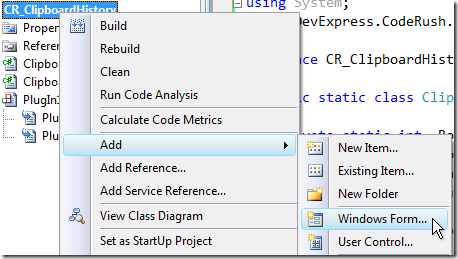
Now let's add a form so we can see the history we're collecting. Right-click the project and choose Add | Windows Form....
Give the form a meaningful name...

...and fill out the following properties:
| Property | Value |
| Text | Clipboard History |
| MinimizeBox | False |
| ShowIcon | False |
| ShowInTaskbar | False |
| StartPosition | Manual |
For the last property, StartPosition, we'll add code later to locate the form over the edit window. Now switch to the code. Let's create a new static method in the FrmClipHistory class to show the history...
public static void ShowClipboardHistory()
{
using (FrmClipHistory frmClipHistory = new FrmClipHistory())
{
TextBox textBox = new TextBox();
textBox.Multiline = true;
textBox.Anchor = AnchorStyles.Top | AnchorStyles.Bottom | AnchorStyles.Left | AnchorStyles.Right;
textBox.Location = new Point(0, 0);
textBox.Size = frmClipHistory.ClientRectangle.Size;
for (int i = 0; i <= ClipboardHistory.LastIndex; i++)
if (ClipboardHistory.Entries[ i ] != null)
textBox.AppendText(String.Format("{0}. {1}", i, ClipboardHistory.Entries[ i ].Text) + Environment.NewLine);
frmClipHistory.Controls.Add(textBox);
frmClipHistory.ShowDialog(CodeRush.IDE);
}
}
Back in our plug-in, let's change the code in our event handlers to take advantage of our new FrmClipHistory and ClipboardHistory classes...
private void actClipboardHistory_Execute(ExecuteEventArgs ea)
{
FrmClipHistory.ShowClipboardHistory();
}
private void PlugIn1_ClipboardChanged(ClipboardChangedEventArgs ea)
{
ClipboardHistory.AddEntry(ea.Details);
}
Testing One More Time
Let's Run again...
| Unable to Build Because the Plug-in File is Locked? |
|
Plug-in files can get locked if you close down and then start Visual Studio after successfully building the plug-in at least once. When the DXCore loads the second time, it loads all plug-in DLLs including the plug-in we just built. If you can't build because the DLL is locked, follow these steps: 1. From the DevExpress menu, bring up the About... box. 2. Click the Plug-ins... button. 3. Sort the directory by file date modified. The most recently-built plug-in should appear on top. 4. Exit all instances of Visual Studio using this plug-in. 5. Delete both this plug-in's DLL and its corresponding PHB file. 6. Start Visual Studio and resume your session working on this plug-in. |
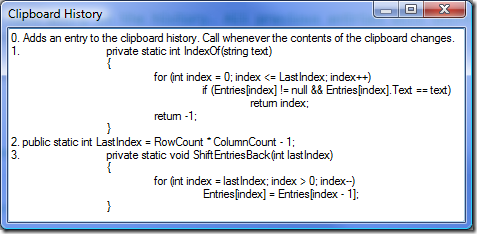
In the second instance of Visual Studio, copy several random selections of source code, and then press our shortcut, Ctrl+Shift+Insert. Our clipboard history test UI should appear:
Excellent!
We're getting closer. In tomorrow's post we'll spend some time refining the UI, and learn how to work with CodeView controls to get syntax-highlighted views into source code....