Integrating CodeView controls with the Clipboard History Plug-in

Welcome to Part 3 of the series showing how to build plug-ins for Visual Studio using DXCore.
So far we've:
In today's post we'll take the crude test UI built in yesterday's post and turn it into something substantially sexier, using a powerful control that ships with the DXCore called the CodeView. CodeView controls syntax-highlight the source code they contain using the same color settings and fonts you use for syntax-highlighting in Visual Studio.
Working with CodeView Controls...
At the start of this series I mentioned I wanted to syntax-highlight the text from the clipboard history, so let's do that right now. The DXCore CodeView control is located in the DevExpress.CodeRush.UserControls namespace. This namespace is not added automatically by the plug-in wizard, so we'll need to add this by hand.
Right-click the References folder of your project and choose Add Reference....
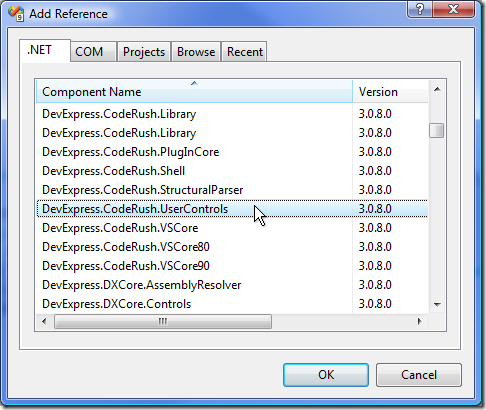
Select the DevExpress.CodeRush.UserControls assembly, and click OK.
| Why am I seeing "CodeRush" in the namespace? |
|
The decision to release DXCore to the public was made a few years after CodeRush was released. The DXCore originally started as the low-level engine to CodeRush, which we pulled out so the .NET community could have a fast, easy and powerful way to extend Visual Studio. Consequently, there are still some places inside the DXCore where the word CodeRush shows up as part of the namespace. We won't change this because there are plug-ins out there that would break if we did. Because DevExpress.CodeRush.UserControls ships with the DXCore, this plug-in can be easily shared with all developers, even those that do not have CodeRush installed. |
Next, let's replace the TextBox from the test UI built earlier with an array of CodeView controls....
The changes needed in FrmClipHistory start with the declaration of two fields we'll need to track the active form (essentially a singleton) and the CodeView controls we'll place on it:
static FrmClipHistory _FrmClipHistory;
static CodeView[] _CodeViews = new CodeView[ClipboardHistory.LastIndex + 1];
Next, let's change the ShowClipboardHistory method so the _FrmClipHistory field points to the form when it's displayed, and is later set to null when the clipboard history is closed. Let's also add calls to three new methods to create, position, and update the contents of the CodeView controls:
public static void ShowClipboardHistory()
{
if (_FrmClipHistory != null)
return;
_FrmClipHistory = new FrmClipHistory();
try
{
CreateViews();
PositionViews();
UpdateViews();
_FrmClipHistory.ShowDialog(CodeRush.IDE);
}
finally
{
CleanUpViews();
_FrmClipHistory.Dispose();
_FrmClipHistory = null;
}
}
The CreateViews method will create the controls and parent them:
private static void CreateViews()
{
for (int i = 0; i <= ClipboardHistory.LastIndex; i++)
{
_CodeViews[ i ] = new CodeView();
_FrmClipHistory.Controls.Add(_CodeViews[ i ]);
}
}
The PositionViews method arranges the clipboard views into an array of evenly-spaced rectangles on the form:
private static void PositionViews()
{
if (_FrmClipHistory == null)
return;
Rectangle clientRect = _FrmClipHistory.ClientRectangle;
int width = clientRect.Width / ClipboardHistory.ColumnCount;
int height = clientRect.Height / ClipboardHistory.RowCount;
for (int row = 0; row < ClipboardHistory.RowCount; row++)
for (int column = 0; column < ClipboardHistory.ColumnCount; column++)
{
CodeView thisView = _CodeViews[GetIndex(row, column)];
if (thisView == null)
continue;
thisView.Size = new Size(width, height);
thisView.Location = new Point(width * column, height * row);
}
}
PositionViews contains a call to GetIndex, which looks like this:
private static int GetIndex(int row, int column)
{
return row * ClipboardHistory.ColumnCount + column;
}
The UpdateViews method moves text from our clipboard history into each CodeView control:
private static void UpdateViews()
{
for (int i = 0; i <= ClipboardHistory.LastIndex; i++)
{
ClipboardHistoryEntry thisEntry = ClipboardHistory.Entries[ i ];
if (thisEntry == null)
continue;
CodeView thisView = _CodeViews[ i ];
if (thisView == null)
continue;
thisView.LanguageID = thisEntry.Language; // Determines language for syntax highlighting
thisView.Text = thisEntry.Text;
}
}
And finally, the CleanUpViews method (called from the finally block of ShowClipboardHistory) sets each element of the _CodeViews array back to null...
private static void CleanUpViews()
{
for (int i = 0; i <= ClipboardHistory.LastIndex; i++)
_CodeViews[ i ] = null;
}
Sizing the Clipboard History Window
The code we've added so far will correctly position the CodeViews when the Clipboard History is first displayed, but we'll need a bit more to make it all work when the form is resized.
Activate the FrmClipHistory.cs [Design] surface, then on the Events page of the Properties grid and add a handler for the form's Resize event. In the handler we can add a simple call to PositionViews, like this:
private void FrmClipHistory_Resize(object sender, EventArgs e)
{
PositionViews();
}
The code feels pretty good so far. Let's see how it works....
Testing the CodeView Layout
Run one more time....
In the second instance of Visual Studio, open some source code and perform a number of copy operations.
Press Ctrl+Shift+Insert.
Resize the form.
You should see something like this:

Definitely looking better.
Tomorrow we'll create a visual selection mechanism (e.g., a cursor), so we can select the desired clipboard history element and actually paste that entry into the code. See you then!