DevExpress Office & PDF File API — Year-End Roadmap (v26.2)

In this blog post, I'll outline the DevExpress Office & PDF File API features and capabilities we expect to ship in our year-end release (v26.2 — December 2026). To discuss this roadmap in greater detail, or to share a business use case we have yet to address, please submit your feedback through the DevExpress Support Center. We are happy to follow up.
Roadmap Updates
.NET 11 Support
DevExpress Office & PDF File API libraries will support .NET 11 (both v26.1 and v26.2) following Microsoft's official release.
Minimum Supported .NET and Visual Studio Versions
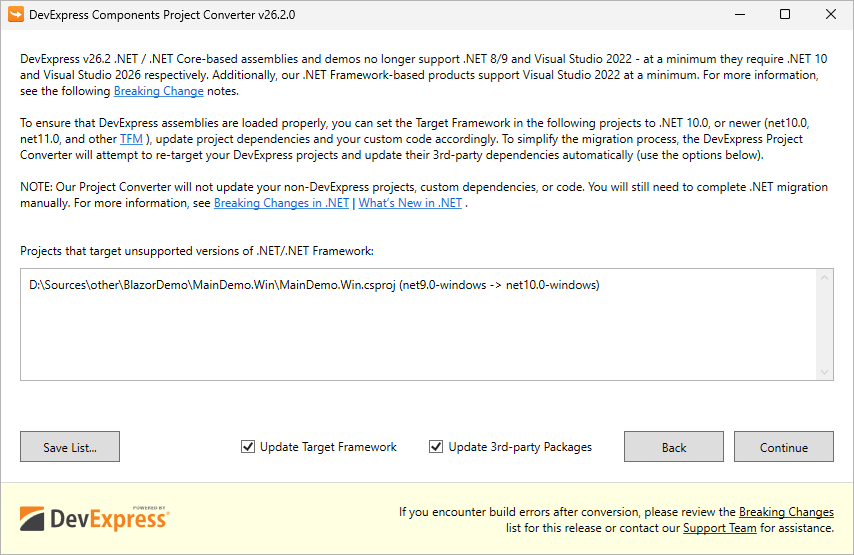
Automatically Re-target DevExpress-based Projects to .NET 10 and Update 3rd Party NuGet Packages
For .NET/.NET Core, we recommend using the DevExpress Project Converter to update all DevExpress-related and third-party project references, packages, and configurations automatically. See also a related Breaking Change notice.
Separate NuGet Packages for Different .NET Versions (.NET 10, .NET 11, etc.)
Today, third-party dependencies are automatically patched after a detected vulnerability (for example, a vulnerability in System.Security.Cryptography.Xml) only for the minimally supported .NET version (today it's .NET 8). Today (with v26.1, v25.2, v25.1, v24.2), manual version pinning (Solutions #1 or #2 from this article) may still be required for .NET 9/10-based projects depending on their exact TFM and project SDK. We will provide .NET-specific dependency groups in DevExpress NuGet packages, which will simplify use of v26.2.
Security — SBOMs and CRA Readiness
If you deliver software in the EU, the Cyber Resilience Act (CRA) will require a Software Bill of Materials (SBOM – an inventory of every component inside your solution) as part of your conformity documentation. The CRA and its associated regulatory regime will go into effect on December 2027. Each software application/solution manufacturer must fulfil SBOM-related obligations. DevExpress-authored SBOMs will help customers document/inventory DevExpress libraries used within a DevExpress-powered app.
- Components embedded inside a package. Some DevExpress NuGet packages bundle fonts and third-party JavaScript libraries. Package metadata has no way to declare them, so a scanner never reports them — even though their licenses and vulnerabilities are as real as those of any declared dependency.
-
Developer dependencies. Libraries we use to build our products never reach users, so we mark them with
scope: "excluded". We list these libraries regardless, because all vulnerabilities should be documented.
WCF Dependency Will Be Removed from XPO and Printing Core Libraries
These core libraries currently include references to WCF (Windows Communication Foundation), a standard library with a well-documented history of vulnerability disclosures in its dependencies ("thanks" to System.Security.Cryptography.Xml). We will remove these WCF references from DevExpress.Xpo core and DevExpress.Printing.Core libraries in v26.2. .NET Framework users will use the new DevExpress.Xpo.Services and DevExpress.Printing.Remote libraries instead (if you need this advanced and rarely used WCF functionality). The Project Converter will update project references automatically, so you should not encounter upgrade-related issues.
Product-Tailored AI Skill Updates
We expect to extend and update the DevExpress AI Agent Skills repository based on user feedback (for multiple implementation tasks and AI coding assistants, such as GitHub Copilot, Claude Code, Cursor, and JetBrains AI Assistant).
The repository includes folders for different DevExpress products. Navigate to the dx-office-file-api directory to locate AI Agent Skills for Office/PDF File API coding assistants with built-in knowledge of Office/PDF File API libraries, their capabilities, related APIs, best practices, and code examples.
New Document Processing Libraries for .NET and Java
As you may already know, our new PDF and Presentation APIs are object-based document processing libraries. In upcoming release cycles, we will extend the same object-based approach to our Word Processing and Spreadsheet APIs. Both APIs will share the same design objectives: a modern, idiomatic object model built upon concrete, cloneable objects, with a consistent developer experience for both .NET and Java. Moving forward, we expect to design future APIs from ground up for both platforms, so developers can use the same concepts and document workflows regardless of their technology stack.
New Word Processing Document API
DevExpress.RichEdit.Core, it will be backend-oriented and run cross-platform on .NET 10+.- Generate a complete document (an invoice, report, technical documentation) from scratch
- Examine and edit the document object tree, including text runs, paragraphs, shapes, fields, and other elements
- Apply styles and formatting
- Insert tables and images
- Replace placeholders, calculate fields, and initiate mail merge
- Search, edit, and format document elements using an advanced range-based API
- Convert documents across different Word-like formats, including HTML
- Export documents to PDF
- Encrypt or protect a document
- And more
New Spreadsheet Document API
DevExpress.Spreadsheet engine and calculation infrastructure. You will work with concrete objects through a clean, range-based model. The same API and feature set will be available across both .NET and Java.- Generate a workbook from scratch
- Convert workbooks across formats, and split and merge workbooks
- Edit worksheets, rows, columns, and cells
- Apply styles and formatting
- Insert tables, charts, and shapes
- Read, write, and calculate formulas
- Sort and filter data
- Export to PDF
- Encrypt or protect a workbook
- And more
Safer Document Processing API
PDF Document API — Secure Loading and Sanitization
- Secure loading — reject dangerous documents before or during parsing. You will be able to set limits for file size, indirect-object count, and page count, and activate a strict loading mode that disables heuristic recovery for malformed PDFs.
-
Active content sanitization — remove executable and interactive content, including embedded JavaScript, document actions (
JavaScript,Launch,URI,GoTo, andSubmitForm), and embedded files or attachments. - Privacy and data-leakage prevention — sanitize external links and annotations, strip document metadata, and inspect document content before removal, so sanitization remains under your control.
Presentation API — Security and Privacy
- Security loading limits — enforced during import to guard against decompression and resource-exhaustion attacks. You will be able to cap the slide count and the number of shapes per slide, along with file size and XML element count/nesting depth. When a limit is exceeded, the API will allow you to handle, log, or throw an error, based on your configuration.
- Dangerous content removal — applied during import, before content is loaded into the document model. You will be able to strip external images, links, and chart-data references (removing these prevents tracking and IP leakage), macros, OLE objects, ActiveX controls, and custom XML parts.
-
Privacy sanitization — an
Inspect/SanitizeAPI applied on demand to a loaded document.Inspectdetects sensitive content;Sanitizeremoves or neutralizes it, covering document metadata (author, organization, description), hidden slides, unrecognizable text, speaker notes, and embedded objects.
New PDF Document API
Bookmark API
Incremental Updates — Research Stage
- Update document metadata
- Apply digital signatures
- Change page size, boxes, or rotation
- Add, modify, or remove attachments
- Insert pages or overlay content on existing pages
Digital Signature API
- Create signature fields and customize associated appearance, including signer name, reason, location, date, labels, fonts, colors, and images.
- Sign documents with a digital signature and associated metadata such as reason, location, contact information, and signing time, together with a certification level and change permissions.
- Inspect existing signatures, including the signer, reason, location, signing time, certification level, and permitted document changes.
Form Field and Annotation Flattening
PDF/A and PDF/UA Compliant API
- Generate PDF/A- and PDF/UA-compliant documents directly during document generation.
- Convert loaded or newly generated documents to a target compliance standard.
- Validate compliance before distributing a document.
OCR API
- Recognize text in scanned pages, page regions, and multi-page documents.
- Generate a searchable PDF text layer while preserving original page graphics.
- Extract recognized text as a structured model of blocks, lines, and words, each with its own text, bounds, and confidence level.
- Preserve page reading order and text positioning.
Presentation API
Hyperlink Support
- External web URLs
- Email addresses (
mailto:) - Local files
- Other slides within the same presentation
Word Document Processing
PDF Export / Rendering — Floating-Point Layout Calculation
System.Single, RectangleF, PointF, and SizeF) instead of integers. The change will start with font metrics and extend to the layout model. This shift will enhance positioning precision and fidelity for rendered and exported documents (PDF and image formats). You can expect more precise text and object positioning, improved table and paragraph accuracy, and closer compatibility with Microsoft Word's rendering engine.PDF/UA-2 Export — PDF Structure Destinations & Field Tagging
Spreadsheet Processing
ODS Format Support — Research Stage
Your Feedback Counts
v26.1 - What’s New
And before I let you go - If you have yet to review the features/capabilities introduced in our most recent major update, please visit the following webpage and let us know what you think of our June release by responding to our online survey: Explore Our Newest Features (v26.1).
Free DevExpress Products - Get Your Copy Today
 Maria Nikulina (DevExpress)