VCL — Year-End Roadmap (v25.2)

The following post outlines VCL UI component (Delphi & C++Builder) features/capabilities we expect to ship in December 2025.
Before I detail our year-end VCL Roadmap...if you have not yet done so, please take a moment to review What's New in v25.1 (our last major VCL update) and submit feedback using the related survey. Your responses help us better understand your needs/concerns and allows us to make more informed development decisions. As always, thanks to everyone who has already submitted feedback/suggestions.
RAD Studio 13 Support
As you probably know, RAD Studio 13 Ganymede is coming soon. As always, it requires us to test and modify our release artifacts:
- Design-time packages and tests (to address architectural changes).
- Licensed and trial installations.
- Internal build farm and related development tools.
Our v25.1.4 build already includes unofficial support for RAD Studio 13 Beta.
Support Deprecation: Delphi/C++ Builder 10.3 (Rio), 10.2 (Tokyo), 10.1 (Berlin), 10.0 (Seattle)
Embarcadero first released its oldest IDE version (10.0) a decade ago. With v25.2, we will only support 10.4 Sydney (released more than 5 years ago) and the latest versions of newer updates (11.3, 12.3, 13.vLast). Please consult Prerequisites: Supported IDEs, Frameworks, and SDKs for additional information in this regard.
Accessibility, UI Automation, and Keyboard Navigation Enhancements
As you may recall from previous announcements, accessibility (A11Y) support is a primary focus area across all product libraries. VCL is no exception in this regard. Our strategy is driven by the following principles:
- Make our UI components and related software libraries more accessible to people with visual impairments.
- Comply with existing A11Y-related regulations in regions like the US, Europe, etc.
- Ensure that apps built with our UI components are testable using automated testing/e2e software (Microsoft UI Automation <UIA> is important for both external customers and us internally).
Full VCL accessibility support is a significant undertaking and requires substantial development resources. Accessibility-related engineering efforts will continue throughout 2025.
v25.2 will include the following accessibility enhancements:
- TreeList and Data Grid navigation and data editing usage scenarios.
- Other popular Data Editors and UI controls (like tagbox, hyperlink, color and currency edit, formatted label, etc.).
- Improved accessibility support for the DevExpress VCL Scheduler and Pivot Grid.
Our VCL demos will have accessibility support enabled by default in v25.2.

ExpressReports: Official Release/RTM
As you may already know, hybrid desktop and mobile apps (apps that look like native apps for a given platform, but rely on JavaScript (JS) or other technologies inside) are becoming more and more prevalent in the marketplace. Good examples are desktop versions of Microsoft Teams, Outlook (new) and Visual Studio Code, which rely on a WebView2 (an embedded web browser) component inside a native container app for Windows, macOS, or Linux. DevExpress itself has been using JS wrappers in our .NET MAUI, Blazor, and even WinForms product lines for quite a long time (as well as our Blazor component wrappers in WinForms/WPF with BlazorWebView).
In our v25.1 release cycle, we published our new AI-powered Reporting Platform (ExpressReports) as a Community Technology Preview (CTP). This bridge leverages the DevExpress JavaScript Report Designer and Viewer for use in native VCL apps (using modern web-based design capabilities via WebView2 and ASP.NET Core).
In v25.2, we will officially release ExpressReports with the following new capabilities:
- Enhanced .NET and JS dependency management (with CPM and props files, like our .NET/JS products).
- Report parameter support.
- Subreport support.
- We will make it easier to configure report parameters, print settings and initiate other common reporting tasks using Delphi/C++ Builder code at the TdxReport level.
- UI localization enhancements.
- Better multi-user/distributed environment support (as a prerequisite to support a self-hosted report backend service in 2026).
Our ExpressReports demo will also include additional modules based on aforementioned usage scenarios (which we temporary excluded for v25.1). Our ExpressReports help system should also include additional GitHub examples, for instance:
- edit report templates at runtime in the end-user report designer and store these templates in a file system (GitHub);
- preview database-stored report templates in the application UI (GitHub);
- filter a report data source based on currently selected grid records (GitHub);
- localize report viewer and designer UI (GitHub)

ExpressDashboards: An Early Preview/CTP
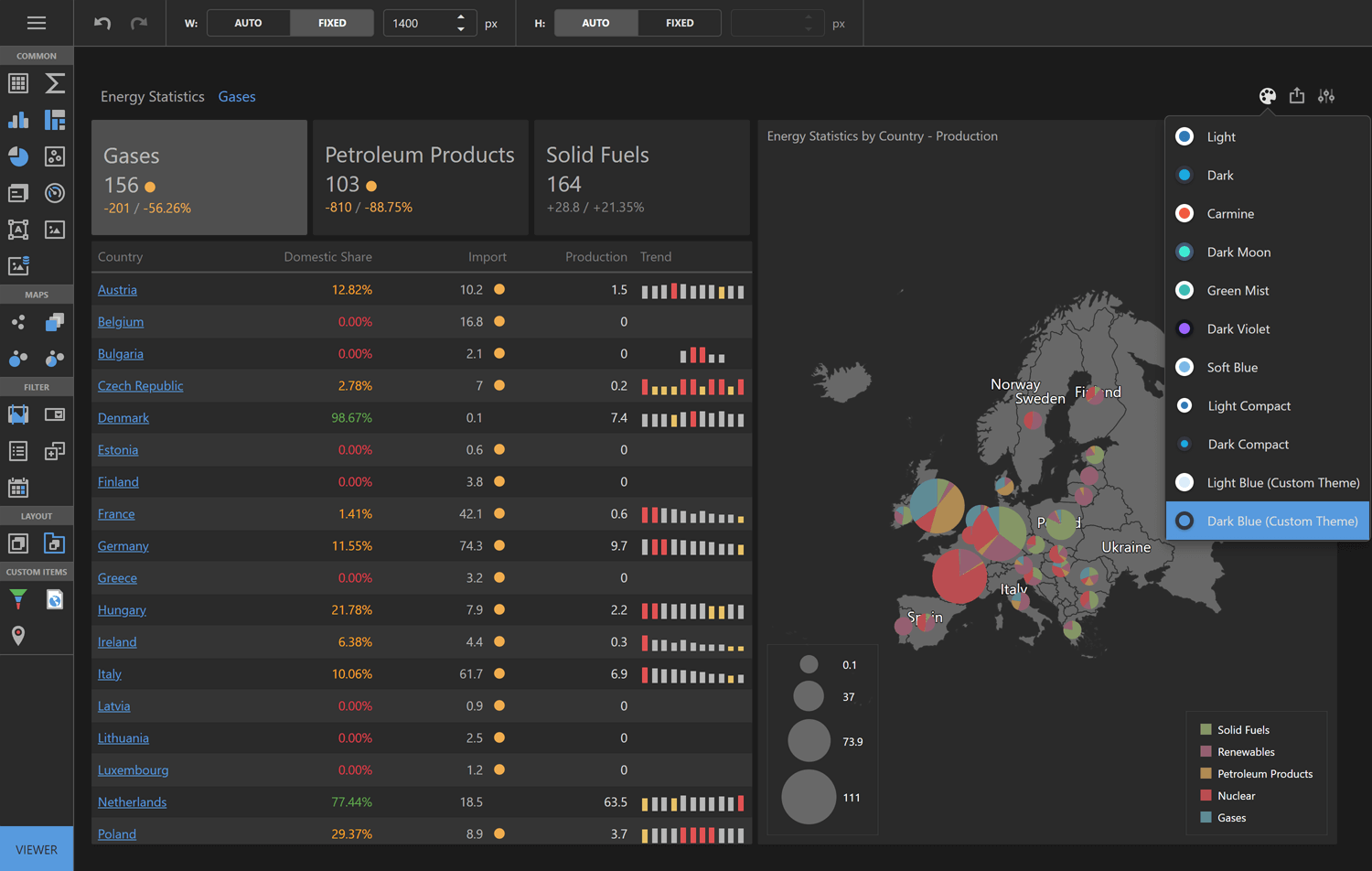
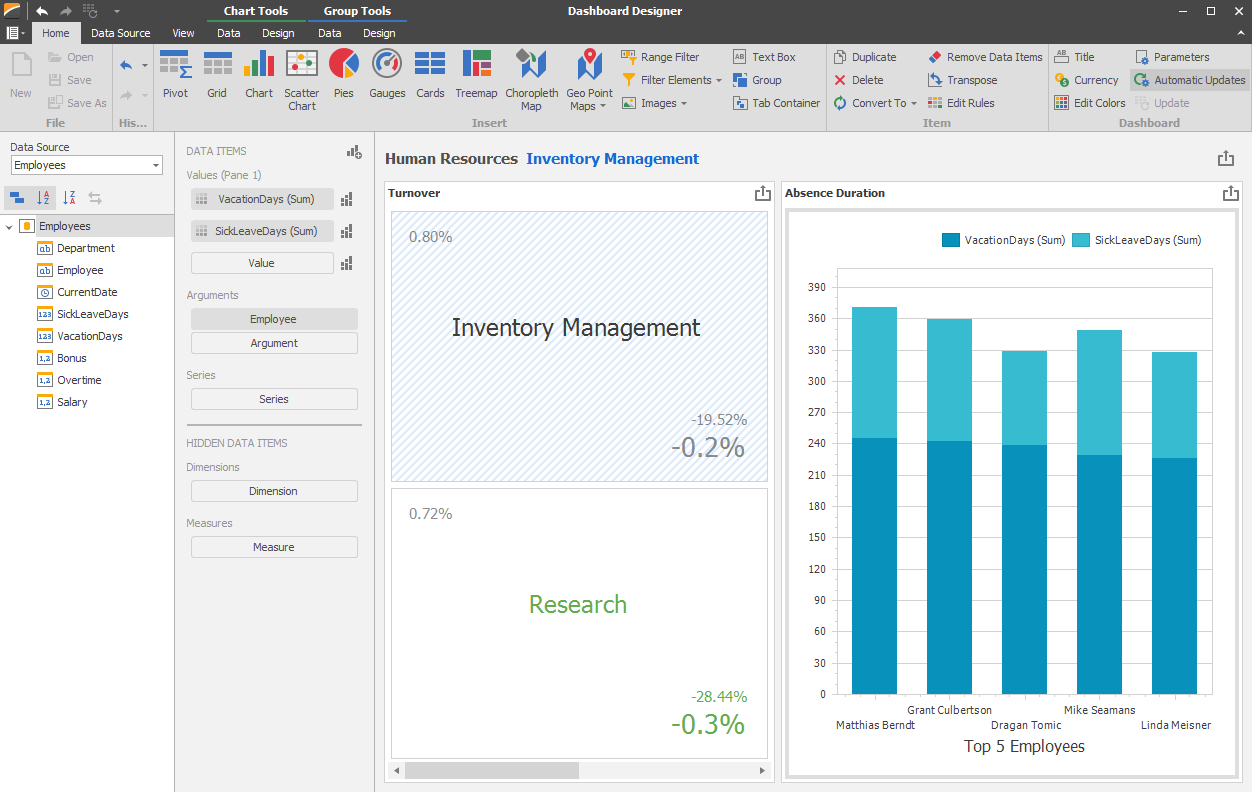
As you know by now, our ExpressReports-based integration strategy is applicable to other DevExpress JS-based component libraries (like BI Dashboards). With v25.2, we plan to ship a Community Technology Preview (CTP) of our hybrid VCL BI Dashboard implementation powered by the DevExpress Dashboard Designer & Viewer (for ASP.NET Core/JS). With this implementation, dashboards can be created, designed and previewed inside VCL apps and stored in a database/file system as JSON/XML when necessary.
Technical prerequisites to run this solution also include ASP.NET Core and a WebView2 component (an embedded web browser) for Microsoft Windows. All required .NET and JS dependencies are embedded into a single self-contained EXE file transparently. As such, you can use Delphi/C++Builder for many dashboard customizations, maintaining one of the key advantages of VCL as a platform. For additional technical information in this regard, please review this FAQ.
Artificial Intelligence (AI) Enhancements
If you are unfamiliar with our existing VCL AI-Powered extensions for text editors and ExpressReports, please review these documents.
VCL v25.2 will introduce one or more AI-related enhancements from the following list:
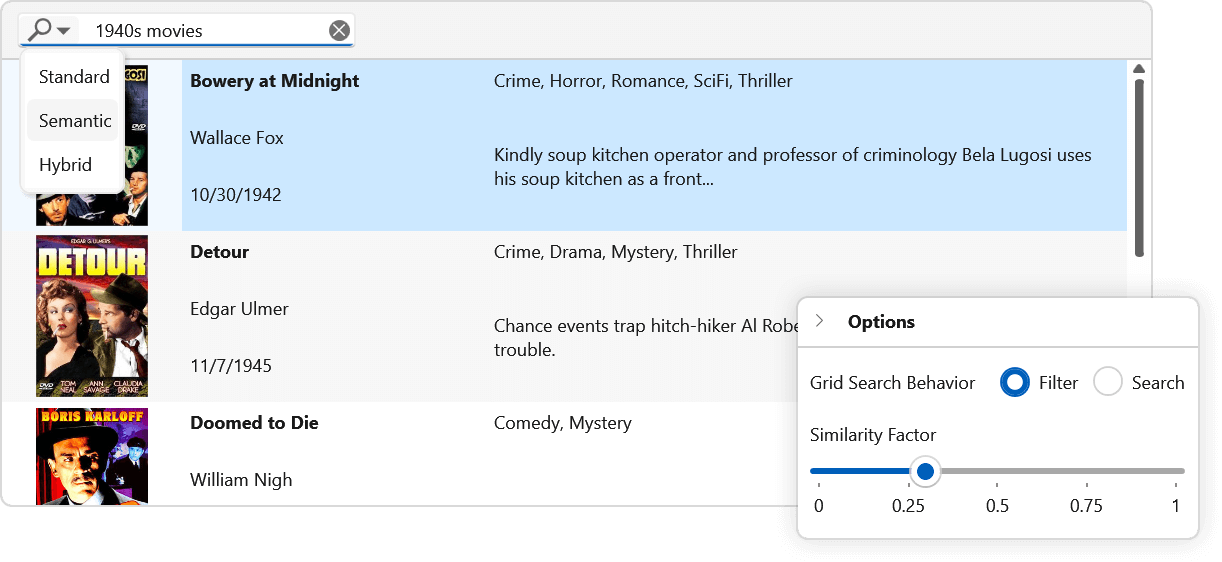
- Semantic or Smart Search in the DevExpressw VCL Data Grid and Lookup editors.
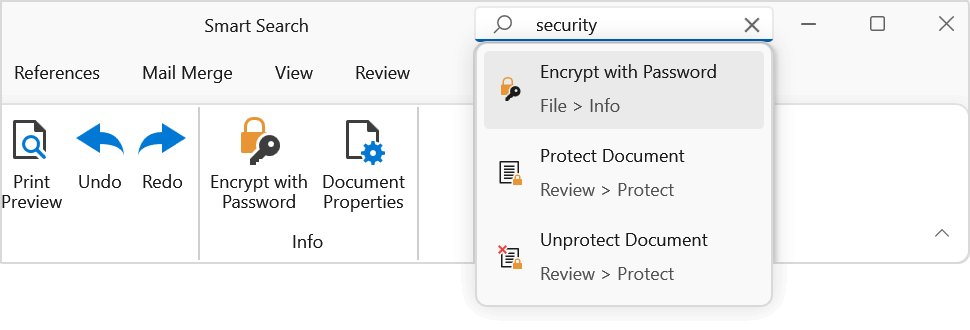
- Semantic or Smart Search within our VCL Ribbon and Accordion controls.
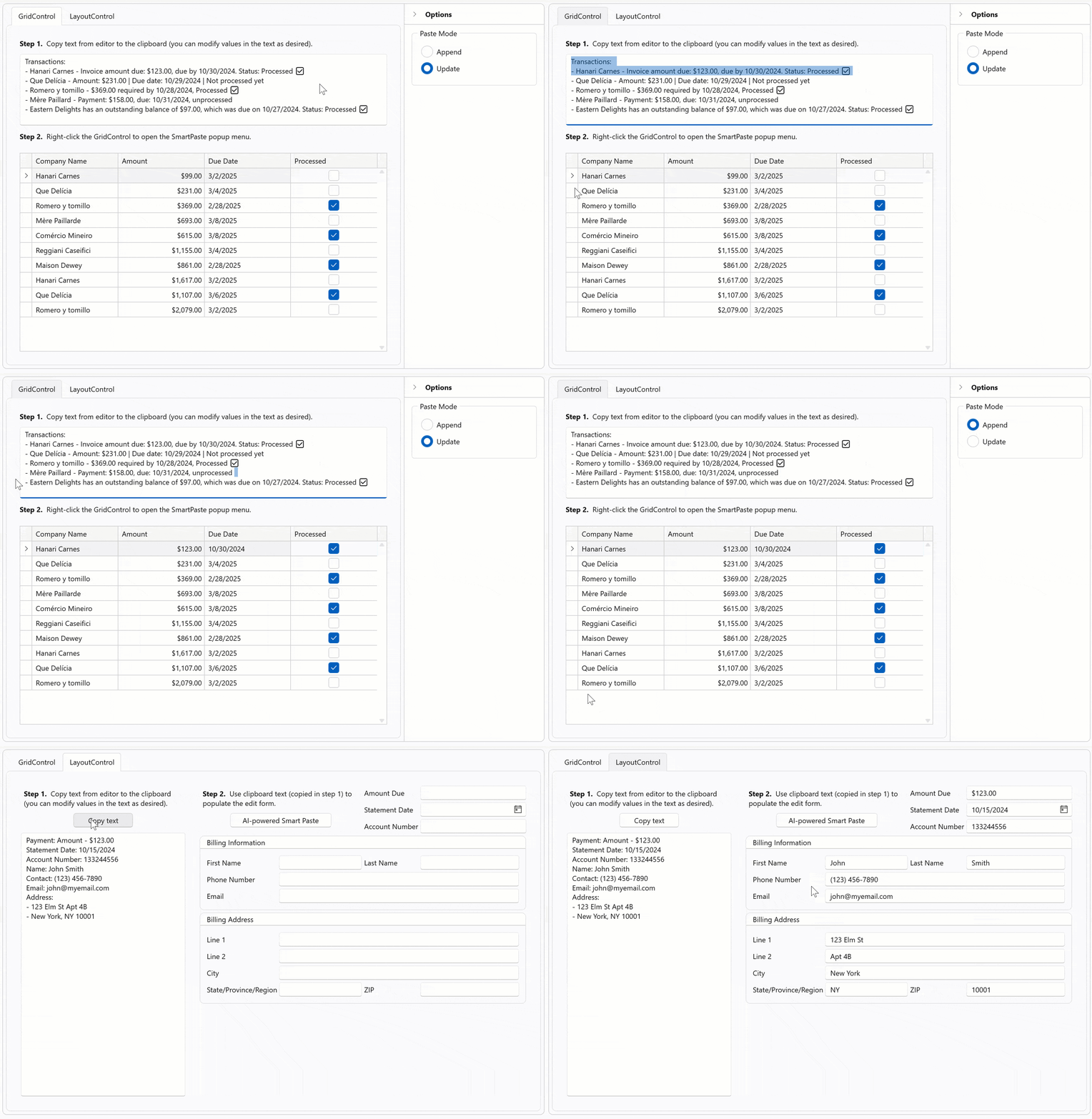
- AI-powered Smart Paste within our VCL Data Grid and Layout control. SmartPaste analyzes content and intelligently assigns correct values to appropriate layout fields or row cells (to transform traditional copy-and-paste operations).
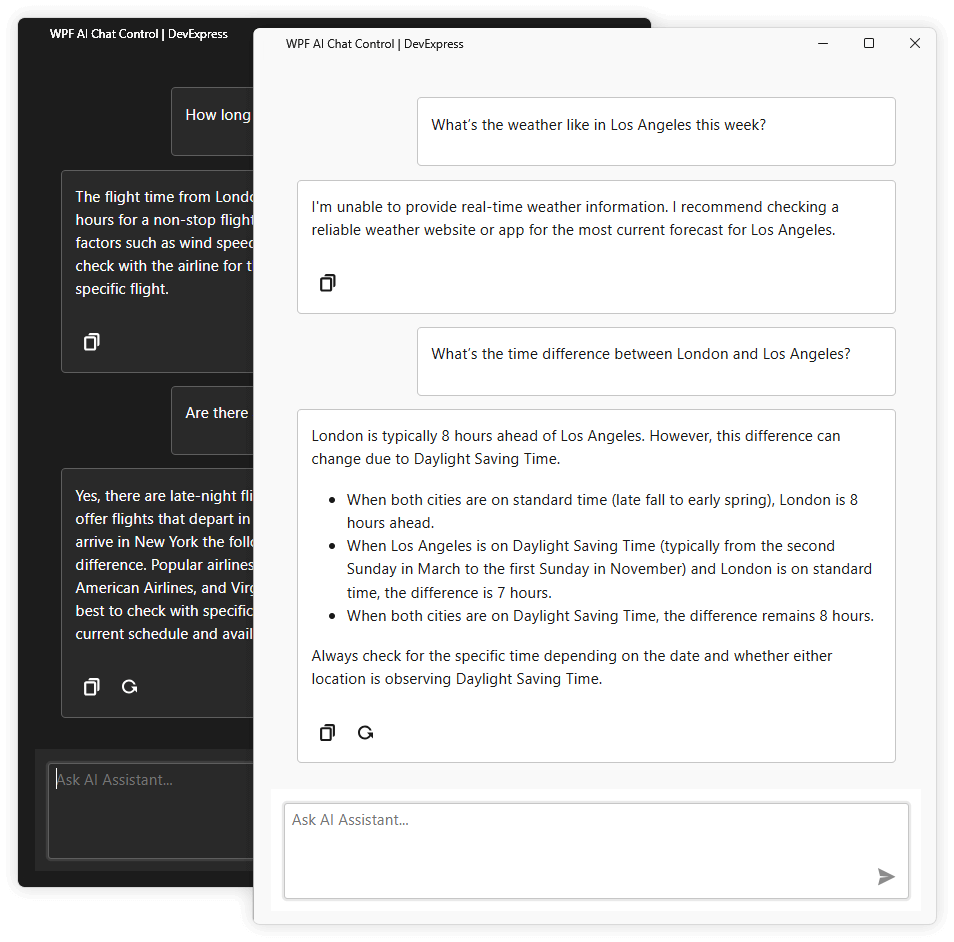
- AI Chat integration (including a project template).
Smart Grid Search
Smart Menu Search
Smart Form Paste
AI Chat Control
DevExpress MCP Server for AI-Powered Documentation Access
We will introduce an MCP server that connects GitHub Copilot Chat, Cursor, and other MCP-compatible AI tools directly to our comprehensive documentation database. The server will provide instant access to over 300,000 help topics through natural language queries within your IDE. This will allow you and AI coding agents such as Claude Code to access current DevExpress documentation directly within the AI assistant's context. Learn more: DevExpress Documentation MCP Server: Configure an AI-powered Assistant.

Your Feedback Matters
As always, we welcome your feedback. Should you have specific questions related to our v25.2 release, please submit a support ticket via the DevExpress Support Center.
Thanks,
Dennis Garavsky
Principal Product Manager
dennis@devexpress.com