VCL – June 2026 Roadmap (v26.1)

EDIT: What's New in v26.1 | VCL — Year-End Roadmap (v26.2)
The following list outlines features/capabilities we expect to ship for our VCL UI Component Libraries - Delphi & C++Builder (expected release date: June 2026). As you will see, accessibility (A11Y), developer productivity, and blazing fast pixel-perfect rendering for high-resolution displays remain cornerstones of our long‑term VCL product strategy. As always, our intent is also to reduce friction in day‑to‑day development tasks and help you build and maintain complex VCL applications more efficiently.
Before I detail our VCL Roadmap...if you have not yet done so, please take a moment to review What's New in v25.2 (our last major VCL update) and submit feedback using the inline survey. Your survey responses (both in the What's New and in Roadmap posts such as this) help us better understand your needs/concerns and allows us to make more informed development decisions. As always, thanks to everyone who has already submitted feedback/suggestions.
Accessibility, Microsoft UI Automation, and Keyboard Navigation Enhancements
As you may recall from previous announcements, accessibility (A11Y) support remains a primary focus area across all DevExpress product libraries. As you may also know, Embarcadero introduced their own Microsoft UI Automation (UIA) support recently. DevExpress VCL efforts in this area began in 2024 (track our current progress).
Our accessibility strategy continues to be driven by the following principles:
- Make our UI components and related software libraries more accessible to people with visual impairments (via narrator/screen reader apps such as NVDA or Narrator).
- Ensure that applications built with our UI components are easily testable using automated UI testing and enterprise-scale end‑to‑end frameworks powered by UIA (such as Ranorex).
- Help our customers comply with existing A11Y-related regulations in regions such as the US and Europe (Section 508, EN 301 549, EAA).
Full VCL accessibility support is a large undertaking and requires significant engineering investment. In 2026, we plan to finalize our main accessibility enhancements for the VCL platform. It may include, but is not limited to better accessibility support in the following components:
- Remaining Data Editors and Forms (such as Shells, ListBoxes, Printing System dialogs, etc.) and Data Grid use-cases (like summaries)
- Spreadsheet, Rich Text Editor, PDF Viewer, Scheduler
- Designers in the ExpressReports/ExpressDashboards products
- Pivot Grid, Vertical/Property Grid, Charts, Maps

VCL Reporting and BI Dashboard Enhancements
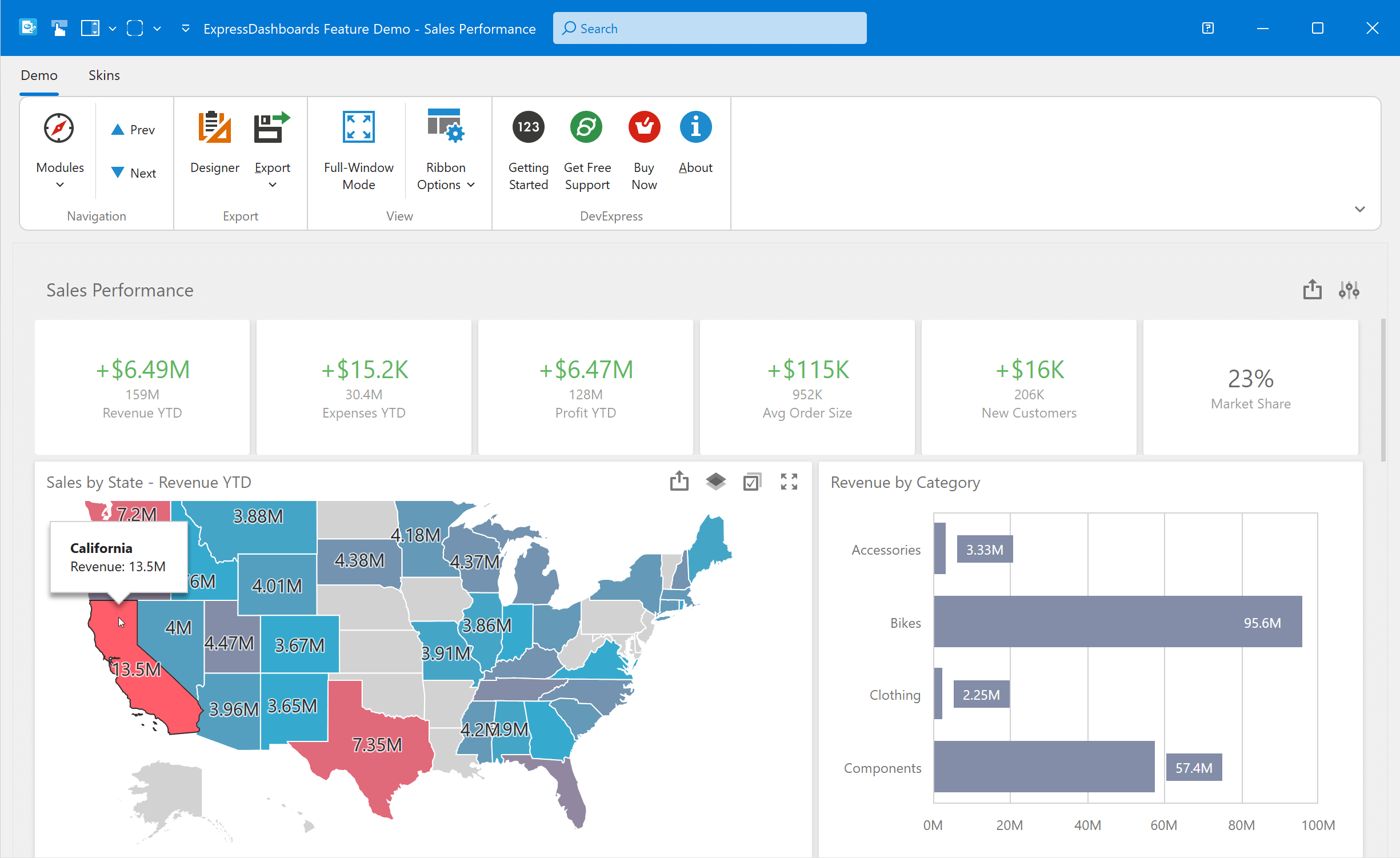
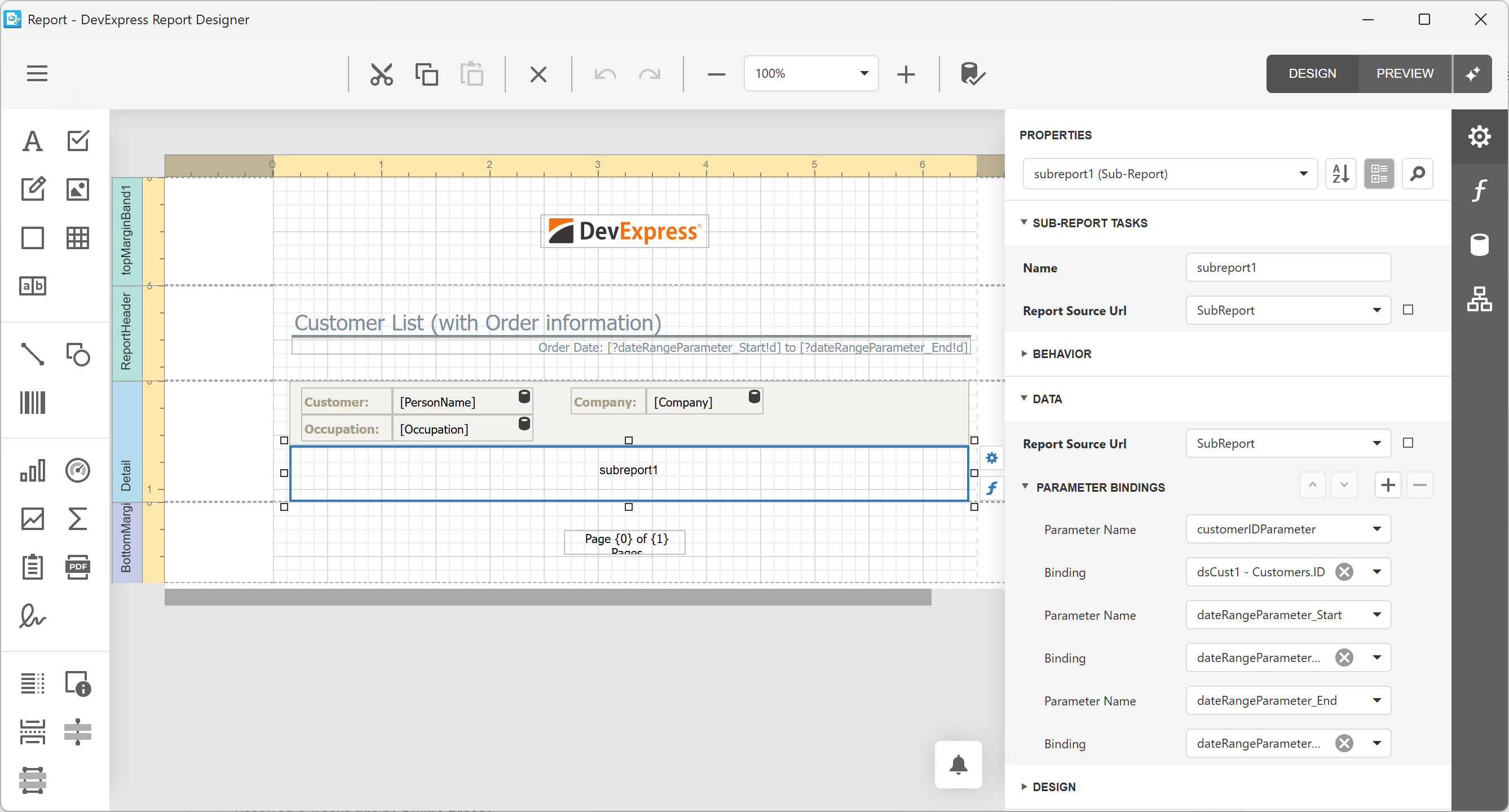
Following the introduction of the new ExpressReports Suite/VCL Subscription + in mid-2025 and our ExpressDashboards Suite preview in v25.2, VCL v26.1 release plans include the following key initiatives for both Delphi and C++Builder developers:
Expanded Demo and Project Template Coverage
For our customers, this will help everyone get started and improve confidence for production use. For us, it will reduce regressions via additional automated tests. For example, imagine using our new predefined templates/wizards to create a BI-powered application for various data analytics scenarios (master-detail reports, dashboards with charts, gauges, and maps) in a single click. Or you want to create a workflow/scheduled job (a Windows Service or Console application) to export reports to PDF silently, print or email dashboard documents, modify documents (split, merge, filter, Mail Merge, etc.) without any user interaction... We want to have a project template for that too.
Extended Learning Materials
We plan to deliver 10+ additional examples/tutorials for our VCL Reports and Dashboards. If you follow our FAQ updates, you might already see multiple new help topics recently. NOTE: our new v26.1 project templates will simplify database access in general and our getting started tutorials in particular (like VCL Reports - Create a Table Report Using the Report Wizard).
Additional AI-Powered Functions
DevExpress VCL Reports already includes multiple smart functions (like report generation from a prompt). We hope to derive yet more from our DevExpress .NET Reporting and BI Dashboard platforms to VCL.
Additional Delphi/C++Builder APIs and Related Usability Enhancements
This will help VCL developers configure/customize dashboards and reports in code easier. A few examples:
- Our upcoming v25.2.5 update already includes related enhancements that made non-GUI workflow automation/distributed scenarios possible (a GitHub example: VCL Reports - Generate and Export Report Documents in a Headless / non-GUI Service Application).
- Also in v25.2.5+, it is more natural to use TDataSource and its DataSet (a common Delphi-way) with TdxBackendDataSetJSONConnection for ORM-based integrations like RemObjects' Data Abstract (thanks to customer feedback).
- In v26.1, we will introduce new OnViewer/DesignerFormShow, OnExport, and other events into TdxReport/TdxDashboard to help developers customize the End-User Report Designer and Print Preview forms easier (for example, to resize forms or make forms non-modal for MDI-based apps).
- Other usability and API enhancements based on customer feedback (for example, we are also considering PRNX support in VCL Reports or a new ad-hoc TdxReportControl similar to TdxDashboardControl for Tabbed MDI and user control-based/embedded scenarios, much like in our ExpressReports Demo).
Some initiatives (especially AI and distributed/workflow service scenarios) depend on cross-team alignment and technical validation to ensure the final experience meets DevExpress quality standards.
High DPI Rendering and Performance Enhancements
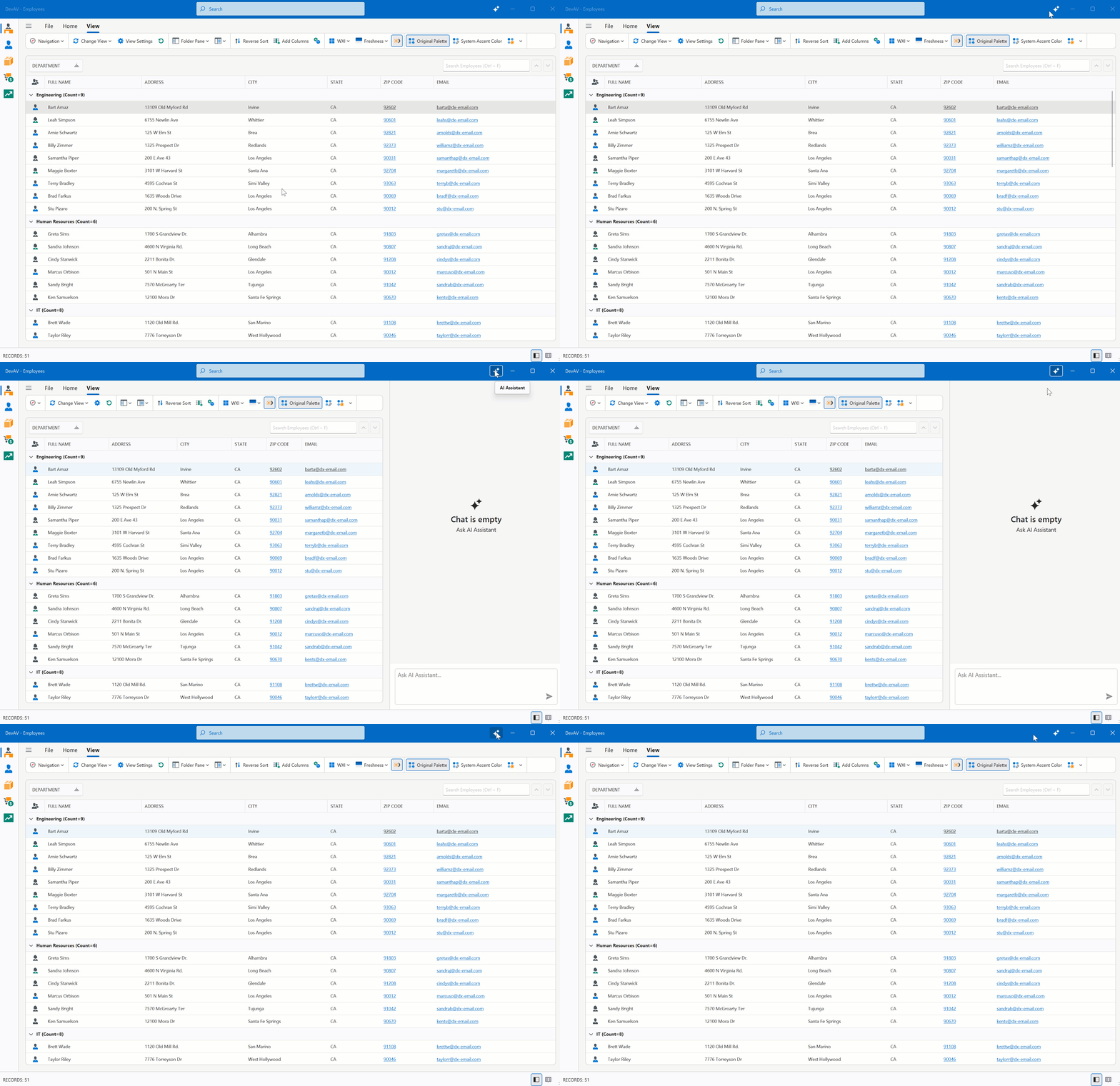
VCL v25.2.5+ (and v26.1) introduces noticeable performance-related enhancements for VCL apps running on 4K+ displays.
- Form resize performance on Windows 11 and WXI Compact is now 30-35% better for TdxRibbonForm (with rounded corners and other default settings).
- Other optimizations to skinned forms and vector‑based UI elements. For example, you may notice that our Mail Client demo forms are rendered 10-20% faster.
- Form shadow rendering enhancements. We made a new shadow (TdxWindowFrame), which behaves like the native/system OS shadow, but is 10x faster than our shadow. The new shadow also has a bigger "resize zone" and different display for active/inactive forms. The new shadow is always used on Windows 11 (and on Windows 10 when the form has square corners). Once again, we thank you for your feedback in this regard.


Fluent UI Support - Replicate Modern Microsoft Outlook and Teams User Interfaces
In v26.1, we will start our work on modern Fluent UI support, bringing VCL applications closer to contemporary Windows UI standards inspired by Microsoft Fluent 2 Design System and "new" Microsoft Outlook and Teams apps. Our goal is to allow VCL developers to adopt a more modern visual language progressively, without forcing large‑scale rewrites or breaking existing UI layouts.
Our work will likely continue into v26.2 due to its scope (it also took two majors for our .NET WinForms and WPF platforms - learn more from the roadmap). Planned areas of v26.1 investments include:
- Refinements to existing VCL visual elements to better align with Microsoft Fluent UI principles (for example, Outlook-inspired Side Panel, Rounded Skin Panel, Ribbon and Layout control enhancements).
- New project and form templates (for the VCL Template Kit)
- Updated Mail Client demo or a new Outlook-Inspired Demo (like in WinForms/WPF below).
- New Fluent icons with SVG Icon Colorization support

VCL Template Kit - Cut Time to Market with Project and Form Templates
In v26.1, we will introduce a VCL Template Kit designed to quickly create common VCL application types and frequently used UI forms. This new Template Kit will include both project templates and form templates, allowing you to scaffold complete applications or add new forms and modules to existing projects in just a few steps. Very similar to its DevExpress .NET counterpart, the VCL Template Kit is intended to address typical business app usage scenarios (such as data‑centric forms, master‑detail layouts, and common navigation patterns) and will evolve over time based on customer feedback throughout 2026.
Our goal with this initiative is to:
- Reduce time spent on repetitive project and form setup (for example, 1-2 clicks instead of minutes-hours).
- Encapsulate DevExpress VCL best practices introduced in recent releases (for example, accessibility, a global Skin Controller and vector skins, a single SVG image list for menu and navigation vs multiple images lists with duplicate images, modern Fluent UI layouts).
- Improve onboarding for new VCL developers while boosting productivity for experienced teams (for example, get started with our VCL Reporting and BI Dashboard platforms or DevExpress AI-powered smart functions).
Initial list of templates includes, but is not limited to the following:
- Outlook-inspired application (powered by our new Fluent UI Design System and inspired by the "new" Microsoft Outlook)
- Reporting Application, BI Dashboard application (with options to select Designer, Viewer and also a file system/database/embedded layout storage, whether to use a separate or embedded backend service, whether to enable AI functions, etc);
- Ribbon-based and Toolbar-based application (with options to select a Classic or single-lined ribbon, icon size, etc.);
- Data-aware application (options to select data grid, treelist, pivot, chart, etc.).
- JavaScript Hybrid VCL application (for example, to integrate an HTML Editor or Syntax Editor components using popular DevExpress or free/open-source JS libs).
- Tabbed MDI, Tile, and Wizard application
- Middle-Tier Security application (no direct database connection)
- Office-inspired application (Word Processing, Spreadsheet, PDF Viewer, Scheduling, Mapping component integrations)
- Splash Screens/Wait and Overlay Forms/Loading Panels

VCL Splash Screen Manager - Repeatable and Error-Prone Development Tasks Made Easy
In v26.1, we plan to introduce a VCL Splash Screen Manager (TdxSplashScreenManager) designed to simplify the creation and management of loading forms (aka splash screens, loading panels, wait and overlay forms). This new component will provide a centralized and consistent way to display splash screens during application startup or long‑running operations. As you'd expect, TdxSplashScreenManager API and capabilities will be similar to its .NET WinForms/WPF counterpart (see example code below). Of course, our new VCL Template Kit will include customizable splash form templates, to get started in a few clicks.
The VCL Splash Screen Manager will also reduce boilerplate code and improve maintainability while delivering a polished user experience in data‑centric applications. Even with AI coding assistants today, generating splash screen screens yourself across your application can easily go wrong due to Win32 API or known VCL multi-threading quirks (a real community example). With our new component, VCL developers will no longer deal with low-level window lifecycle (such as main UI thread message loop) and repeatable ad‑hoc logic (such as fade-in and fade-out animations) - they will focus on top-level design and business logic only.
Key goals for the VCL Splash Screen Manager include:
- Simplified splash screen design, invocation, progress update and shutdown (with support for background operations/threads)
- Better integration with modern VCL rendering in high‑DPI environments (vector skins, animations, multiple appearance options)
- Improved consistency across applications that require startup or progress UI (reusable form templates and RAD Studio integration)


BBCode-Inspired Rich Text Formatting for Additional UI Elements
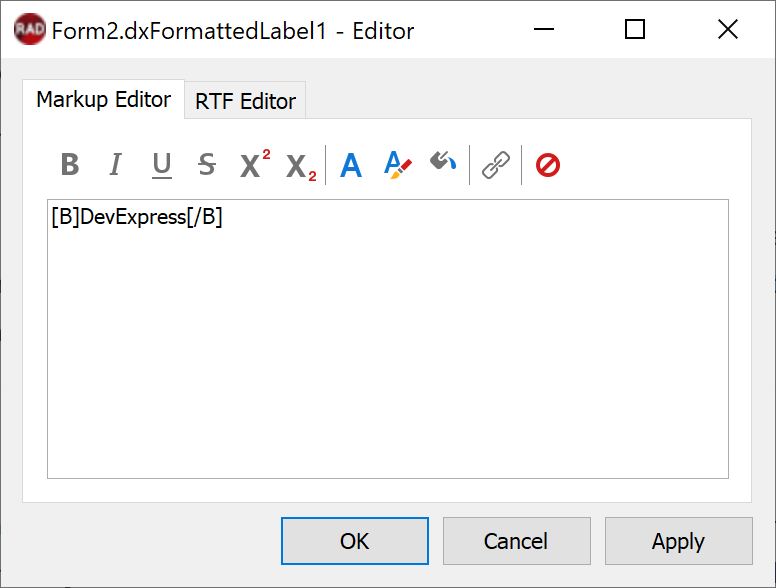
In v26.1, we plan to extend BBCode support across a wider range of VCL UI elements and captions:
- Column headers in Data Grid, TreeList, and PivotGrid controls;
- Form captions and window headers;
- Captions and labels in charts, buttons, and other UI elements;
- Screentips and other tooltip‑style UI surfaces.
The goal is to improve visual expressiveness and clarity in data‑centric and information‑dense applications (without introducing custom drawing logic or breaking existing layouts). As with other BBCode‑enabled features, formatting will remain optional and fully backward‑compatible with applications that rely on plain text captions.
RAD Studio vNEXT Support
We will continue to track Embarcadero’s RAD Studio roadmap closely. As new IDE versions and updates become available, v26.1 will include the necessary testing, build pipeline updates, and installer changes required to ensure a smooth development experience for active subscribers.
We've already researched the new cool features introduced for Windows desktop development in the latest version of RAD Studio 13.1 (Beta). For example, we conducted preliminary research on the native Windows ARM 64-bit support introduced in the latest RAD Studio 13.1. We will be researching and testing this further for our v26.2 major release (not for v26.1). ARM 64-bit support will require us to rewrite certain parts (e.g., for performance reasons we have some Assembler code in the core, which will not compile).
VCL Localization Reimagined - Research DevExpress Localization Tool Integration
In v26.1, we will evaluate how modern localization workflows and tooling can be applied to VCL applications. Ideal or final destination is to potentially deprecate the existing VCL Localizer Editor in favor of a new and better DevExpress Localization Tool by v26.2 or so.
Our research goals include:
- Assess integration scenarios between VCL controls and the new tool (one and better tool to rule/localize all DevExpress platforms)
- Simplify localization workflows and improve translation accuracy and consistency (reuse strings between similar .NET and VCL UI elements)
- Ensure long‑term maintainability and backward compatibility for existing customer apps (make an adapter between INI files and the new format)
VCL Office File API - Research User Demand and Technical Feasibility
As you might know, we have a powerful .NET Office File API library for non-visual PDF, Word, Excel, and PowerPoint document processing. These non‑visual Office file format processing APIs are also at the core of many DevExpress Office-inspired UI components such as .NET Rich Text Editors.
For us (internally), it is interesting to further isolate and enhance non-visual VCL Office File APIs (TdxRichEditDocumentServer, TdxPDFDocument, and something from our VCL Spreadsheet component) based on our existing .NET code. Especially when C# to Delphi conversion is now easier with AI. This would potentially simplify visual component maintenance (VCL Rich Text Editor, PDF Viewer, Spreadsheet).
For customers (externally), it can help expand support beyond Windows desktop application types to macOS/Linux/mobile/web ("Hi again, FMX!"). Even for Windows OS only, we are aware of multiple customer requests where non-visual document processing APIs would be helpful in non-GUI/service applications (very similar to what we discussed for VCL Reporting/BI Dashboard above). I hope to finalize this research by the end of 2026.
Your Feedback Matters
As always, we welcome your feedback. Should you have specific questions related to our v26.1 release, please submit a support ticket via the DevExpress Support Center.
Thanks,
Dennis Garavsky
Principal Product Manager
dennis@devexpress.com
Free DevExpress Products - Get Your Copy Today
 Dennis Garavsky (DevExpress)