WinForms — June 2026 Roadmap (v26.1)

Security
Fluent Icons
We expect to introduce a comprehensive set of Fluent icons to our suite. To simplify migration to these new icons, you will be able to switch the icon set across all DevExpress controls via a single global setting. Our new collection will include thousands of Fluent icons which can be used in any UI element with SVG support.

Localization Tool Enhancements
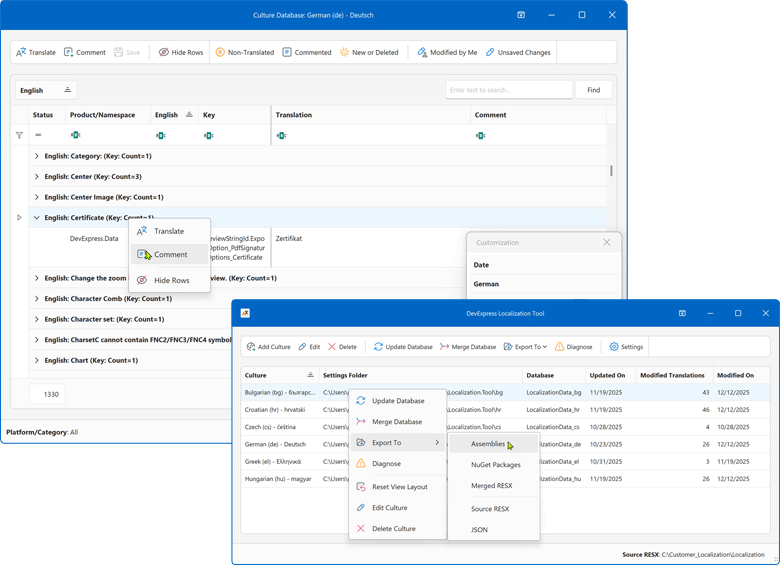
In v25.2, we released a new Localization Tool as a Community Technology Preview (CTP). With v26.1, we plan to ship it officially. Our Localization Tool will offer enhanced collaboration capabilities, easier resource navigation and management, AI-powered translation services, support for multiple DevExpress products and platforms, and more.
We also expect to add the following enhancements:
Filter localization strings based on referenced DevExpress assemblies.
Automatically load base localization resources - you will no longer need to download them from a GitHub repository manually.
DateTimeOffset Core Support
We are initiating support for DateTimeOffset across our product line. We will start with core DevExpress classes, including criteria operators and data processing modules.
Our goal is to eliminate manual conversion of DateTimeOffset to DateTime when working with local time zones. You will be able to specify the required time zone, and conversion to a local date will occur automatically. In this mode, users will see a simple date/time value without the offset portion (as if it were a DateTime object).
As a first step, DateTimeOffset support will allow you to use date/time-related functions (such as AddHours, GetDays, DateDiffDays, and others) in filter expressions and unbound columns.
DateTimeOffset offers the following advantages compared to DateTime:
Local and global time support: Suitable for usage scenarios that require both local machine time and UTC (such as logging systems).
Clear semantics: The DateTime.Kind property is not serialized (which can lead to incorrect usage). DateTimeOffset always includes the offset (for example, 6/10/2025 5:30:00 PM -07:00).
Web service compatibility: Many services return dates as DateTimeOffset. Once supported, conversion to DateTime will no longer be required.
Microsoft documentation recommends DateTimeOffset instead of DateTime when representing a single point in time, performing date/time arithmetic, and preserving related times:
These uses for DateTimeOffset values are much more common than those for DateTime values. As a result, consider DateTimeOffset as the default date and time type for application development.
AI Agents API
AI Chat Enhancements
We plan to introduce a set of small but useful APIs to help customize the DevExpress AI Chat Control. For example, new properties will allow you to specify the text displayed in an empty chat view and in an empty text input field.
MemoEdit — Automatic Scrollbar
The DevExpress MemoEdit control will automatically hide the scrollbar when text height does not exceed control bounds. You will be able to control this behavior via an option.

Monaco-Based Code Editor (Example)

Spreadsheet — New Excel Functions
- XLOOKUP
- XMATCH
- SORT
- FILTER
- UNIQUE
Reporting
Accessibility & Export Compliance
DOCX/HTML Export — AccessibleDescription Support
Organizations subject to WCAG 2.2 and Section 508 requirements will be able to include meaningful alternative text for all embedded images and graphical elements in exported Word documents and HTML pages. With v26.1, DevExpress Reports will apply a report control's AccessibleDescription property value to DOCX and HTML export output. This capability is especially relevant for controls exported as images, such as XRPictureBox, XRBarCode, XRShape, and XRChart, where assistive technologies rely on alternative text to describe visual content.

PDF/UA Export Enhancements
Government agencies and enterprises that must comply with PDF/UA standards will benefit from extended PDF export capabilities in v26.1:
- XRRichText content will use proper semantic tagging and group continuous text into logical paragraphs instead of word-by-word
<P>tags. - The
AccessibleDescriptionproperty will apply to PDF signatures and AcroForm controls so that digitally signed or form-enabled PDF documents meet accessibility requirements. - XRPageInfo controls will support paragraph-level semantic markup.
Data Source Enhancements
DateTimeOffset Support
Applications that store time zone-aware timestamps (such as financial transaction logs, audit trails, and event scheduling systems) require DateTimeOffset support to preserve the original offset for accurate data representation. With v26.1, our Report Designer's Field List will display DateTimeOffset fields and allow data binding, filter, group, and sort operations across SqlDataSource, EFDataSource, and ObjectDataSource.
End-User Experience
WinForms End-User Report Designer — Startup Optimization
We will optimize the DevExpress WinForms End-User Report Designer's startup sequence to deliver a smoother and more responsive launch experience. Dock panels and UI elements will appear quickly on initial load, and transitions between the Design and Preview tabs will be rendered seamlessly.
XRLabel & XRPanel — Custom Border Styles Example
Invoice layouts, financial statements, and reports with visually distinct section separators often require independent border configuration per side. We will extend the How to Create a Custom DevExpress Report Control GitHub repository with a new example that demonstrates custom XRLabel and XRPanel controls. These custom controls will allow you to define distinct border styles and width for top, bottom, left, and right sides independently.

IDE Integration
DevExpress Report Designer for JetBrains Rider — .NET Projects Support
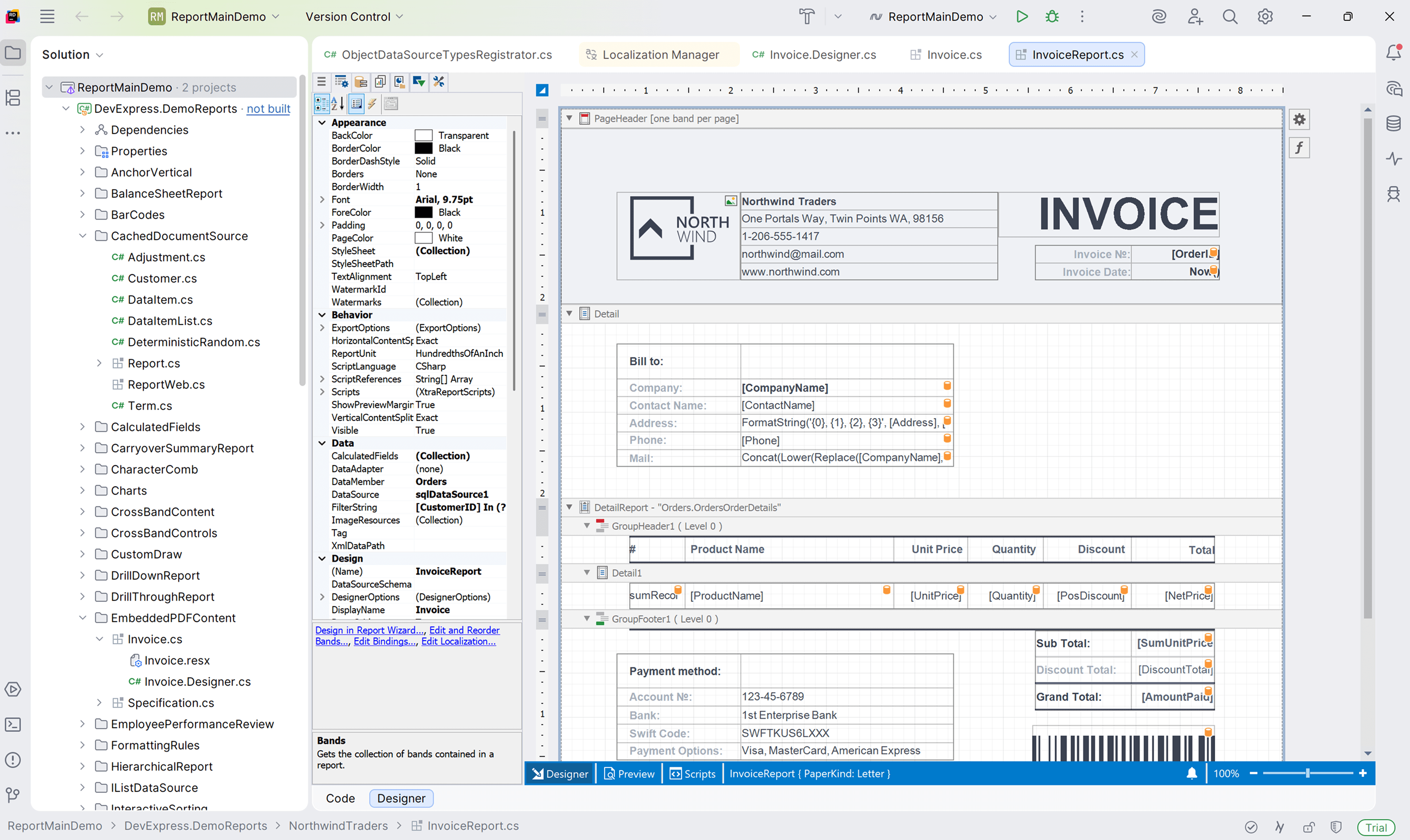
In v25.2, we introduced the DevExpress Report Designer for JetBrains Rider with .NET Framework support. In v26.1, we will extend this integration to .NET-based projects. We also expect to deliver property search and reset in the Properties panel and light/dark theme support to match the JetBrains Rider IDE.
AI-powered Enhancements
AI Prompt-to-Report Wizard — Optimization
We will optimize the AI Prompt-to-Report Wizard to allow users to input shorter prompts and achieve more consistent, production-ready report output. The updated implementation will use a multi-agent workflow and will also reduce token consumption per report generation request.
Report Designer — AI-powered Chat Assistant
Our DevExpress WinForms End-User Report Designer includes an AI Assistant panel that allows users to add, remove, and modify report elements, properties, and data bindings using natural language commands. In v26.1, we will extend this capability to our Web and WPF Report Designer components and add the following features:
- Built-in tools that enable AI to search relevant end-user documentation
- Wizards that can be launched via AI commands
- Enhanced interaction with the designer environment
Stay tuned for updates as development continues.
AGENTS.md for AI Coding Assistants
Developers who use AI-powered code completion tools will obtain more accurate and context-aware suggestions when they work with DevExpress Reports. We will create an AGENTS.md file that equips AI coding assistants, such as GitHub Copilot and Cursor, with DevExpress Reports expertise. The file will contain API patterns, expression syntax rules, common report creation scenarios, troubleshooting guides, and best practices.
