DevExpress Reports & BI Dashboard — Year-End Roadmap (v25.2)

Thank you for your continued support and for choosing DevExpress Reports and DevExpress BI Dashboard for your software development needs. Our year-end release (v25.2) will include features designed to enhance accessibility compliance, strengthen security, extend IDE integration support, and achieve AI feature parity across all supported platforms.
Once you've had the opportunity to review our v25.2 roadmap, please share your feedback, requirements, and/or questions using the DevExpress Support Center discussion links below.
The information contained within this blog post details our current/projected development plans. Please note that this information is being shared for INFORMATIONAL PURPOSES ONLY and does not represent a binding commitment on the part of Developer Express Inc. This roadmap and the features/products listed within it are subject to change. You should not rely on or use this information to help make a purchase decision about Developer Express Inc products.
Roadmap Updates
Our year-end roadmap will be updated regularly to reflect development progress. As we get closer to the release, we expect to add additional items and modify the status of planned features. Look for the following labels next to every feature:
.NET 10 Support
.NET 10 support will be available for both v25.2 and v25.1 after November 2025.
DevExpress MCP Server for AI-Powered Documentation Access
We will introduce an MCP server that connects GitHub Copilot Chat, Cursor, and other MCP-compatible AI tools directly to our comprehensive documentation database. The server will provide instant access to over 300,000 help topics through natural language queries within your IDE. This will allow you and AI coding agents such as Claude Code to access current DevExpress documentation directly within the AI assistant's context.

Accessibility
We are improving accessibility compliance across multiple products and platforms. These enhancements will deliver better support for assistive technologies and compliance with industry regulations including WCAG 2.1 and Section 508.
Enhanced PDF Export
We will extend DevExpress Reports APIs and give you granular control over PDF accessibility features. This enhancement allows developers to specify PDF layout artifacts — elements skipped by assistive technologies — and define alternative text for report watermarks.
Enhanced DOCX Export
A report control's AccessibleDescription property will be available when exporting reports to DOCX files.
Report Design Analyzer — Accessibility Checker (Discuss This Feature)
We will extend the Report Design Analyzer pane with a new "Accessibility" error source category to help report designers create accessible documents across multiple Microsoft Office/PDF export formats. This feature mirrors accessibility functionality found in Microsoft Office products and provides proactive guidance during the design phase. As you would expect, this capability will dramatically improve accessibility compliance while reducing the learning curve for developers new to accessibility standards. This feature will also:
- Enable report designers to identify and fix accessibility issues before export
- Reduce accessibility violations in exported documents
- Provide clear, actionable guidance for accessibility improvements
- Support multiple export formats with format-specific checks

IDE Integration
DevExpress Report Designer for JetBrains Rider (Discuss This Feature)
Responding to community demand and the growing popularity of JetBrains Rider, we will integrate the DevExpress Visual Studio Report Designer with JetBrains Rider. This IDE integration will allow developers to create, modify, and manage DevExpress Reports directly within their preferred IDE environment, eliminating the need to switch between development tools.


Security Enhancements
We will continue to implement comprehensive security improvements across APIs and product components to ensure that both Reporting and BI Dashboard comply with the highest security standards. These updates align with current industry best practices and address evolving security requirements.
AI-powered Enhancements (Discuss This Feature)
With v25.2, we plan to deliver AI-powered feature parity across DevExpress Report Designer components for supported platforms, including our Visual Studio Report Designer. No matter which platform or IDE you use, you’ll benefit from the same AI-powered tools that accelerate report design and reduce manual effort.

For a detailed overview of AI-powered capabilities in DevExpress Reports, refer to the following help topic: AI-powered Functionality.
End-User Experience
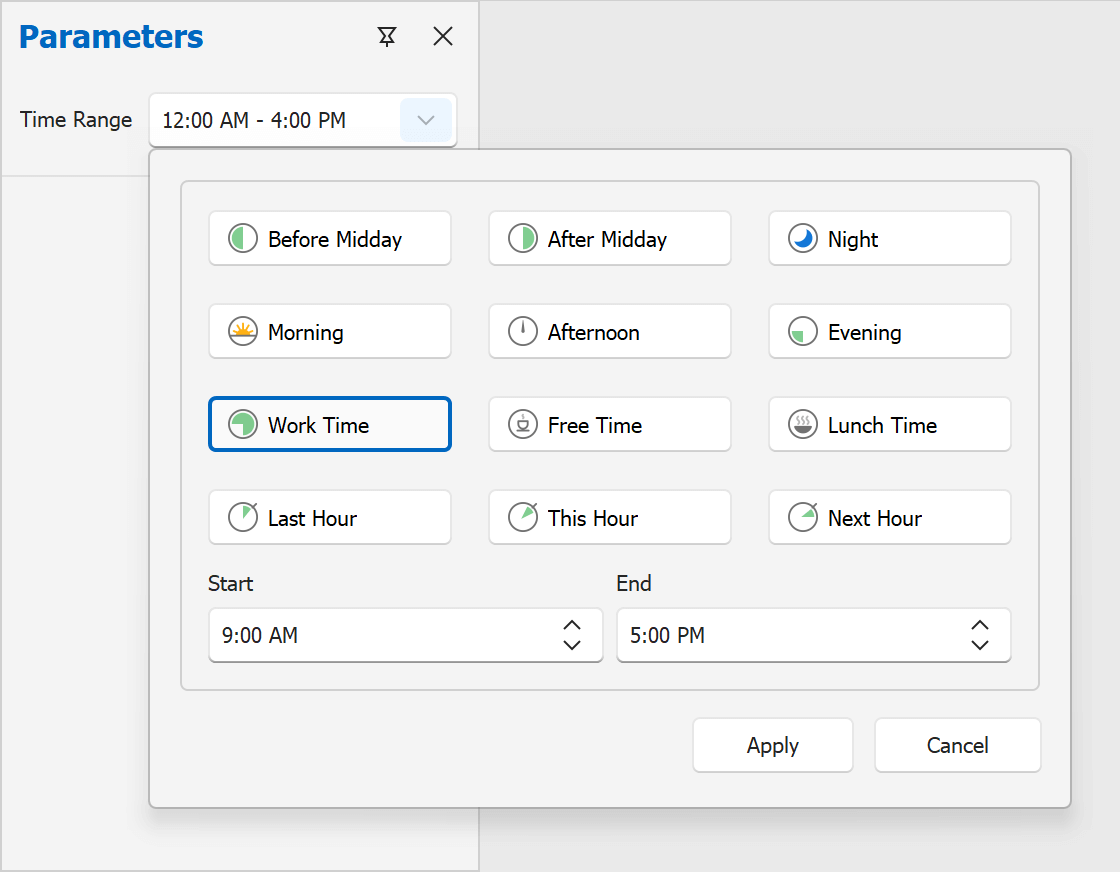
Time Range Parameter Editor
In v25.1, we introduced a time range (TimeOnly) parameter editor for our WinForms Report Viewer. With v25.2, we plan to support time range parameter editors in our WPF, ASP.NET Core, Angular, React, and Blazor Report Viewers. This enhancement delivers a unified time range filtering experience across platforms (with support at both the data source and report levels).
WinForms End-User Report Designer — Settings Window
We plan to add a new dialog window to our WinForms End-User Report Designer that allows users to configure report design/document generation settings globally at the application level:
- Default settings for new reports. Users can modify report settings to match preferences.
- Centralized dock panel management. Users can control the state of multiple panels simultaneously (instead of one-by-one via the toolbar).
- Unified access to designer settings. Users can customize layout, data, and appearance from a single location.

DevExpress Report Designer Data Source Wizard — Pinned Data Sources
We will enhance the "Choose a data source" page in the Data Source Wizard to allow users to pin frequently used database providers as favorites. These favorite providers will be displayed at the top of the list for quick access.

Time Zone Conversion (Discuss This Feature)
With v25.2, DevExpress Reports will convert UTC date/time values to the viewer's local time zone. Users across different regions will be able to analyze report data in their respective local time zones.
MongoDB Data Source Wizard (Discuss This Feature)

Our Web Report Designer and Web Dashboard will allow users to create new data sources using MongoDB connections and schemas provided by application developers.
Your Feedback Counts
We value your input and encourage you to share your thoughts on these upcoming features. Your feedback helps us prioritize development efforts and ensure that our products continue to meet your evolving needs.
Contact us via the DevExpress Support Center at your convenience. We'll be happy to follow up and discuss how these enhancements can benefit your specific use case.
