Reporting & BI Dashboard — June 2026 Roadmap (v26.1)

Thank you for choosing DevExpress Reports and DevExpress BI Dashboard for your software development needs. Our June 2026 release (v26.1) will include features designed to advance AI-powered report design workflows, extend accessibility and export compliance, strengthen security, and enhance BI Dashboard customization and platform integration.
Once you've had the opportunity to review our v26.1 roadmap, please share your feedback, requirements, and/or questions using the DevExpress Support Center discussion links below.
The information contained within this blog post details our current/projected development plans. Please note that this information is being shared for INFORMATIONAL PURPOSES ONLY and does not represent a binding commitment on the part of Developer Express Inc. This roadmap and the features/products listed within it are subject to change. You should not rely on or use this information to help make a purchase decision about Developer Express Inc products.
Roadmap Updates
Our year-end roadmap will be updated regularly to reflect development progress. As we get closer to the release, we expect to add additional items and modify the status of planned features. Look for the following labels next to every feature:
Reporting
Accessibility & Export Compliance
DOCX/HTML Export — AccessibleDescription Support
Organizations subject to WCAG 2.2 and Section 508 requirements will be able to include meaningful alternative text for all embedded images and graphical elements in exported Word documents and HTML pages. With v26.1, DevExpress Reports will apply a report control's AccessibleDescription property value to DOCX and HTML export output. This capability is especially relevant for controls exported as images, such as XRPictureBox, XRBarCode, XRShape, and XRChart, where assistive technologies rely on alternative text to describe visual content.

PDF/UA Export Enhancements
Government agencies and enterprises that must comply with PDF/UA standards will benefit from the following extended PDF export capabilities in v26.1:
- XRRichText content will use proper semantic tagging and group continuous text into logical paragraphs instead of word-by-word
<P>tags. - The
AccessibleDescriptionproperty will apply to PDF signatures and AcroForm controls so that digitally signed or form-enabled PDF documents meet accessibility requirements. - XRPageInfo controls will support paragraph-level semantic markup.
Web Reporting — Accessibility Improvements
We will continue to enhance keyboard navigation and screen reader support in our DevExpress Web Report Viewer. Users who rely on assistive technologies will experience more consistent navigation, predictable focus management, and reliable interaction across DevExpress web-base Reporting components.
Data Source Enhancements
DateTimeOffset Support
Applications that store time zone-aware timestamps (such as financial transaction logs, audit trails, and event scheduling systems) require DateTimeOffset support to preserve the original offset for accurate data representation. With v26.1, our Report Designer's Field List will display DateTimeOffset fields and allow data binding, filter, group, and sort operations across SqlDataSource, EFDataSource, and ObjectDataSource.
End-User Experience
WinForms End-User Report Designer — Startup Optimization
We will optimize the DevExpress WinForms End-User Report Designer's startup sequence to deliver a responsive launch experience. Dock panels and UI elements will appear quickly on initial load, and transitions between Design and Preview tabs will produce seamless panel rendering.
XRLabel & XRPanel — Custom Border Styles Example
Invoice layouts, financial statements, and reports with visually distinct section separators often require independent border configuration per side. We will extend the How to Create a Custom DevExpress Report Control GitHub repository with a new example that demonstrates custom XRLabel and XRPanel controls. These custom controls will allow you to define distinct border styles and width for top, bottom, left, and right sides independently.

Web Report Designer Overhaul
We will continue our comprehensive revamp of the DevExpress Web Report Designer to phase out the Knockout.js library and implement a new public API without KO. This transition will enhance performance and maintainability of the control, and aligns with our long-term plan to introduce native Angular and React components for seamless integration with modern web solutions.
Security Enhancements
We will continue to strengthen security across APIs and product components to ensure that both Reporting and BI Dashboard comply with the highest security standards. These updates align with current industry best practices and address evolving security requirements.
IDE Integration
DevExpress Report Designer for JetBrains Rider — .NET Projects Support
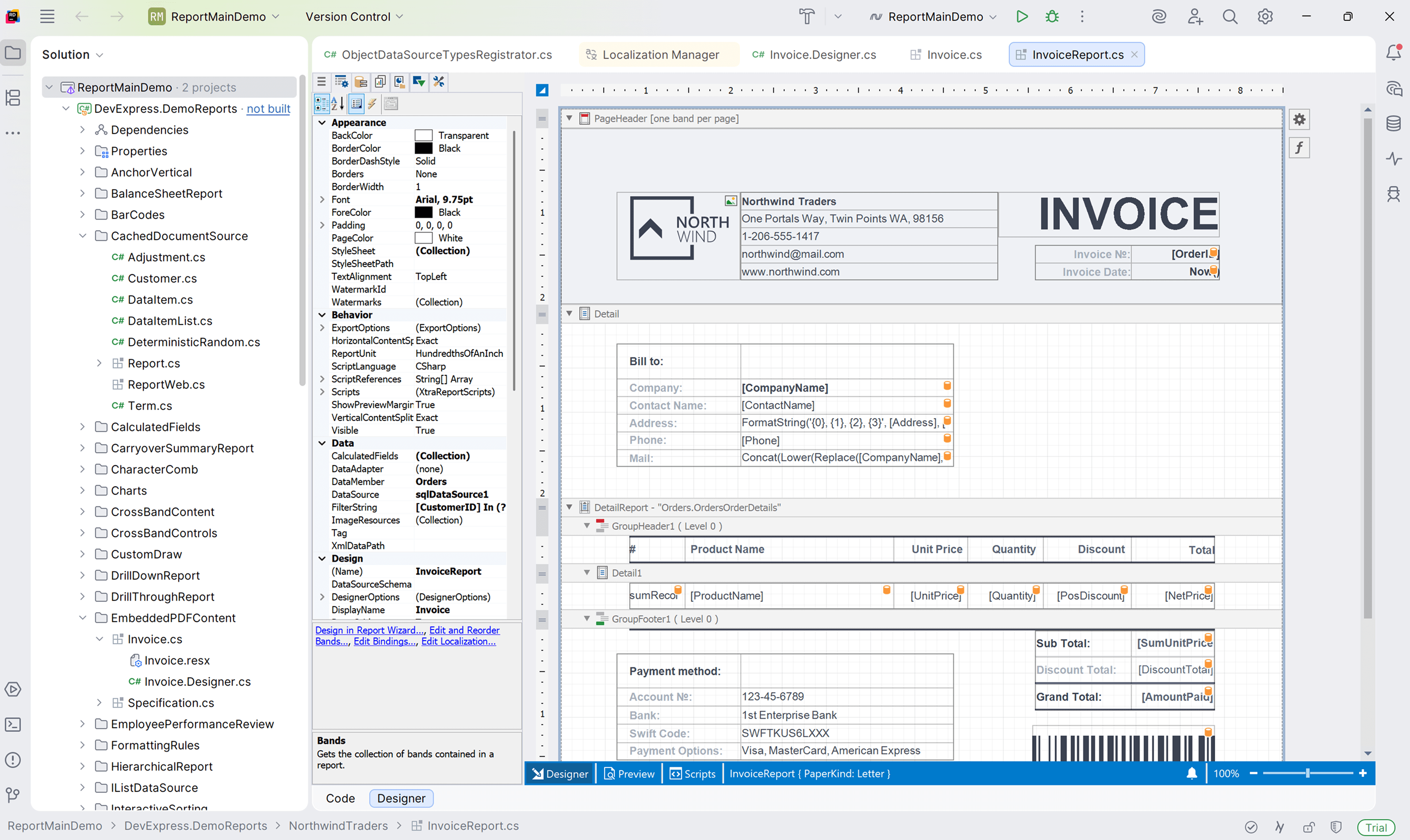
In v25.2, we introduced the DevExpress Report Designer for JetBrains Rider with .NET Framework support. In v26.1, we will extend this integration to .NET-based projects and deliver property search and reset in the Properties panel, along with light/dark theme support to match the JetBrains Rider IDE.
AI-powered Enhancements
WPF Report Designer — AI-powered Expressions
DevExpress WPF Report Designer will support expression generation via natural language queries, and will match the AI-powered expression capabilities already available in our WinForms and Web Report Designer. Report creators can describe the desired logic in plain text, and the AI assistant will generate appropriate expression syntax. This update will deliver AI-powered expression parity across all supported desktop and web platforms.
AI Prompt-to-Report Wizard — Optimization
We will optimize the AI Prompt-to-Report Wizard so that users can input shorter prompts and produce more consistent, production-ready report output. Our updated implementation will use a multi-agent workflow and reduce token consumption per report generation request.

Web and WPF Report Designer — AI-powered Chat Assistant
Our WinForms End-User Report Designer includes an AI Assistant panel that allows users to add, remove, and modify report elements, properties, and data bindings using natural language commands. In v26.1, we will extend this capability to our Web and WPF Report Designer components and add the following new features:
- Built-in tools that enable AI to search relevant end-user documentation
- Wizards that can be launched via AI commands
- Enhanced interaction with the designer environment
Stay tuned for updates as development continues.
AGENT.md for AI Coding Assistants
Developers who use AI-powered code assistant tools will receive more accurate and context-aware answers when they work with DevExpress Reports. We will create an *.agent.md file that equips AI coding assistants, such as GitHub Copilot in Visual Studio and Cursor, with DevExpress Reports expertise. The file will contain API patterns, expression syntax rules, common report design examples, troubleshooting guides, and best practices.
BI Dashboard
Accessibility
We will continue to improve accessibility across BI Dashboard components. v26.1 will introduce color-blind friendly palettes for chart visualizations, adjusted spacing between pie/donut elements for better visual separation, and continued fixes for keyboard navigation and screen reader support across dashboard item content, toolbar button states, and interactive elements.
Data Source Enhancements
DateTimeOffset Support
DevExpress BI Dashboard will support DateTimeOffset field types so that dashboard creators can bind widgets to DateTimeOffset data fields, apply filter, group, and sort operations, and display these values correctly in the Field List. This extends the DateOnly and TimeOnly support introduced in v25.1 and makes the BI Dashboard compatible with data sources that store time zone-aware timestamps.
Customization
Cards — Text and Icon Customization
KPI cards and summary panels will deliver richer visuals with custom text and icon settings. Dashboard creators will be able to customize text appearance within Card items, including font style and size. Cards will also support icon display. For example, a KPI card will be able to display a custom icon alongside a metric value with a specific font size to match organizational branding guidelines.

Dashboard Items — Margin and Padding Control
Fine-grain spacing control allows dashboard creators to achieve tighter or more spacious layouts for each individual item. We will add item-level padding and margin properties to dashboard items, with support for both uniform and individual side settings. Kiosk displays that require maximum data density and executive dashboards that benefit from generous whitespace can use these controls to achieve the desired layout.

Platform Integration
Blazor Dashboard — SignalR Transport
Developers who register custom scoped services (such as multi-tenant data filters or user-specific security providers) will benefit from consistent service lifetimes across both Blazor pages and Dashboard backend operations. We plan to transition the Blazor Dashboard from traditional HTTP requests to SignalR-based transport for server communication. This change will allow scoped Blazor services registered within a SignalR circuit to function correctly with Dashboard controllers.
Your Feedback Counts
We value your input and encourage you to share your thoughts on these upcoming features. Your feedback will help us prioritize development efforts and ensure that our products continue to meet your evolving needs.
Contact us via the DevExpress Support Center at your convenience. We'll be happy to follow up and discuss how these enhancements can benefit your specific use case.
Free DevExpress Products - Get Your Copy Today
 Dmitry Tokmachev (DevExpress)